
 CZ
CZ SK
SK HU
HU AT
AT DE
DE ES
ES SI
SI HR
HR
Nothing in the basket.

- Search
-
Login

-
0
Comparison
Add products to compare, then they will appear here and you can compare parameters.
-
0
0 €
News
New 8.31 update for Grass Valley's popular video editing application EDIUS adds new codec support and bug fixes. EDIUS 8.31 now supports Sony XAVC 1.2, Canon XF-AVC 2.2, and Sony X-OCN clips, and fixes numerous issues, incl. PSD import from Adobe Photoshop CS6, AVC-Ultra LonG export, fixed playback of MOV files created by Panasonic DMCX-GF2 cameras, improved Primary Color Correction UI design, and more!
Date: 09. 12. 2016,
Category: News
FULL ARTICLE
One year after releasing the point update, Cubase is back with major updates incorporating new features requested directly by customers alongside the many other studio-grade audio and MIDI tools for composing, recording, editing and mixing. All three versions are crafted to suit the very different needs and levels of expertise in music recording and production. Cubase Pro 9 is engineered to meet the exacting standards of professionals; Cubase Artist 9 provides a comprehensive tool set tailored to instrumentalists and songwriters; and Cubase Elements 9 is the entry-level DAW that offers straightforward recording in high-quality audio. The Cubase Pro 9, Cubase Artist 9 and Cubase Elements 9 full retail versions are now available! Customers who have activated Cubase Pro 8.5 and Cubase Artist 8.5 since October 26, 2016, are eligible for a free, downloadable Grace Period update to the latest versions, respectively. Upgrades from older versions start at 99,99 EUR incl. VAT for update from Cubase Pro 8.5.
Ground-breaking new features, streamlined workflows and stunning new plug-ins -- the latest update enhances your favorite digital audio workstation in every direction and underlines Cubase’s claim of being the most complete DAW available. The new Lower Zone gives you direct access to editors and the MixConsole without leaving the Project window; the perfectly integrated Sampler Track opens up new creative possibilities; and the surgically precise Frequency EQ (Pro version only) takes your mix to the next level. The new Plug-in Sentinel, Multiple Marker Tracks (Cubase Pro only), the improved Maximizer -- Cubase 9 introduces loads of new features that you won't want to miss in future music productions.
Top new features at glance
- Lower Zone for maximum accessibility, ideal workflow and perfect project overview
- Sampler Track for quick inspiration and easy creative processes
- Frequency 8-band EQ for microscopic audio surgery including M/S support and Linear Phase mode (Pro version only)
- MixConsole History for mixer undo/redo and sophisticated A/B comparison invites to experiment with your mixes (Pro/Artist versions)
- Plug-In Sentinel for increased stability and reliability

Date: 08. 12. 2016,
Category: News
FULL ARTICLE
Press Release
Blackmagic Design announced that Fukuoka-based production company KOO-KI produced a new set of commercials for Japanese department store giant Marui using Fusion Studio.
KOO-KI consists of directors, CG directors, producers and CG/Motion graphic designers and offers planning, direction and production for TV commercials, campaigns, TV dramas, TV animation and apps. Their award winning work includes CG work for the “Universe of Nikon” museum, the opening movie for KONAMI’s new baseball game and the planning and direction of the award winning drama “Mentai Piriri.”

One of the acclaimed projects that KOO-KI has produced is the new TV commercial for Marui’s seasonal campaign sale. Marui is a major Japanese retail company which operates a chain of department stores in cities throughout Japan. The commercial was created in full 3DCG and KOO-KI used Fusion Studio as the main VFX software for the production.
The concept of the commercial is “a fantasy for grown ups.” They aimed to express the excitement of shopping in their visual work, depicting people living in a fantastic town enjoying shopping in a vivid and lively manner. All composition in the commercial was done in Fusion Studio.
For the project, KOO-KI’s director Tatsushi Momen and producer Masami Shimamura worked with animation director and Fusion artist Vito LaManna, who works out of Germany and Japan. Vito, a longtime Fusion user and creator of the Fusion tutorial site “Con-fusion,” handled all creative works for the project.
“When I started doing CGI, there were not many artists in the industry. So I had to do everything, such as modeling, animation, composition, storyboarding, animatics, etc. So, for this Marui commercial, I did character design and modeling as well as compositing. But my passion is in composition,“ said Vito.
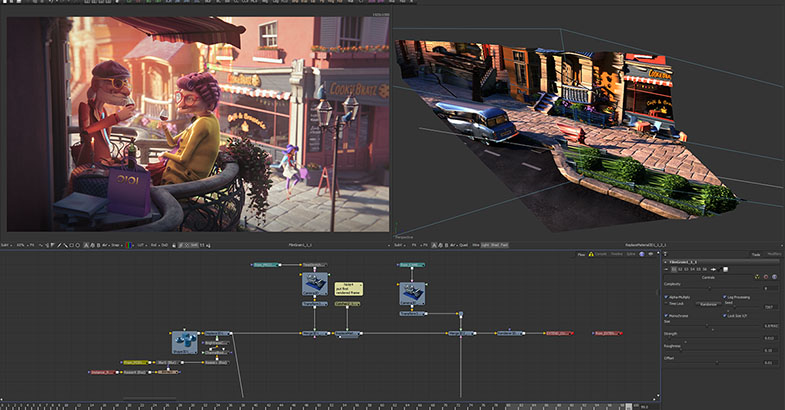
Being a talented painter, Vito uses Fusion as if he paints with Fusion, and uses Fusion’s mask feature’s extensively. “For this project I used many masks. Mask is very important for me as I want to adjust as many objects as possible to create a nice harmony in a scene. Also, the volume mask tool is very powerful. It allows you to create masks in a 3D space. It’s so fast. I don’t have to re-render out these masks. It’s very efficient. And I can even copy some masks and combine them to create new masks!”
Vito continued: “The challenge with this commercial was to make a flat looking image look deep, powerful and pleasing to the eye. Even the lighting or shading artists did not have enough time to make a good foundation. But Fusion gave me the tools to get it done. Fusion gave me the ability to save so many shots.
For example the bus in an outside scene, the original render was very flat and boring, so I added fog and extra light using many masks and made the bus pop out more. Also, for the characters in the commercial, I applied horizontal and vertical gradient to their hair to add more texture. By doing so, it gave more volume to the hair. I also did a lot of color correction for this commercial to create vibrant atmosphere. I could do these all in composition, not render out from the 3D software!”

Vito also said that the Displace 3D tool was very useful, especially when he wanted to place an object in between other objects. “Displace 3D tool can use the World Position Pass to displace the scene, so it creates a 3D presentation of the original 3D scene. The simple plane becomes 3D and lets me work in a 3D space. I needed to add an object in a scene where a girl is walking, but I did not want to re-render the whole thing. I could just place it precisely in the scene in 3D space, keeping the relation to the depth of each object.
“Fusion allows me to be creative, without taking me out of the creative flow. You don’t have to think much, you can just do. I like to be in this state. I’ve used other software and those are too technical or throw up many errors, so the flow always stops somewhere. Fusion keeps me in the creative flow for the longest time, so it is really fast working using Fusion,” Vito said.
OIOI Marui from MovieBrats Studios on Vimeo.
Press Photography
Product photos of all Blackmagic Design products, are available at www.blackmagicdesign.com/press/images.
About Blackmagic Design
Blackmagic Design creates the world’s highest quality video editing products, digital film cameras, color correctors, video converters, video monitoring, routers, live production switchers, disk recorders, waveform monitors and real time film scanners for the feature film, post production and television broadcast industries. Blackmagic Design’s DeckLink capture cards launched a revolution in quality and affordability in post production, while the company’s Emmy™ award winning DaVinci color correction products have dominated the television and film industry since 1984. Blackmagic Design continues ground breaking innovations including 6G-SDI and 12G-SDI products and stereoscopic 3D and Ultra HD workflows. Founded by world leading post production editors and engineers, Blackmagic Design has offices in the USA, UK, Japan, Singapore and Australia. For more information, please go to www.blackmagicdesign.com.
Date: 06. 12. 2016,
Category: News
FULL ARTICLE
Panasonic announced availability and pricing for its new AK-UB300 4K multi-purpose camera, designed for applications where a compact form-factor yet high-quality image is required. Ideal for broadcast and remote studios, weather and traffic reporting, remote live production, image magnification and sports, the UB300 is equipped with a one-inch MOS sensor that outputs a UHD signal up to 3840x2160/59.94p with the ability to simultaneously output HD up to 1080/59.94p. An HD Cropping feature allows an HD image to be cropped from the 4K picture, and the HD Cropping area can be controlled by a Panasonic AW-RP50 or AW-RP120 remote controller. The HD Cropping feature is especially useful as remote “Pan” or “Tilt” functionality can be accomplished electronically with a fixed POV type of camera without sacrificing image quality.
Streaming video outputs will be available from the UB300 in several forms and formats, and at a wide range of transmission speeds. For remote production and IP distribution, four simultaneous streams will be available in either H.264 or three streams in motion JPEG. Video resolutions of up to 1080/60p are available at rates of up to 24Mbps. For IP-Live remote monitoring and control, up to 16 cameras can be viewed simultaneously in a single browser window, with extensive on-screen camera controls available when a single camera is selected for monitoring. IP control enables system integration with Panasonic RP50/RP120 joysticks and AK series ROP panels (available later via firmware update).
An Intelligent Automatic Adjust function will automatically correct the image level and color temperature as the outdoor lighting conditions change. Intelligent Automatic Adjust Functions include Auto tracing white balance, which automatically adjusts the white balance or color temperature, and automatic control of lens aperture or iris, gain and ND filter.
The UB300 boasts newly-developed haze-reduction technology--valuable for outdoor environments such as weather reporting--for ensuring optimal image reproduction. In certain situations, picture contrast may be low as result of environmental fog or haze conditions, and this Haze Reduction function will optimize camera image settings appropriately to assure that the subject of shooting is as clear as possible.
The UB300 is available at a suggested list price of $24,995 US. Additional video format and controller support will be available Q1 2017.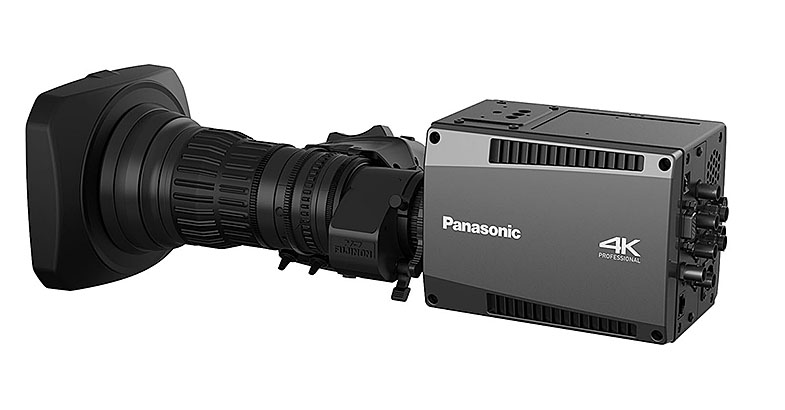
Date: 05. 12. 2016,
Category: News
FULL ARTICLE
By Paul Isaacs, Director of Product Management and Design, Sound Devices, LLC
"The purpose of color correction is to fix any problems with exposure and color, ensuring the final image looks right. Color grading is used to set the mood by adjusting the colors of the video imagery to achieve a certain look or feel. At the core of color correction is tonal range: the range of brightness from dark (black) to light (white). When the tonal range is narrow, imagery will lack contrast and appear flat. Increasing the range will increase the contrast, providing brighter whites and deeper, darker blacks. This contrast often helps increase color saturation and can make a shot appear more vibrant.
Professionals often use cameras to record log-format video which allows for greater dynamic range and exposure detail to be captured in shadows and highlights for a given video bit depth. This requires that, while on set, having a quality monitor with precision scopes to properly analyze the video signal is even more vital.
There are a number of widely used exposure monitoring tools available today. Zebras and false colors are excellent for quickly identifying areas of over- or under-exposure and for setting an approximate correct exposure for skin tone. For more accurate monitoring of exposure and color balance, it is preferable to use scopes of which there are three commonly used varieties —waveform, histogram, and vectorscope.
Waveform is a tool designed to check and aid in the setting of exposure levels, both for brightness and color. Its vertical scale provides more accurate exposure level measurement than false colors or zebras. A monitor’s waveform can have three modes: luma, RGB overlay, and RGB parade. Regardless of mode, the waveform is a scope ideally suited for avoiding over-saturation of colors and checking exposure of skin tone, as well as consistent background lighting. It is also useful to ensure background separation on green screen shots."
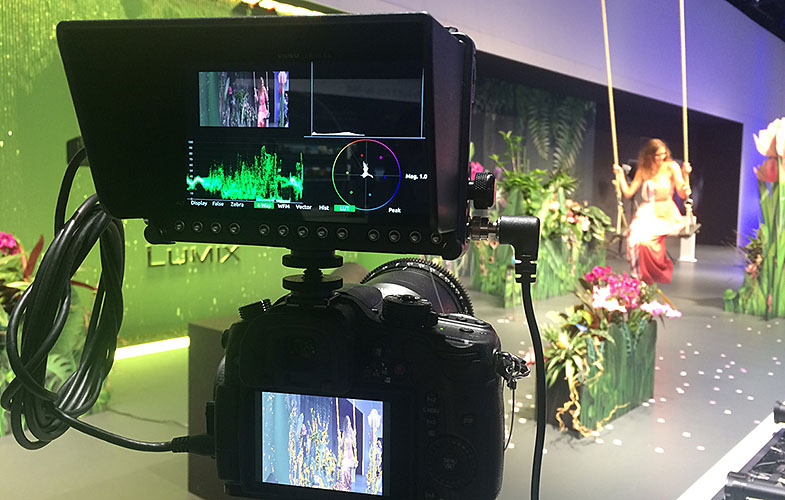
Histogram is a tool for checking overall brightness (luma) or color level (chrominance) within an image. It displays how many pixels there are at each brightness or color level. Like waveform, the histogram can have three modes— luma, RGB overlay, and RGB parade. It can be used to quickly determine whether the full dynamic range is being captured. In other words, most pixels should be distributed broadly around the center of the horizontal axis. Too hard to the left, and the image is underexposed. Too hard to the right, and the image is overexposed.
Vectorscope is a circular graphical tool for monitoring color saturation and hues. It may be used to help make creative choices on overall look, eliminate unwanted color casts (offsets), and check white/black color balance. It’s also a crucial tool for ensuring that color saturation falls within a legal broadcast color gamut. While modern HD televisions can handle the full tonal range (for 8-bit, RGB 0,0,0 to 255,255,255), there are still specifications for “broadcast safe colors” that remain in effect worldwide and limit the range to 16,16,16 (safe black) to 235,235,235 (safe white). On a monitor’s vectorscope, color saturation is determined by the distance from the center of the scope; the greater the saturation or more vivid a color, the further its trace reach is from the center. Color hue is determined by the direction or angle of the trace. Small boxes represent target values for fully saturated REC 709 primary and secondary colors. There is also a line, between the red and yellow target boxes that indicates skin tone.
With today’s fast-paced, ever-evolving industry, a high-quality monitor with scopes is crucial for any professional to have in their arsenal. Proper color correction, with the application of the right scopes, can help to bring any video imagery to life.
****************
Základy měření video signálu
Produktový manažer společnosti Sound Devices, Paul Isaacs, připravil krátký článek věnující se softwarovým měřícím nástrojům moderních kamerových monitorů, např. Video Devices PIX-E:
„Účelem barevných korekcí je opravit problémy s expozicí a barevností a zajistit optimální vzhled výsledného obrazu. Barevný grading je naopak kreativní nástroj pro změnu nálady snímku prostřednictvím barevných úprav. Základním předpokladem úspěšných barevných korekcí je optimální tonální rozsah, tedy rozsah od tmavých tónů po světlé. Pokud je tonální rozsah příliš úzký, obraz nebude mít dostatečný kontrast a bude působit ploše. Optimální rozsah se projeví také lepší saturací obrazu a živějším barevným podáním.
Profesionálové často natáčí do logaritmických video formátů, které dovolují zaznamenat široký dynamický rozsah a tedy i velké množství detailů v extrémech jasového spektra. Tento přístup ale vyžaduje kvalitní kamerový monitor pro měření a analýzu video signálu během záznamu.
Existuje řada nástrojů pro měření expozice. Např. zebra nebo zobrazení ve falešných barvách jsou skvělé funkce pro rychlou identifikaci pod- nebo přeexponovaných částí obrazu resp. pro nastavení optimálních pleťových tónů. Pro přesnější měření expozice a vyvážení barev jsou ale vhodnější klasické měřící nástroje – monitor vlnového průběhu, histogram a vektorskop.
Monitor vlnového průběhu se hodí pro nastaven korektní expozice, jak v jasové oblasti, tak co se týče barevnosti. Jeho vertikální škála poskytuje přesnější informace o expozici, než náhled ve falešných barvách nebo zebra. Může pracovat ve třech režimech: luma, RGB overlay a RGB parade. Ať už je aktivován jakýkoliv z těchto režimů, monitor vlnového průběhu pomůže vyhnout se extrémně saturovaným záběrům, ale i při kontrole pleťových tónů nebo při kontrole osvětlení pozadí. Je také velmi užitečný při kontrole separace zeleného klíčovacího pozadí.
Histogram je nástroj pro kontrolu jasu (luma) a barevných úrovní (chrominance) obrazu. Znázorňuje distribuci pixelů jednotlivých jasových nebo barevných úrovní. Stejně jako monitor vlnového průběhu, i histogram nabízí tři režimy zobrazení: luma, RGB overlay a RGB parade. Dovolí snadno zkontrolovat, je-li zaznamenáván celý dynamický rozsah. Jinými slovy, většina pixelů by měla být distribuována rovnoměrně na horizontální ose histogramu. Příliš velká koncentrace pixelů v levé části histogramu značí podexponování obrazu. Příliš velká koncentrace pixelů vpravo je naopak známkou přeexponování.
Vektorskop je zvláštní druh osciloskopu s kruhovým referenčním displejem pro monitorování barevné saturace a přesnosti. Může pomoci při kreativní práci s barevností snímku, eliminaci barevného závoje a kontrole celkového barevného vyvážení. Je také zcela nezbytnou pomůckou při kontrole bezpečného barevného rozsahu pro TV vysílání. Ačkoliv moderní HD televizory zobrazují plný tonální rozsah (8 bitů, RGB hodnoty 0, 0, 0 až 255, 255, 255), stále jsou ve světe v platnosti vysílací normy, které specifikují bezpečný tonální rozsah, definují např. bezpečnou úroveň černé (16, 16, 16) nebo bezpečnou úroveň bílé (235, 235, 235). Na vektorskopu můžeme odečíst barevnou saturaci jako vzdálenost od středu; čím větší vzdálenost, tím vyšší je saturace. Barevný odstín je dán úhlem průběhu. Malé čtverce na displeji jsou cílové hodnoty plně saturovaných primárních a sekundárních barev např. normy REC 709. Linka mezi cílovými čtverci pro červenou a žlutou indikuje pleťové tóny.
V dnešním rychle se rozvíjejícím filmovém odvětví je kvalitní monitor s měřícími nástroji absolutní nezbytností. Barevné korekce spolu s přesnými měřícími prvky pomohou vdechnout vašim záběrům život.”
Date: 02. 12. 2016,
Category: News
FULL ARTICLE