
 CZ
CZ SK
SK HU
HU AT
AT DE
DE ES
ES SI
SI HR
HR
Nothing in the basket.

- Search
-
Login

-
0
Comparison
Add products to compare, then they will appear here and you can compare parameters.
-
0
0 €
News
Blackmagic Design's new Blackmagic URSA Studio Viewfinder, a high resolution 7” studio viewfinder with variable tension mounting points, tally, external controls and more, will soon be available. The monitor turns Blackmagic URSA Mini into a true professional studio camera! The Blackmagic URSA Studio Viewfinder features a large 7” high resolution screen and is perfect for camera operators working on live events at which they need to stand behind the camera and capture the action for hours on end. The all metal design is durable and features the highest quality variable tension mounting points available, as well as an articulated arm so the viewfinder can be raised, lowered, moved forward and backward. These mounting points can be set for the perfect amount of resistance so that customers can pan and tilt the viewfinder to whatever position they need. When attached to URSA Mini, the camera sends information via the SDI connection to the viewfinder so customers can see the critical information they need such as recording status, camera settings, battery life and more while shooting. The design of the Blackmagic URSA Studio Viewfinder makes it familiar and easy to use for anyone that’s worked with other traditional studio cameras before, as the layout of the controls follows a familiar industry layout!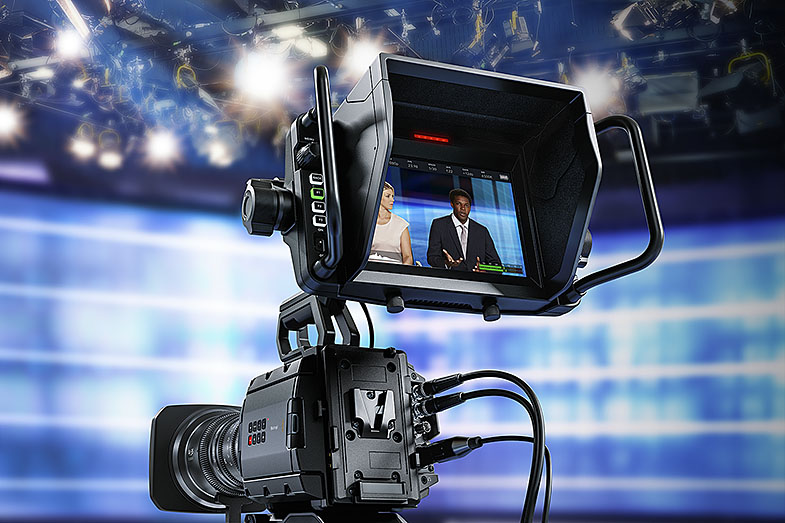
Blackmagic URSA Studio Viewfinder Features
- Super bright 7” high resolution viewfinder with detachable sunshade.
- Large handles and variable tension articulated pivot points to adjust viewfinder position.
- Tactile physical dials, knobs and customizable function buttons for quickly adjusting settings.
- Large RGB LED tally indicator with clip on perspex camera numbers for easy camera identification.
- Integrated V-Lock mounting plate for quick setup and attaching to the URSA Mini top handle.
- Connects to SDI input and power from camera, so no extra cables or power supplies needed.
- Compatible with Blackmagic Video Device Embedded Control Protocol for full control of camera functions such as talkback, tally, color correction, image detail, gains, all lens functions and much more.
Date: 14. 11. 2016,
Category: News
FULL ARTICLE
Sony is expanding its FS Series Super 35mm professional family with the addition of the new FS7 II camcorder. The new model builds on the original FS7’s strengths by adding advanced features including Electronic Variable ND technology, a lever lock type E-mount, and a new mechanical design for faster and easier set-up.
Since its introduction in 2014, the FS7 has become one of the most widely used cameras in a range of production applications, and the original model remains in the Sony line-up. The new FS7 II now gives creative professionals a broader range of creative tools, with new features all based on end user feedback.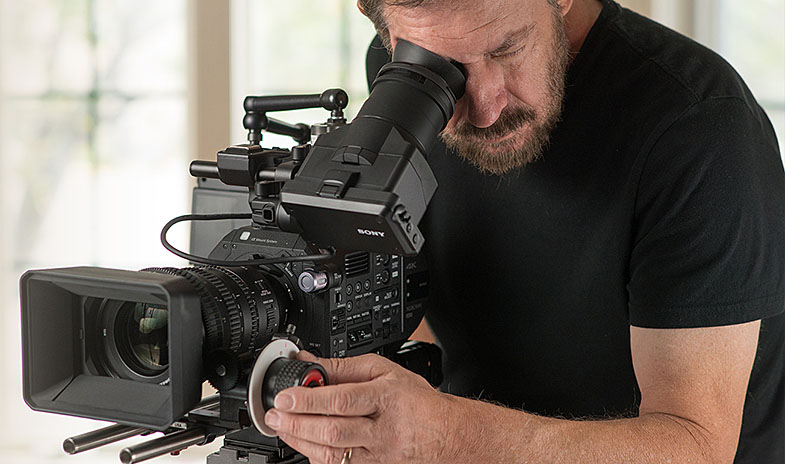
The new FS7 II camcorder is designed for long-form shooting and production applications, especially for documentaries and independent filmmaking. Amongst the many enhancements outlined below, the FS7 II can also record in BT2020 colour space, hence making it ideal for today’s 4K broadcast productions.
Electronic Variable ND Technology
The camcorder’s Electronic Variable ND Filter system, combined with its large sensor, delivers greater exposure control, with the option of preset or variable operation modes. Variable ND mode (clear + 2~7 stop range, in seamless transition steps up to 1/128) allows the user to vary the density of the ND filter during shooting and to transition seamlessly between steps. This also ensures an optimum motion delivery by maintaining desired shutter speed.
The camera’s expanded ND operations enables fine exposure adjustment by relegating iris to set depth of field, prevents soft focus caused by diffraction, and prevents colour shift caused by stacking multiple external ND filters.
The camera can compensate for exposure fluctuation caused by iris control while adjusting the depth of field. Users can adjust exposure while keeping the same bokeh in changing shooting or lighting environments.
Preset mode lets users assign three ND settings to the filter turret, useful in selecting the most appropriate filtration range for changing light conditions, for example. Auto ND mode is also available allowing exposure to stay at a fixed level while adjusting the depth of field with iris control.
E-mount (Lever Lock type) for professional shooting
The FS7 II revisited E-mount (lever lock type) gives users the ability to change lenses by rotating the locking collar rather than the lens itself, which means that in most cases lens support rigs don't need to be removed, saving time during a production. The new E-Mount has been designed for demanding applications in the professional environment and will fit any existing E-mount lenses in the market and other mount lenses with an adapter. The new FS7 II camcorder also supports Sony ? Mount System, which includes more than 70 lenses.
Mechanical Design Enhancements
Like its counterparts in the FS Series family – the FS7 and FS5 models – the new FS7 II features several design and ergonomic updates for comfortable and functional use in the field. These new features are based customer feedback around the FS7.
The FS7 II “tool-less” mechanical design lets users make on-the-fly changes to the camera’s set-up and operation. For example, no tools are required to adjust the Smart Grip or viewfinder positions.
The detachable viewfinder eyepiece, which comes with a pop-up hood, provides a third stabilizing contact point when shooting handheld. Durable square section rods and lever-clamps on the LCD and camera body provide simple and precise front-to-back VF adjustment while retaining level positioning.
New Sony 18-110mm Sony G lens
Sony also introduced a new E-mount, Super 35mm lens specifically designed for documentary and motion picture production.
The new lens, model E PZ 18-110mm F4 G OSS, covers Super35mm and APS-C sensors. Compact and lightweight -- 2.4 lbs (1.1Kg) -- with an 18 to 110 focal range (6x zoom) it uses a new fully mechanical/servo zoom switchable system, capable of snap zooms and entirely devoid of lag. The focal range is optimised for Super 35 and APS-C sensors.
The lens is compatible with Sony ? Mount System cameras, including the ?7 series interchangeable-lens cameras and professional Super 35mm 4K camcorders like the FS7 or FS5. Although perfectly suited for still image taking, filmmakers will fully appreciate the lens’ extended creative capabilities for shooting motion images.
The lens benefits Smooth Motion Optics (SMO) design from Sony, which is developed to optimise performance during motion image capture. This lens design eliminates undesirable characteristics and artifacts that do not affect still image taking, but can severely limit a lens’ usefulness for motion shooting, such as:
Ramping: F stop gradually diminishes when zooming tight
Not holding focus while zooming
Breathing (angle of view variation while focusing)
Optical axis shift (image moves in the frame while zooming)
Due to a change in the SELP18110G specifications it is no longer compatible with the SEL14TC and SEL20TC teleconverters.
XQD Cards
The FS7 II supports the XQD memory card format, designed for capturing and transferring high-bandwidth, high resolution files. The newest XQD card from Sony, QD-G256E-- with an industry first 256 GB capacity -- enables recording time of approximately 45 minutes at 4K 60P and 3.5 hours at 2K 30P. Combined with a read speed of 440MB/s and write speed 400MB/s, users can shoot for longer without needing to change media cards.
Date: 11. 11. 2016,
Category: News
FULL ARTICLE
Red Giant PluraEyes 4.1.2 is a free update for current users, and includes:
- Support Adobe Premiere Pro CC 2017
- Support for MAGIX Vegas Pro 14
- Support for RED WEAPON and RED RAVEN .R3D media
- Better support for multi-channel media (previously if the first channel was silent, PE4 would show a silent clip)
- New Track-level Sync Options – Two new options have been added to the the track context menu to provide better manual control of sync behaviour when needed: “Allow Sync to Change Clip Order” and “Allow Sync to Split Tracks.” By default they are set automatically based on PluralEyes’ analysis of the files, but the user can override the automatic setting.
- Better support for audio recording file naming, which can include a suffix that specifies the audio source e.g. The ZOOM H4N will add an “I” or “M” character to each file when recording in 4 channel mode, to indicate which of the two stereo inputs the file comes from. PluralEyes 4.1.2 now detects such cases during the sync, and splits them onto separate tracks.
- Better support for audio recorders that place each audio clip in a separate folder (e.g. Roland R26, ZOOM H5, ZOOM H6). Previously PE4 would incorrectly split these into separate tracks, with one clip per track.
- BUG FIX: Fixed an issue where PE4 shows a grey screen upon launch
How to Update PluralEyes 4.1.2
This update is free to current users. Download and run the latest installer here.
Date: 10. 11. 2016,
Category: News
FULL ARTICLE
On Wednesday, November 9, Livestream begun fulfilling all orders for the Livestream Studio (portable) HD550 4K Edition and (rackmount) Livestream Studio HD51 4K Edition. The 4K Editions feature upgraded hardware all around, including Blackmagic Design DeckLink 4K cards, 8-core Intel i7 CPU (16 virtual threads), 64GB RAM, 2TB SSD drive, and Windows 10 system. The 4K editions feature 5 inputs and one output with full size HDMI and SDI connectors. The price for the Studio HD550 4K Edition is 9,999 USD and the price for the Studio HD51 4K Edition is 8,999 USD ex. VAT. Also available is Livestream Studio 4 software, with support for Facebook Live and the new Mevo camera, as well as 4K crop technology, allowing producers to turn any single 4K camera feed into a multi-camera shoot.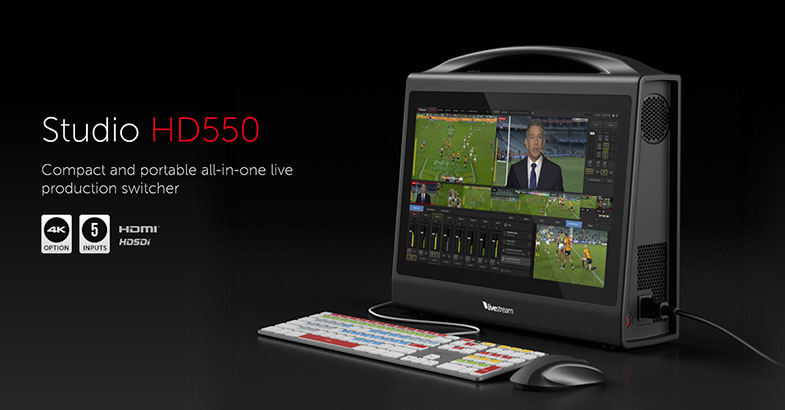
Date: 10. 11. 2016,
Category: News
FULL ARTICLE
With version 8.3 of EDIUS Pro and EDIUS Workgroup, Grass Valley, a Belden Brand, is introducing a number of new features that will make video editing more productive and more creative. The new version brings high-quality slow motion, more DVD/Blu-ray burning options, and other new usability improvements to all EDIUS Pro and Workgroup 8 users.
"Our customers choose EDIUS because they know that it's a smart investment that will keep up with their needs as technology advances," said Steve Wise, director of product marketing, Grass Valley. "We are constantly adding features and improving performance in response to feedback from users, which means that the software never falls behind the needs of the market. And the permanent license structure is such that existing users have access to the incremental upgrades within a version at no additional charge."
Specific improvements for EDIUS Pro 8.3 and EDIUS Workgroup 8.3 include:
- High-quality slow motion using optical flow interpolation
- Bin now shows timecode information
- Many more "Burn-to-disc" options for DVD and Blu-ray
- More proxy resolution options
- GV Browser improvements
- GUI improvements
- F-Log (Fujifilm) color space
EDIUS 8 supports more formats and more resolutions in real time than its competitors, with more creative options and real-time, no-render editing of all popular SD, HD and even 4K formats. It is widely regarded as the most versatile and fastest nonlinear editing software available on the market today. EDIUS is available in two versions -- EDIUS Pro 8 is targeted at the professional production user, while EDIUS Workgroup 8 is aimed at editors working within a broadcast-based, collaborative editing environment that might require GV STRATUS or third-party MAM connectivity, or to edit-in-place on K2 server/storage.
Date: 09. 11. 2016,
Category: News
FULL ARTICLE