
 CZ
CZ SK
SK HU
HU AT
AT DE
DE ES
ES SI
SI HR
HR
Nothing in the basket.

- Search
-
Login

-
0
Comparison
Add products to compare, then they will appear here and you can compare parameters.
-
0
0 €
Blog
The new podcast in the EDIUS Podcast series covers failed video export as well as voice over recording due to wrong positions of the In/Out markers on EDIUS timeline. Visit podcast.edius.net YouTube channel to watch the ongoing podcast series.
Date: 26. 05. 2017,
Category: News
FULL ARTICLE
This beta update provides improved performance and bug fixes for DaVinci Resolve 14 Studio. DaVinci Resolve 14 Studio includes all the features of the free version plus dozens of Resolve FX filters including advanced facial recognition and enhancement tools, multi user collaboration, 4K and higher output at frame rates up to 120fps, motion blur effects, temporal and spatial noise reduction, 3D tools and more.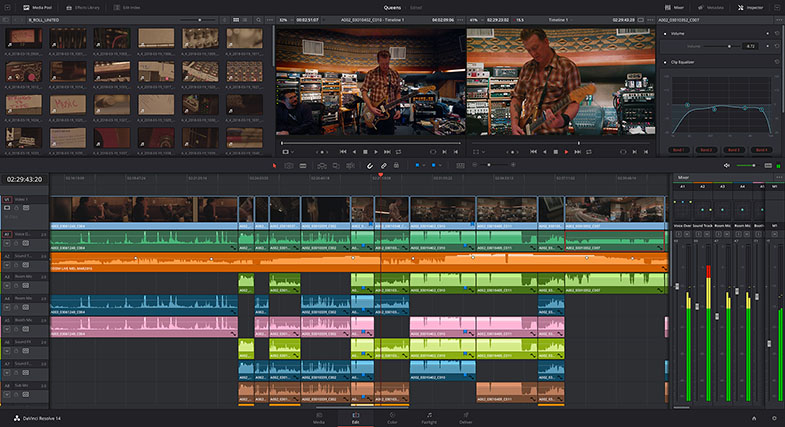
Date: 25. 05. 2017,
Category: News
FULL ARTICLE
Panasonic PTZ HD integrated cameras offer high image quality and sophisticated features, and have been well accepted at various applications such as wedding, public facility, conference hall, university, broadcasting station and more. In response to strong requests from customers, the new Panasonic Full HD Outdoor Integrated Camera was finally introduced. The camera retains the same level of high image quality for broadcasting and business purposes while offering resistance to water, dust, wind pressure and severe salt damage. This allows for installation in tough outdoor environments without the need for a housing.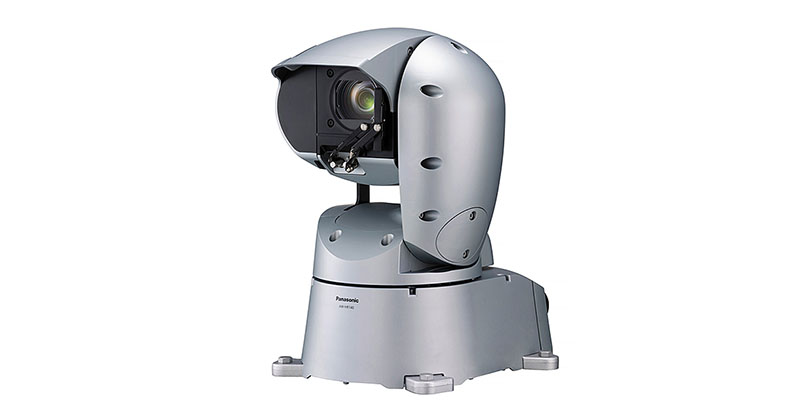
Date: 25. 05. 2017,
Category: News
FULL ARTICLE
Press Release
Blackmagic Design today announced that award winning Singapore-based short film director Daniel Yam shot his new short film, “Time,” using URSA Mini Pro and completed color correction using DaVinci Resolve. The film marks Viddsee’s first original short film, which was commissioned as part of Viddsee’s partnership with the Singapore Film Commission, a division of Singapore’s Info-Communications Media Development Authority.
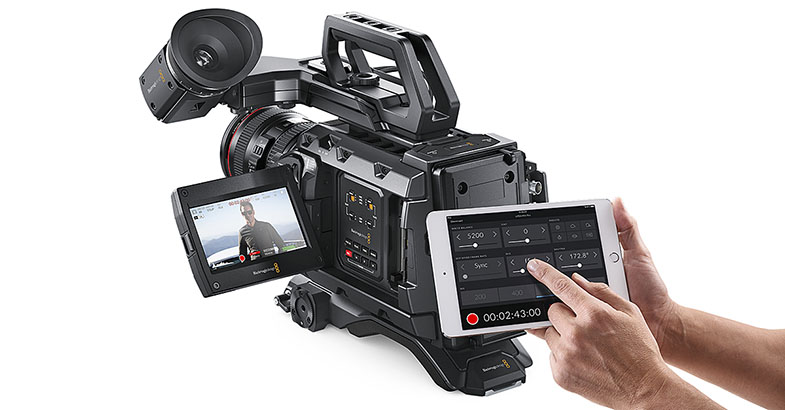
The film follows Grace, a frustrated young mother juggling between the constant demands of her son and her work. She wishes her boy would grow up quickly, just like she did. Unbeknownst to her, time has other plans.
”We knew going in we needed a good portable camera. As the camera needed to be transferred quickly from handheld to a dolly and to tripods, good camera portability would speed up production. We were also shooting indoors and out, so good capture quality for color grading during post production was also a key concern,” said Daniel.
“We only had two days to shoot. There was a scene where the doors would open and daylight would flood into a night lit scene. I thought the camera’s dynamic range held the highlights and shadows extremely well. We were supposed to shoot in the park for the hand holding scene but it rained. So, we chose to shoot indoor below a HDB flat. We were shooting under a shelter out into the open. The high contrast was handled very nicely by the camera,” Daniel recounts.
“We chose to shoot with Blackmagic's URSA Mini Pro and are very happy on how it all turned out. The URSA Mini Pro has spectacular dynamic range, natural colors and a high frame rate. So, it's no surprise that the finished film looks awesome. Well, At least I think so! I especially liked that it was reliable. It did not overheat or give any issues when we were shooting in the sun, so we could focus on getting great shots for the story,” he continued.
To convey the emotional depth of the film and layered scenes, the filmmakers relied heavily on color and tones to set the narrative stage. Using the URSA Mini Pro’s ability to capture 4.6K raw footage, they had ample ability to treat scenes come post production. DaVinci Resolve software was used to achieve the desired visual moods.
Audiences can also watch the short film “Time” on Viddsee.com. “Time” also premieres on May 13, Saturday, 10:35pm as part of a Mother’s Day special on Lifetime, across 15 territories in Asia.
Press Photography
Product photos of all Blackmagic Design products, are available at www.blackmagicdesign.com/press/images.
About Blackmagic Design
Blackmagic Design creates the world’s highest quality video editing products, digital film cameras, color correctors, video converters, video monitoring, routers, live production switchers, disk recorders, waveform monitors and real time film scanners for the feature film, post production and television broadcast industries. Blackmagic Design’s DeckLink capture cards launched a revolution in quality and affordability in post production, while the company’s Emmy™ award winning DaVinci color correction products have dominated the television and film industry since 1984. Blackmagic Design continues ground breaking innovations including 6G-SDI and 12G-SDI products and stereoscopic 3D and Ultra HD workflows. Founded by world leading post production editors and engineers, Blackmagic Design has offices in the USA, UK, Japan, Singapore and Australia. For more information, please go to www.blackmagicdesign.com.
Date: 23. 05. 2017,
Category: News
FULL ARTICLE
Three new podcast in the EDIUS Podcast series show disc burning using the external EDIUS Disc Burner application, manual installation of the Microsoft Legacy FireWire Drivers for older DV/HDV cameras under Windows 8.1/10, and project as well as user settings transfer from one EDIUS installation to another, respectively. Visit podcast.edius.net YouTube channel to watch the ongoing podcast series.
Date: 22. 05. 2017,
Category: News
FULL ARTICLE