
 CZ
CZ SK
SK HU
HU AT
AT DE
DE ES
ES SI
SI HR
HR
Nothing in the basket.

- Search
-
Login

-
0
Comparison
Add products to compare, then they will appear here and you can compare parameters.
-
0
0 €
News
Press Release
Blackmagic Design has become the first Australian company to be selected as Red Dot: Design Team of the Year, an honour widely acknowledged as the most prestigious design award in the world.
The annual award recognizes design teams whose work is consistently characterized by innovative achievements. Being awarded the Red Dot: Design Team of the Year is a unique accolade, as no designer or company can apply for this esteemed honour and sees Blackmagic Design join the exclusive company of previous winners including Apple, Bose, BMW, Braun, Porsche, Sony, Adidas and Bosch.
Blackmagic Design has rapidly grown over the last decade to become one of the world’s leading innovators and manufacturers of creative video technology. Blackmagic Design’s dedication to innovation, quality and rapid product development, has seen its products revolutionize the industry by allowing the highest quality video to be affordable to everyone. Blackmagic Design’s end-to-end suite of hardware and software products are used in films, television programs, advertisements and news broadcasts around the world. The global business is headquartered in Port Melbourne, with offices in the United States, Europe and Asia, and employs more than 800 staff as part of its dynamic “invention factory”.
Prof. Dr. Peter Zec, founder and president of the Red Dot Award, says, “The Blackmagic Design team has developed a reputation for combining user-centered design with highly innovative engineering to consistently deliver products that not only challenge, but change markets. Their strong product language is backed by a deep-rooted design philosophy that is focused on use and function in an uncompromising way. That makes Blackmagic Design the deserved recipient of the highest Red Dot title in 2016.”
In addition to the design team award, four Blackmagic Design products were recognized in the Red Dot: Product Design 2016 competition. They were chosen from around 5,200 submissions from 57 nations and evaluated by an international jury of experts against specific criteria including: degree of innovation; functionality; ergonomics; longevity; ecological compatibility; and clarity of function.
Blackmagic Design’s URSA Mini was awarded a “Red Dot: Best of the Best”. Blackmagic Design’s Micro Camera, URSA Electronic Viewfinder and Video Assist products were awarded the Red Dot: Product Design 2016 award. Many of this year’s biggest Hollywood blockbusters have been made possible using these award-winning products, along with Blackmagic Design’s DaVinci Resolve, including The Martian, Mad Max: Fury Road, Furious 7 and The Dressmaker.
“We are honored to accept the Red Dot: Design Team of the Year Award for 2016,” said Blackmagic Design CEO Grant Petty. “We have a proud history of innovation and this award is confirmation of our resolve to continuously blow customers’ minds with exceptionally designed, high-quality, exciting products which make the creative process easier for them. The award is testament to the creative work of Simon Kidd and the entire design team and we are delighted that the team has been recognized with such a prestigious global award.”
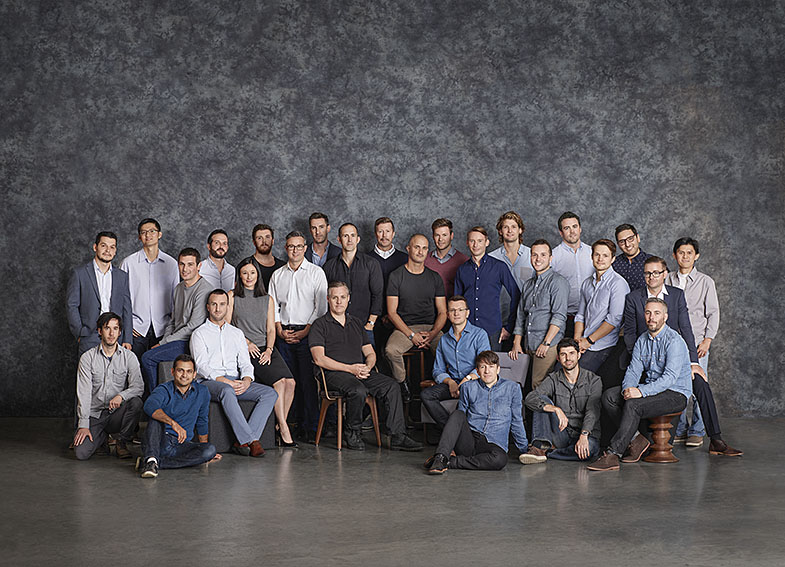
Simon Kidd, Director of Industrial Design, who has built and led the design team since its inception 10 years ago, said “We have an incredible team of highly talented, passionate and dedicated designers. When you pick up one of our products, I believe you can see the commitment our team has made to creating the very best product possible. To be recognized among the top design-led businesses in the world truly endorses this commitment.”
Awards will be presented to the winners at the Red Dot Gala awards ceremony at the Aalto Theatre in Essen, Germany on 4 July 2016.
Blackmagic Design’s products will be on display in a special exhibition “Blackmagic Design – leading the creative revolution” the Red Dot Design Museum in Essen, Germany from 4 July 2016.
Press Photography
Product photos of all Blackmagic Design products, are available at www.blackmagicdesign.com/media/images.
About Blackmagic Design
Blackmagic Design creates the world’s highest quality video editing products, digital film cameras, color correctors, video converters, video monitoring, routers, live production switchers, disk recorders, waveform monitors and real time film scanners for the feature film, post production and television broadcast industries. Blackmagic Design’s DeckLink capture cards launched a revolution in quality and affordability in post production, while the company’s Emmy™ award winning DaVinci color correction products have dominated the television and film industry since 1984. Blackmagic Design continues ground breaking innovations including 6G-SDI and 12G-SDI products and stereoscopic 3D and Ultra HD workflows. Founded by world leading post production editors and engineers, Blackmagic Design has offices in the USA, UK, Japan, Singapore and Australia. For more information, please go to www.blackmagicdesign.com.
Date: 13. 04. 2016,
Category: News
FULL ARTICLE
Blackmagic Design today announced that DP Xavier Grobet used several Pocket Cinema Cameras to shoot select scenes for Paramount Pictures’ comedy “Whiskey Tango Foxtrot.” Grobet required a small form factor camera that delivered cinematic images for the film’s in-vehicle shots and several actions scenes.
This was Grobet’s third time working with Directors Glenn Ficarra and John Requa, and Grobet noted that given the nature of the film and the war zone setting, the Pocket Cinema Camera was a natural choice.
“I was looking for a very small camera for my specific needs. We shot in a lot of cars and Humvees, so the camera needed to be compact. We didn’t want to shoot off of a process trailer, mounting the car on a rolling platform. We wanted to do it practically,” said Grobet. “I found the Pocket Cinema Camera to be outstanding. The latitude and definition are great, and I was most impressed with the dynamic range.”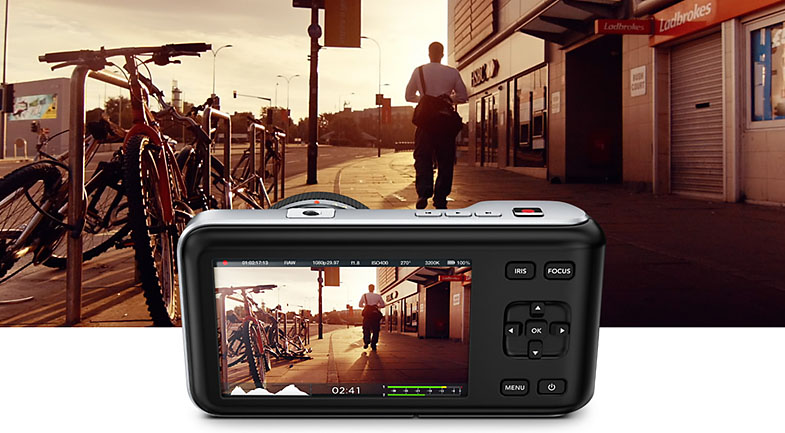
Date: 11. 04. 2016,
Category: News
FULL ARTICLE
New firmware 38.48 for Panasonic PX5000 and version 34.44 for PX270 camcorders adds enhanced functionality of P2 Cast network service. The new versions support a display function of thumbnail images and battery indicators onto P2 Cast; sending and receiving the menu data according to the command given through P2 Cast; time zone correction by GSP; and firmware update according to the command given through P2 Cast. To update, copy the downloaded update file of the to an SD memory card and refer to the installation procedure.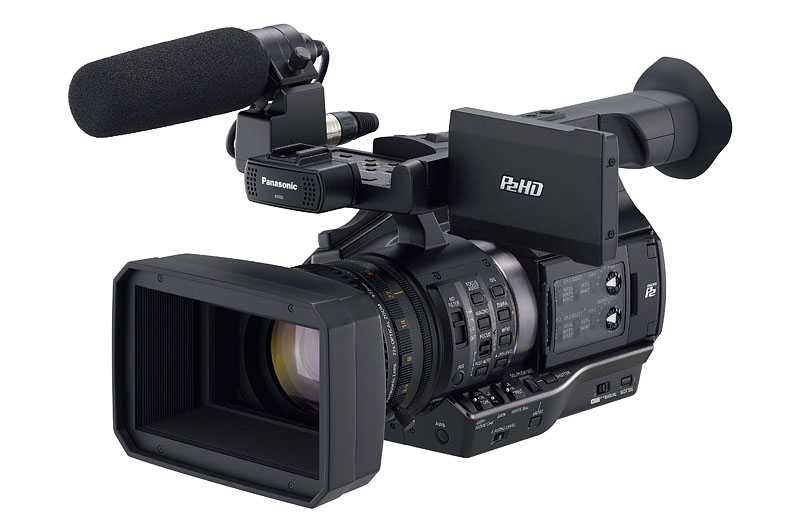
Date: 11. 04. 2016,
Category: News
FULL ARTICLE
The new KMU–100 accepts the single 4K/UHD output of any existing camera and turns it into up to four 16x9 user-defined cropped windows that are sent out as four separate HD signals through HD-SDI! A unique 4K multi-camera production solution that delivers multiple virtual full HD (up to 1080p) scaled camera angles with minimal installation cost and simple operation.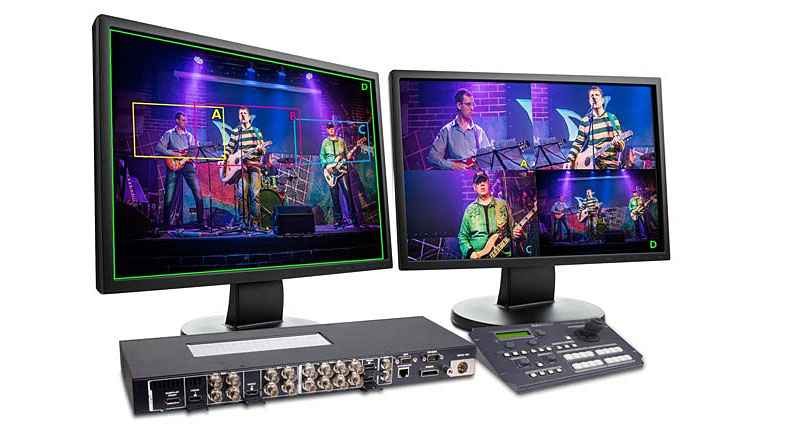
Date: 08. 04. 2016,
Category: News
FULL ARTICLE
Press Release
Blackmagic Design announced that both Fusion 8 and Fusion 8 Studio, the world’s most advanced visual effects and motion graphics software, is now shipping and is available for download from the Blackmagic Design website for both Mac OS X and Windows.
The release of Fusion 8 is the first ever Mac compatible release of Fusion, which was previously a Windows only product. Fusion 8 Studio is now also available in 10, 20 or 50 multi user licenses, making it easy to install in larger creative groups and studios. The multi user licenses feature a single USB dongle programmed with multiple licenses that plug into a machine running Fusion Server, which is installed by default with Fusion Studio. Fusion Server manages the licenses across the Ethernet network. That means licenses can be floating and are not tied to any single machine, making it easy to administer in large facilities with lots of users.
Now that Fusion 8 has come to the Mac, high end visual effects are available to even more users than ever before, opening the door to millions of motion graphic artists, broadcast designers, video editors, visual effects compositors, and 3D animators. In addition, projects can be easily moved between Mac and Windows versions of Fusion so customers can work on the platform of their choice. Now, anyone with a Mac or Windows computer can get access to the same high end visual effects tools used by Hollywood’s most elite artists.
Fusion 8 features a more intuitive and modern looking interface that makes it easier for new users to learn how to use the software, while also maintaining the consistency that long time users need to continue working without having to relearn anything. As part of the port to Mac OS X, the underlying architecture in Fusion has been modernized. Now that the port to Mac OS X is complete, the Fusion engineering team will work with the visual effects community to add even more powerful new features and continue modernizing the software's workflow and user interface.
Fusion has been one of Hollywood’s leading visual effects and motion graphics tools for over 25 years, and has been used on thousands of feature film and television projects, including blockbusters like Thor, Live Die and Repeat, the Hunger Games trilogy, White House Down, Battlestar Galactica and more.
Featuring a powerful node based interface, Fusion makes it extremely easy to build sophisticated visual effects compositions very quickly. Nodes are small icons that represent effects, filters and other image processing operations that can be connected together in any order to create unlimited visual effects. Nodes are laid out logically like a flow chart, so customers won’t waste time hunting through nested stacks of confusing layers with filters and effects. Unlike timeline based applications, it’s easy to see and adjust any part of a project in Fusion by simply clicking on a node.
With a massive toolset consisting of hundreds of built in tools, customers can pull keys, track objects, rotoscope, retouch images, animate titles, create amazing particle effects and much more, all in a true 3D workspace. Fusion can also import 3D models, point cloud data, cameras or even entire 3D scenes from Maya, 3ds Max or Lightwave and render them seamlessly with other elements. Deep pixel tools can be used to add volumetric fog, lighting and reflection mapping of rendered objects using world position passes so customers can create amazing atmospheric effects that render in seconds, instead of hours.
“Some of the world's best animators, designers and visual effects artists prefer using the Mac, but their choices for software have been either too limited or too expensive,” said Grant Petty, Blackmagic Design CEO. “With Fusion 8, there's finally a true professional, high end way to do motion graphics and create visual effects on the Mac! The improved, modernized code base also means that Fusion runs better on Windows than ever before too! The most exciting part of this release is that the free version now makes high end visual effects and motion graphics available to more people than ever. Projects created with the free Fusion 8 are fully compatible with Fusion 8 Studio, the paid version, making it easy for customers to make the jump when they need to!”

Fusion Versions
Fusion 8 is available in two versions:
Fusion 8 for Mac and Windows is free for customers and is now available to download from the Blackmagic Design website. Fusion 8 is a full professional 3D visual effects and compositing system that is suitable for independent effects, motion graphics, and broadcast design artists. Fusion 8 features integrated 2D and 3D compositing and motion graphics software with a massive toolset featuring paint, rotoscope, titling, animation, multiple keyers, an amazing 3D particle system, advanced keyframing, GPU acceleration, and support for importing and rendering 3D models and scenes from other applications.
Fusion 8 Studio for Mac and Windows is available now from US$995. Fusion Studio has all of the same features as the free version, but also adds advanced optical flow image analysis tools for stereoscopic 3D work, retiming and stabilization. Fusion Studio also includes support for third-party OpenFX plugins, unlimited distributed network rendering, and Generation for studio wide multi user collaboration to track, manage, review and approve shots when working with large creative teams on complex projects.
Availability and Price
Fusion 8 is available today for download from the Blackmagic Design website free of charge. Fusion 8 Studio for Mac OS X and Windows is now available for US$995, as well as in multi user licenses starting from US$8,955 for the 10 user license, US$17,895 for the 20 user license and US$44,495 for the 50 user license from Blackmagic Design resellers worldwide.
Press Photography
Product photos of Blackmagic Micro Studio Camera 4K, Video Assist, DaVinci Resolve Studio, Teranex Mini, UltraStudio Express and all other Blackmagic Design products are available at www.blackmagicdesign.com/press/images.
About Blackmagic Design
Blackmagic Design creates the world’s highest quality video editing products, digital film cameras, color correctors, video converters, video monitoring, routers, live production switchers, disk recorders, waveform monitors and real time film scanners for the feature film, post production and television broadcast industries. Blackmagic Design’s DeckLink capture cards launched a revolution in quality and affordability in post production, while the company’s Emmy™ award winning DaVinci color correction products have dominated the television and film industry since 1984. Blackmagic Design continues ground breaking innovations including 6G-SDI and 12G-SDI products and stereoscopic 3D and Ultra HD workflows. Founded by world leading post production editors and engineers, Blackmagic Design has offices in the USA, UK, Japan, Singapore and Australia. For more information, please go to www.blackmagicdesign.com.
Date: 01. 04. 2016,
Category: News
FULL ARTICLE