
 CZ
CZ SK
SK HU
HU AT
AT DE
DE ES
ES SI
SI HR
HR
Nothing in the basket.

- Search
-
Login

-
0
Comparison
Add products to compare, then they will appear here and you can compare parameters.
-
0
0 €
News
Now it’s possible to distribute and sell Ultra HD content direct to customers at live events!
Blackmagic Design announced the new Blackmagic Duplicator 4K, which allows delivery of Ultra HD content to consumers by recording files onto inexpensive SD cards that can be distributed to customers the moment an event is finished. Featuring 25 built in SD card recorders, multi rate 12G-SDI connections and a realtime H.265 encoder, Blackmagic Duplicator 4K is the best way to deliver Ultra HD content that customers can actually view on their 4K televisions and Windows 10 computers today.
Blackmagic Duplicator 4K is available now for US$1,995 and will be demonstrated on the Blackmagic Design NAB 2016 booth at #SL217.
The Blackmagic Duplicator 4K lets content creators dramatically increase revenue because it gives them a way to sell content right after a live event, while attendees are still excited about the performance, and before they walk out the door. Now customers can sell concert videos to fans as they leave the venue, to parents after their children’s latest performance or recital, after sporting events, conferences, sales seminars and more.
The Blackmagic Duplicator 4K encodes video using H.265, which is the new standard for Ultra HD delivery, and saves files in an open file format on to standard SD cards. The built in realtime H.265 hardware encoder gives customers incredible looking Ultra HD video, even at high frame rates up to 2160p60. The H.265 video looks better than the older H.264 standard, and the files are small with data rates low so content can play back from standard SD card media. With H.265, Ultra HD content is not much larger in file size than a HD file would be in the older H.264 standard.
Featuring 25 SD card recorders miniaturized into a single rack unit, the Blackmagic Duplicator 4K uses standard, common SD cards that are readily available, super thin, inexpensive and very fast. Cards can be used for SD, HD and Ultra HD video up to 2160p60 and are compatible with Windows 10 computers. With the addition of a USB adapter, SD cards can even be plugged directly into most consumer Ultra HD televisions for immediate playback of the video.
The built in H.265 encoder is so efficient that a one hour Ultra HD program can easily fit onto a very inexpensive 8GB SD card. SD cards are also easy to label and completely re-usable so customers can reformat unsold cards and record over them again at their next event. Unlike proprietary disc based formats like Blu-Ray, customers don’t have to buy a slow and expensive player. Blackmagic Duplicator 4K is the easiest, most compatible and cost effective way to distribute Ultra HD content to consumers today.
The front panel controls are designed to make duplicating content as easy as possible and feature 6 large illuminated buttons for record, stop, lock, append, menu and remote. The lock button prevents accidental interruption of recording during an event, and the append record button seamlessly combines recordings from different parts of an event into a single file.
This revolutionary new append recording feature is perfect for events that have natural breaks, like weddings with a ceremony and reception in different locations. Append recording makes it easier for consumers to watch the final program because they only have to play back a single movie file.
The Blackmagic Duplicator 4K features advanced, multi rate 12G-SDI connections that can record all SD, HD and Ultra HD formats up to 2160p60. For larger events, multiple duplicators can be stacked using the SDI loop thru and RS-422 deck control. This lets customers encode and duplicate to an unlimited number of SD cards in realtime. When recording is started or stopped on the first duplicator, the others automatically follow. There is also an optical fiber SFP socket for adding an optional SMPTE compatible optical fiber SDI module when working in larger venues with long distances between equipment. Adding optical fiber SDI directly into the duplicators could be very useful when duplicators are set up close to the merchandising stands away from the production area so that cards can be handed to customers for quick sale.
“Virtually all televisions sold are now Ultra HD models,” said Grant Petty, CEO, Blackmagic Design. “Manufacturers have moved away from regular HD and customers are buying new larger high resolution TV’s. But the problem for consumers is that there’s very little content available so they can’t take advantage of the resolution, color and detail that their new Ultra HD televisions can display. The Blackmagic Duplicator 4K is the solution to the Ultra HD delivery problem because it is an extremely affordable and convenient way to deliver Ultra HD content directly to consumers that they can play on their Ultra HD televisions today!”

Blackmagic Duplicator 4K Key Features
25 SD card recorders for simultaneously recording onto multiple cards at once.
Realtime H.265 encoding technology which is the standard for Ultra HD.
12G-SDI input and loop thru output, along with RS-422 control.
Uses open standard file formats that are compatible with computers and Ultra HD televisions.
Records all SD, HD and Ultra HD formats up to 2160p60.
Record unlimited cards by daisy chaining multiple duplicators together.
Easy to use front panel controls with lock, record, append, stop and remote buttons.
Built in universal 110V - 240V AC power supply.
Availability and Price
Blackmagic Duplicator 4K is available now for US$1,995 from Blackmagic Design resellers worldwide.
Press Photography
Product photos of the Blackmagic Duplicator 4K, and all other Blackmagic Design products, are available at www.blackmagicdesign.com/press/images.
About Blackmagic Design
Blackmagic Design creates the world’s highest quality video editing products, digital film cameras, color correctors, video converters, video monitoring, routers, live production switchers, disk recorders, waveform monitors and real time film scanners for the feature film, post production and television broadcast industries. Blackmagic Design’s DeckLink capture cards launched a revolution in quality and affordability in post production, while the company’s Emmy™ award winning DaVinci color correction products have dominated the television and film industry since 1984. Blackmagic Design continues ground breaking innovations including 6G-SDI and 12G-SDI products and stereoscopic 3D and Ultra HD workflows. Founded by world leading post production editors and engineers, Blackmagic Design has offices in the USA, UK, Japan, Singapore and Australia. For more information, please go to www.blackmagicdesign.com.
Date: 20. 04. 2016,
Category: News
FULL ARTICLE
Introducing the world's smallest broadcast quality video converters!
Blackmagic Design introduced Blackmagic Micro Converter SDI to HDMI and Blackmagic Micro Converter HDMI to SDI, two new super small, pocket size broadcast quality video converters. Both models are available immediately for only 79 EUR ex. VAT each.
Blackmagic Micro Converters are available now and will be demonstrated on the Blackmagic Design NAB 2016 booth at #SL217.
The Blackmagic Micro Converter SDI to HDMI converts signals from professional broadcast equipment such as cameras, decks, switchers and routers, and converts it into HDMI so customers can monitor video using big screen televisions and projectors. The Blackmagic Micro Converter HDMI to SDI model lets customers connect their HDMI equipment, such as laptop computers, gaming consoles and consumer video cameras, to professional broadcast equipment.
Both models feature full size HDMI and professional 3G-SDI connections for working with all SD and HD formats up to 1080p60. Unlike other small video converters, Blackmagic Micro Converters feature the highest quality broadcast technology, miniaturized into a proper metal enclosure. Customers get the same broadcast quality 10-bit video processing found in full size converters. In addition, Blackmagic Micro Converters also have SDI re-clocking on the 3G-SDI input which regenerates the SDI video input, reduces SDI jitter and improves SDI eye pattern before the signal is processed. This allows longer cable lengths and makes them incredibly reliable for use in professional broadcast.
Blackmagic Micro Converters are powered via the same micro USB connection that’s used on smartphones so customers can use the included DC plug pack, any USB device, or even a smartphone charger to power the converters. The included external power supply supports 110 to 240V AC and comes with 4 different AC socket adapters so customers can plug them into outlets anywhere in the world. That means they can be run from the external power supply, or even over USB from things such as big screen televisions or laptop computers if there are no AC wall outlets available.
“The new Blackmagic Micro Converters are exciting because they give customers full 10-bit broadcast quality video processing in an incredibly small design they can take anywhere,” said Grant Petty, CEO, Blackmagic Design. “There’s never been a converter this good, this small and this affordable! Customers are going to use them in studios on broadcast news, at live events, hidden on set, with digital signs, in corporate or hotel AV setups and everywhere in between!”
Blackmagic Micro Converters are part of a large family of professional broadcast converters that include even more advanced models with a massively increased range of features. This range includes 3G, 6G and 12G-SDI models that are compatible with SD, HD and Ultra HD all the way up to high frame rate 2160p60. Blackmagic Mini Converters and Teranex Mini converters feature support for a wide range of connections such as balanced analog and AES/EBU audio, redundant inputs, analog video, optical fiber and more.
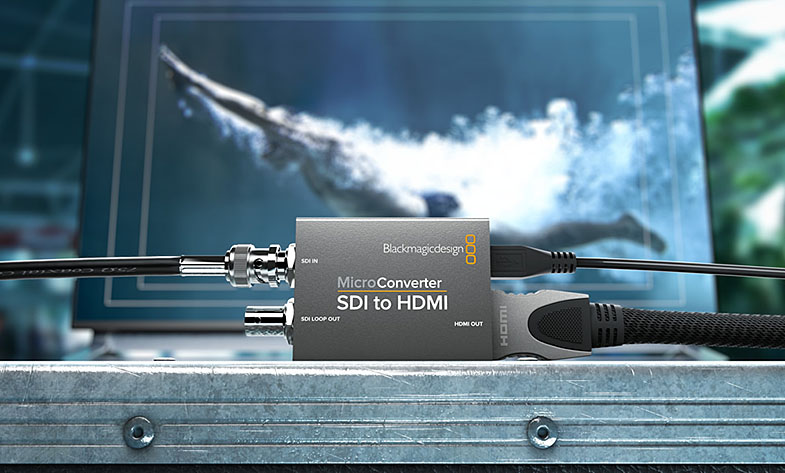
Blackmagic Micro Converter Key Features
Available in SDI to HDMI model or HDMI to SDI model.
Full size HDMI and 3G-SDI connections for working with all SD and HD formats up to 1080p60.
Durable metal enclosure designed to be rugged enough to use anywhere.
Professional Blackmagic Design broadcast quality 10-bit video processing.
SDI re-clocking on 3G-SDI input to reduce SDI jitter and improve SDI eye pattern.
Power via micro USB connection from devices such as laptop computers, phone chargers, and televisions, or via the included DC plug pack with external 110V - 240V AC power supply.
Availability and Price
Blackmagic Micro Converters are available now for 79 EUR ex. VAT.
Press Photography
Product photos of the Blackmagic Micro Converters, and all other Blackmagic Design products, are available at www.blackmagicdesign.com.
About Blackmagic Design
Blackmagic Design creates the world’s highest quality video editing products, digital film cameras, color correctors, video converters, video monitoring, routers, live production switchers, disk recorders, waveform monitors and real time film scanners for the feature film, post production and television broadcast industries. Blackmagic Design’s DeckLink capture cards launched a revolution in quality and affordability in post production, while the company’s Emmy™ award winning DaVinci color correction products have dominated the television and film industry since 1984. Blackmagic Design continues ground breaking innovations including 6G-SDI and 12G-SDI products and stereoscopic 3D and Ultra HD workflows. Founded by world leading post production editors and engineers, Blackmagic Design has offices in the USA, UK, Japan, Singapore and Australia. For more information, please go to www.blackmagicdesign.com.
Date: 20. 04. 2016,
Category: News
FULL ARTICLE
EDIUS 8.2 brings a number of new features to EDIUS 8 users, including motion tracking, which allows filters to be applied to a moving object to obscure identities or sensitive information for example, and a primary color correction video filter that enables color adjustments to clips in the original color space. It also supports adjustments natively, enabling editors to work with LOG files from Sony, Canon and Panasonic cameras.
Other new features include RAW decoding for Sony and Canon footage, improvements to the innovative GV Browser content management tool and draft preview for EDIUS Workgroup users. The latter makes it easier to work with heavier codecs, for example 4K, and CPU-intensive effects, by using selectable preview resolutions. When the preview is paused, EDIUS instantly displays a full-quality image to give the editor the best of both worlds -- speed and precision.
Another significant boost to EDIUS' plug-in compatibility comes with the announcement at NAB that creative effects specialist HitFilm is developing native support for EDIUS, a preview of which will be shown at the Grass Valley booth. The library of 140 HitFilm Ignite plug-ins (sold separately) will provide a powerful visual effects arsenal for EDIUS users.
Users of EDIUS Neo (versions 1 to 3.5) or EDIUS Pro (versions 2 to 6.5) can still take advantage of the special upgrade promotion that enables an upgrade to EDIUS Pro 8 for just 349 EUR ex. VAT, until April 30, 2016. This promotion also will be open to those who have purchased academic versions.
Date: 19. 04. 2016,
Category: News
FULL ARTICLE
Press Release
Blackmagic Design announced Blackmagic Video Assist 4K, a portable all in one professional monitor and video recorder that can be used to add professional recording and monitoring to any SDI or HDMI camera. Blackmagic Video Assist 4K features a bright, high resolution 7 inch monitor for checking focus and framing, two high speed recorders for non-stop HD and Ultra HD recording, two extremely high quality XLR microphone inputs for professional audio recording, a built in speaker and more.
Blackmagic Video Assist 4K is available now for 825 EUR ex. VAT and will be demonstrated on the Blackmagic Design NAB 2016 booth at #SL217.
The Blackmagic Video Assist 4K is perfect for customers that need better monitoring and higher quality recording. Older cameras often feature custom and hard to use file or tape formats, while lower cost consumer cameras often have poor quality file formats and small screens, limiting their professional use. Blackmagic Video Assist 4K solves this problem because it works with every type of camera from DSLRs to older tape based camcorders, and even the latest digital film cameras.
Blackmagic Video Assist 4K features two built in high speed UHS-II recorders that work with the latest high performance SD cards, making them fast enough to record Ultra HD video up to 2160p30 on widely available, inexpensive SD cards. Files are saved as broadcast quality 10-bit 4:2:2 video in either ProRes or DNxHD formats, making them compatible with all popular editing software, like DaVinci Resolve, so you can start editing immediately without having to transcode or convert files. Recording can be triggered to start and stop using LANC or over HDMI or SDI from the camera. With two built in recorders, customers get non-stop recording because when one card is full it automatically continues onto the next. The new high speed SD cards are compatible with existing SD card readers so they can be mounted directly on a computer for cloning and backup using the included DaVinci Resolve software.
Blackmagic Video Assist 4K is also an extremely high quality audio recorder that features two mini XLR inputs with 48V of phantom power so customers can attach external microphones. This totally eliminates the problems with auto gain controls on DLSR cameras and, with an amazing low electrical noise floor of -128dBV, the recordings are incredibly high quality and sound dramatically better than camera audio. Sound is recorded into the same file as the video, so customers don’t have to worry about AV sync between separate audio and video files!
Durable and lightweight, the Blackmagic Video Assist 4K features a bright, 7 inch high resolution 1920 x 1200 monitor and touchscreen with a wide 135? viewing angle. The extra resolution of the screen lets customers view 16:9 sources and see critical status information without covering the image. The display is also a touchscreen that lets customers use simple tap and swipe gestures to display camera information, change settings and evaluate audio and video levels. Blackmagic Video Assist 4K features an elegant heads up display overlay that lets customers keep their eyes on the shot while viewing the current input frame rate, histogram, audio meters, timecode and more.
For power, Blackmagic Video Assist 4K features two standard LP-E6 battery slots that allow hot swapping of batteries while in use, and it can be powered using the 12V DC input. The batteries are discharged serially, so only 1 is used at a time. When there’s power, the batteries are charged in parallel, which saves time when recharging.
“We’re really excited to announce Blackmagic Video Assist 4K with even more powerful features such as Ultra HD and professional audio recording,” said Grant Petty, CEO, Blackmagic Design. “Customers with DSLRs can use it to frame shots and record higher quality images and superior audio than ever before. Broadcasters can use it to add modern, file based recording to older cameras, and high-end filmmakers can record files for editorial while simultaneously recording RAW files on their camera. The Blackmagic Video Assist 4K is the ultimate all in one monitoring and recording solution for customers that want to shoot better video with any type of camera!”
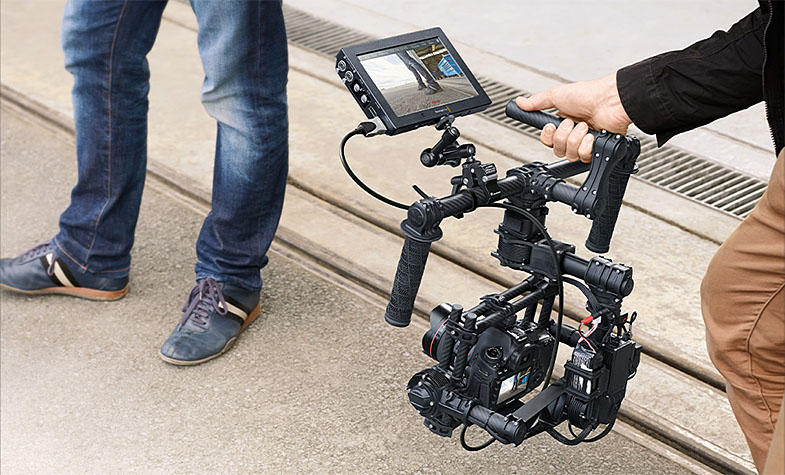
Blackmagic Video Assist 4K Key Features
7 inch LCD touch screen with 1920 x 1200 high resolution monitor.
Professional 10-bit 4:2:2 HD ProRes or DNxHD recording.
Dual high speed UHS-II SDHC card recorders use readily available, inexpensive SD card media.
Dual recorders allow non-stop recording and provide a backup if one fails.
2 mini XLR connectors with 48V phantom power for connecting microphones.
-128dBV electrical noise floor for high quality audio recording.
LANC connection for remote control.
Auto start/stop recording using HDMI or SDI triggers.
Includes slots for 2 hot pluggable batteries as well as 12V DC power input.
Full compatibility with editing software such as DaVinci Resolve, Final Cut Pro X, Avid and Premier Pro.
All in one design, mount to cameras, hold in your hand or set up on a table with the included kickstand.
Includes 6G-SDI input allowing it to be used as an Ultra HD monitor.
Availability and Price
Blackmagic Video Assist 4K is available now for 825 EUR ex. VAT.
Press Photography
Product photos of the Blackmagic Video Assist, and all other Blackmagic Design products, are available at www.blackmagicdesign.com/press/images.
About Blackmagic Design
Blackmagic Design creates the world’s highest quality video editing products, digital film cameras, color correctors, video converters, video monitoring, routers, live production switchers, disk recorders, waveform monitors and real time film scanners for the feature film, post production and television broadcast industries. Blackmagic Design’s DeckLink capture cards launched a revolution in quality and affordability in post production, while the company’s Emmy™ award winning DaVinci color correction products have dominated the television and film industry since 1984. Blackmagic Design continues ground breaking innovations including 6G-SDI and 12G-SDI products and stereoscopic 3D and Ultra HD workflows. Founded by world leading post production editors and engineers, Blackmagic Design has offices in the USA, UK, Japan, Singapore and Australia. For more information, please go to www.blackmagicdesign.com.
Date: 19. 04. 2016,
Category: News
FULL ARTICLE
Panasonic updated its P2 Streaming Server software for Windows, designed to receive the streaming video from the camera recorders / devices on the network and output it from SDI. The application supports AJ-PX5000, AJ-PX800, AJ-PX380, AJ-PX270, AJ-PG50, and now also Panasonic's PTZ cameras.
New features:
PTZ cameras are supported, incl. AW-HE130, AW-UE70, AW-HE40/HE65/HE70. Capability to receive streaming data from PTZ cameras. Remote control of PTZ cameras.
Remote control of P2 cameras.
Capability to receive streaming data from typical RTSP streaming servers.
Date: 18. 04. 2016,
Category: News
FULL ARTICLE