
 CZ
CZ SK
SK HU
HU AT
AT DE
DE ES
ES SI
SI HR
HR
Nothing in the basket.

- Search
-
Login

-
0
Comparison
Add products to compare, then they will appear here and you can compare parameters.
-
0
0 €
News
New videos with tips and tricks for RED shooters:
Date: 11. 10. 2016,
Category: News
FULL ARTICLE
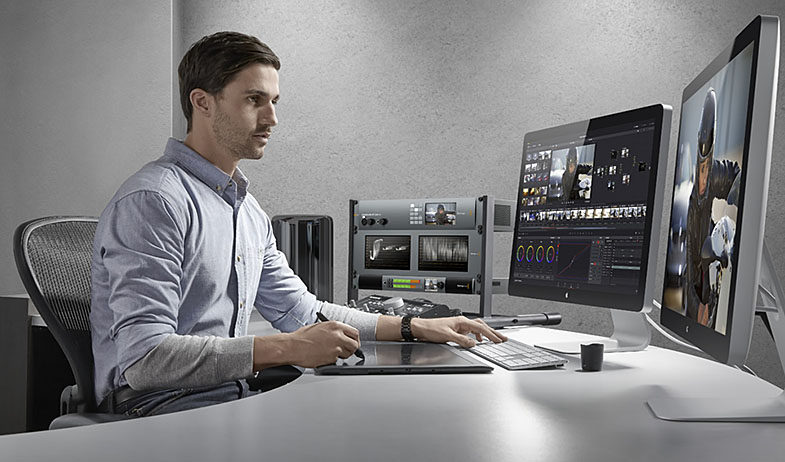
Blackmagic Design released UltraStudio 4K Extreme 3, the world’s most advanced Thunderbolt video capture and playback solution. Featuring the latest 40Gb/s Thunderbolt 3 technology, UltraStudio 4K Extreme 3 has a wide range of digital and analog connections and is designed to work with virtually all formats ranging from SD and HD all the way up to Ultra HD and digital cinema. Thunderbolt 3 performance allows customers to work with the highest quality 12-bit RGB and highest frame rate video, including stereoscopic 3D and DCI 4K, making it perfect for high end feature film, television and commercial work. UltraStudio 4K Extreme features a hardware codec that can encode in real time into the new H.265 format.
UltraStudio 4K Extreme 3 Key Features
- Supports 4K 60p capture and playback using 12G-SDI and HDMI 2.0 connections.
- Built in high performance hardware codec for H.265 encoding.
- Supports 12-bit 4:4:4 RGB 4K for high end color correction and VFX.
- 3D capture and playback via SDI and HDMI.
- Analog Component and dedicated NTSC/PAL in and out.
- 4 channel balanced analog audio in and out. Additional RCA HiFi audio in.
- 2 channel AES/EBU unbalanced audio in and out.
- Professional Mic input with phantom power selector and full input gain control.
- Timecode in and out on XLR connectors.
- Genlock/tri-sync input & output.
- 2 x Sony compatible RS-422 deck control.
- Includes hardware down conversion of Ultra HD to HD on playback.
- Includes hardware SD and HD keying.
- Connects with both Thunderbolt 3 and PCIe
- Includes free DaVinci Resolve software.
- Includes free developer SDK
- Elegant 2 rack unit design, with removable ears so it can be used in a rack or sit on a desk.
Date: 10. 10. 2016,
Category: News
FULL ARTICLE
According to DP Colin Noel, there are certain locations that a cinematographer dreams to shoot in. When the music video concept of Hartford, CT-based Bronze Radio Return’s Only Temporary was presented to him, it was an opportunity he couldn’t pass up. “A nighttime amusement park with a Ferris wheel was on my list of places that I wanted to shoot so I was super excited about it,” says Noel. “We started looking at gear and like most music videos, our budget was pretty low. We wanted to try and use the practical lights inside the amusement park as the actual background lights as much as possible without having to mimic them. We started looking at the VariCam LT and that’s where we decided to go.”
The music video was shot at The Island, an amusement park in Pigeon Forge, TN, right outside of Nashville. Besides mainly working with practical light, Noel’s other big challenge was that they were only allowed to shoot from midnight until sunrise since the entire music video takes place at night. “We essentially shot the whole music video in six hours because that’s all the time we had in the park,” reveals Noel. “Even if we had rigs and lights to simulate the amusement park, we wouldn’t have time to set up, dial it in, and shoot the video in such a short period of time. How do we use the existing light and bring up a key light for our talent, but also use background light as much as we can with just what’s there?”
For developing the look, Noel watched a number of videos that were shot in amusement parks but couldn’t find anything as colorful or vibrant to what he and director Sean Davé of Revolution Pictures were looking to create. One of the major inspirations was the music video, Weekend, by Priory. “It’s got this really cool anamorphic vintage feel to it,” reveals Noel. “It was definitely one of the visual references we used for the color palette and how we wanted it to feel.”
Noel shot the video with a single VariCam LT with Cooke anamorphic lenses, which Noel chose over a set of vintage Hawk anamorphics. “We ended up choosing the Cookes because we wanted to capture a sharper image while still having the option of knocking it down in post for a softer feel,” reveals Noel. “The Cookes are a little faster and a little easier to work with while the Hawks are of different sizes and weigh a ton. With such a quick turnaround on the video, I wanted something to give us exactly what we wanted.”
Over much debating, Noel shot the video in 2K with most of his footage shot at 48-fps because the video features numerous speed ramps within shots. According to Noel, he shot in 2K over 4K because it was going to be a 2K delivery and he wanted to capture in AVC-Intra 2K 422. (4K/UHD AVC-Intra 4K 422 only captures up to 30p.) “I opted for capturing more information at a smaller resolution,” he says.
Noel also captured in V-Log, creating a viewing LUT with Teradek Colr while visitors were still in the amusement park. He built the LUT based on the look they were going for and also recorded HD proxy files with the same LUT. [The editor does not like working with flat Log footage.] “The LUT was fairly simple,” explains Noel. “It was a Rec 709 look with a bit of extra contrast. I also warmed the midtones up a bit and pushed a little more blue into the shadows for more of a Hollywood blue/teal kind of look. We didn’t spend a lot of time on it — maybe five or ten minutes with our female talent and then we had to move on to actually get the ball rolling.”
Because he was working at night, Noel found himself shooting with the native 5,000 ISO quite often. Says Noel, “I went into it thinking we would set it at the 5,000 and I would knock it down to like 2,000 with ND so I wouldn’t gain the sensor. Towards the end, I honestly started using 5000 for everything. I thought the footage might look too bright in terms of what I’m used to, but it was actually really nice for the background to have that extra latitude. You can walk the key back further so you can have a wider shot and with anamorphics, it’s all about those nice wide shots. Being able to walk our key light back even further so we can get wider was really nice for our set-ups.”
Noel did most of key lighting with two ARRI 2K studio lights through an 8 x 8 silk. He also made good use of an ARRI Skypanel, which he created colorful keys for scenes shot in the amusement park’s video arcade. “You can literally just dial in the color and flip through a few options to figure out which look you like and what works in the environment,” he says.
For the most part, Noel relied upon practical light in the park. “With VariCam, the glow from the practical lights was actually giving both a nice back edge and a back light to our subjects,” he explains. “With other cameras, you would see the lights in the background and they would have been nice but it wouldn’t have read on the talent as much as it did, especially when you’re moving around really quick. For our schedule, every little bit helped so if you don’t have to add an extra light, it’s a real time saver.” Noel was also impressed with the way the LT captured color and skin tones and feels the VariCam’s color is up there with the Alexa.
Date: 07. 10. 2016,
Category: News
FULL ARTICLE
GoPro's new Karma drone features a compact, fits-in-a-small-backpack design and includes an image-stabilization grip that can be handheld or mounted to vehicles, gear and more. Karma makes it easy for anyone to capture amazingly smooth, stabilized video during almost any activity. The drone is easy to fly for both seasoned pros and new users, plus the GoPro Passenger App lets friends view your flight and control your GoPro while you fly!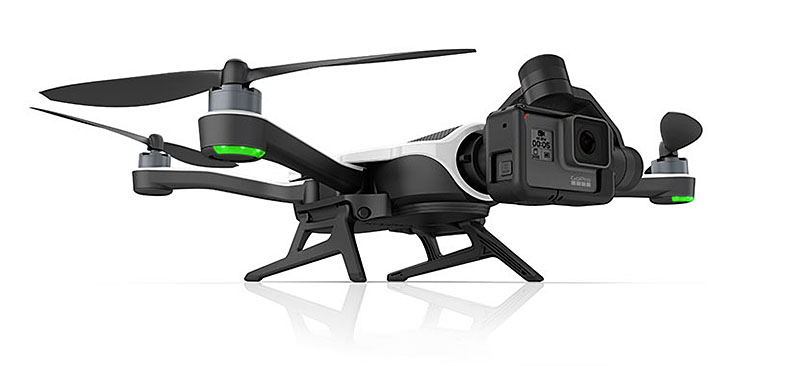
Date: 06. 10. 2016,
Category: News
FULL ARTICLE
GoPro announced its new cloud-connected cameras - HERO5 Black and HERO5 Session are now available. GoPro's all-new HERO5 line of cameras can auto-upload photos and videos to GoPro Plus, a cloud-based subscription service that makes it easy to access, edit and share GoPro content anytime, anywhere using a mobile phone or computer. Additionally, HERO5 cameras are now waterproof to 10 m without the need for a separate waterhousing and feature voice control, image stabilization, simplified controls, and improved battery life. Also new to both HERO5 cameras is the ability to capture non-fisheye perspectives as well as the traditional wide-angle look GoPro has become famous for. Both HERO5 Black and HERO5 Session are compatible with GoPro's new Karma drone and handheld stabilization system.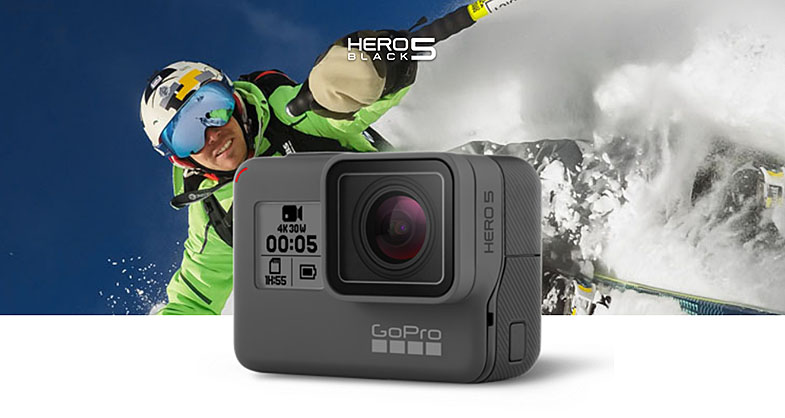
Date: 05. 10. 2016,
Category: News
FULL ARTICLE