
 CZ
CZ SK
SK HU
HU AT
AT DE
DE ES
ES SI
SI HR
HR
Nothing in the basket.

- Search
-
Login

-
0
Comparison
Add products to compare, then they will appear here and you can compare parameters.
-
0
0 €
News
Press Release
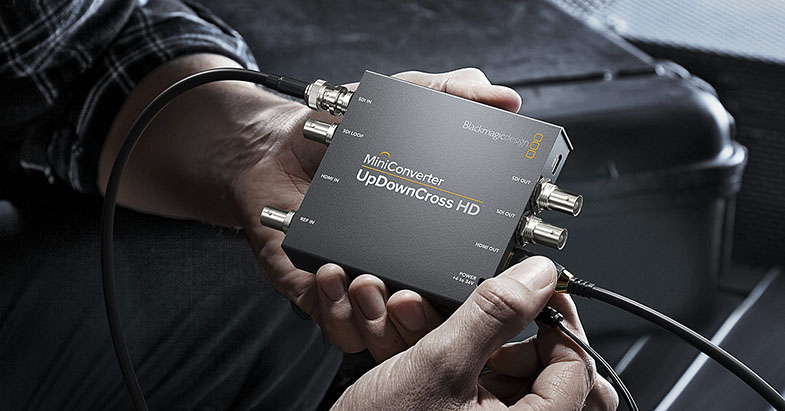
Blackmagic Design announced Blackmagic Mini Converter UpDownCross HD, a new broadcast quality standards converter that lets customers convert any SD or HD video format to any other SD or HD video format via SDI and HDMI input and output connections. In addition, customers also get automatic scaling of computer resolutions to standard broadcast formats. Blackmagic Mini Converter UpDownCross HD is available now for 129 EUR ex. VAT.
Blackmagic Mini Converter UpDownCross HD is an incredibly affordable high quality standards converter that broadcasters can use to convert video formats from its SDI and HDMI inputs. It’s perfect for converting between existing SD and HD broadcast equipment, as well as for connecting SDI equipment to consumer HDMI devices such as laptop computers and big screen televisions. Blackmagic Mini Converter UpDownCross HD uses low latency, high quality Teranex conversion algorithms for broadcast quality results. Customers can simply set the output format they need and the input format is automatically converted, which also ensures valuable equipment is protected by always sending the correct video output signal.
Connecting HDMI computers to professional SDI equipment is virtually foolproof with the Blackmagic Mini Converter UpDownCross HD. That’s because customers never have to change their computer’s display setting. The converter takes whatever the HDMI output is from the computer and then automatically scales and standards converts it to the correct broadcast standard set by the user.
Mini Converter UpDownCross HD features multi rate 3G-SDI connections that work with all SD and HD equipment and video formats up to 1080p60, as well as Level A and B devices. The converter features one 3G-SDI input with a loop output that bypasses all processing, an HDMI input, reference in, two 3G-SDI outputs and an HDMI output.
The 3G-SDI connections feature built in re-sync so all conversions match the reference input video timing signal. In addition, the converter has extremely low SDI jitter and high quality multi-tap video filters. This allows customers to use longer cables to maintain the integrity of the signal for broadcast quality video. Audio is also automatically delayed based on the conversion being performed and then embedded back into the signal so it’s always perfectly synchronized with the video.
The Blackmagic Mini Converter UpDownCross HD includes a universal power supply with international socket adapters for all countries. The power supply features a screw lock connector so customers never have to worry about the power cord being accidentally disconnected.
Blackmagic Mini Converters are part of a large family of professional broadcast converters that includes incredibly affordable Micro Converters as well as advanced models with a massively increased range of features. This range includes 3G, 6G and 12G-SDI models that are compatible with SD, HD and Ultra HD all the way up to high frame rate 2160p60. Blackmagic Mini Converters and Teranex Mini converters feature support for a wide range of connections such as balanced analog and AES/EBU audio, redundant inputs, analog video, optical fiber and more.
Availability and Price
Mini Converter UpDownCross HD is available now for 129 EUR ex. VAT.
Press Photography
Product photos of all Blackmagic Design products, are available at www.blackmagicdesign.com/press/images.
About Blackmagic Design
Blackmagic Design creates the world’s highest quality video editing products, digital film cameras, color correctors, video converters, video monitoring, routers, live production switchers, disk recorders, waveform monitors and real time film scanners for the feature film, post production and television broadcast industries. Blackmagic Design’s DeckLink capture cards launched a revolution in quality and affordability in post production, while the company’s Emmy™ award winning DaVinci color correction products have dominated the television and film industry since 1984. Blackmagic Design continues ground breaking innovations including 6G-SDI and 12G-SDI products and stereoscopic 3D and Ultra HD workflows. Founded by world leading post production editors and engineers, Blackmagic Design has offices in the USA, UK, Japan, Singapore and Australia. For more information, please go to www.blackmagicdesign.com.
Date: 17. 04. 2018,
Category: News
FULL ARTICLE
Press Release
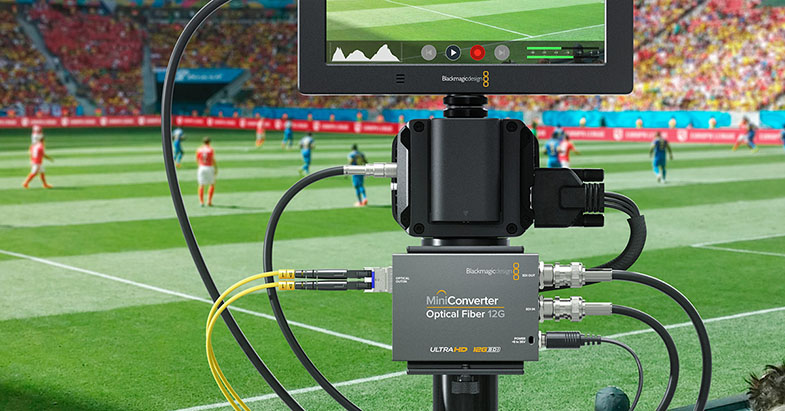
Blackmagic Design announced Blackmagic Mini Converter Optical Fiber 12G, a new bi directional SDI to optical fiber converter that lets customers extend SDI connections up to 16 km away. Blackmagic Mini Converter Optical Fiber 12G is available now for 129 EUR ex. VAT.
Blackmagic Mini Converter Optical Fiber 12G is a compact converter that extends SDI connections over massive distances by converting SDI to optical fiber and optical fiber to SDI in both directions at the same time. Using the new Blackmagic Mini Converter Optical Fiber 12G is an affordable way to increase camera coverage at live events because it lets broadcasters place cameras up to 16 km away from their switchers, routers, and decks using low cost optical fiber cable. That makes it perfect for placing cameras around any studio, for use at outdoor sporting events or even concerts and theatrical performances in large venues.
The converter is also bi directional which means that it can simultaneously send different video formats in different directions at the same time. Depending on the video format being used, signals can be sent up to 16km away from the source. Plus, the advanced 12G-SDI connections on Mini Converter Optical Fiber 12G are multi-rate. That means they automatically detect the video signal and switch speeds so they are compatible with all SD, HD and Ultra HD formats and equipment up to 2160p60, including Level A and B devices.
Mini Converter Optical Fiber 12G features a standard SFP type socket that lets customers add any SMPTE compatible 3G, 6G or 12G-SDI SFP module. It also works with the same of low cost optical fiber cables that are commonly used for computer networks. This type of optical fiber cable can be run much longer distances and is much more affordable than copper SDI cable.
For power, Mini Converter Optical Fiber 12G includes a universal power supply with 4 international socket adapters so it can be used anywhere in the world. It also features a screw lock connector that prevents the power cord from being accidentally disconnected.
Blackmagic Mini Converters are part of a large family of professional broadcast converters that includes incredibly affordable Micro Converters as well as advanced models with a massively increased range of features. This range includes 3G, 6G and 12G-SDI models that are compatible with SD, HD and Ultra HD all the way up to high frame rate 2160p60. Blackmagic Mini Converters and Teranex Mini converters feature support for a wide range of connections such as balanced analog and AES/EBU audio, redundant inputs, analog video, optical fiber and more.
Availability and Price
Mini Converter Optical Fiber 12G is available now for 129 EUR ex. VAT.
Press Photography
Product photos of all Blackmagic Design products, are available at www.blackmagicdesign.com/press/images.
About Blackmagic Design
Blackmagic Design creates the world’s highest quality video editing products, digital film cameras, color correctors, video converters, video monitoring, routers, live production switchers, disk recorders, waveform monitors and real time film scanners for the feature film, post production and television broadcast industries. Blackmagic Design’s DeckLink capture cards launched a revolution in quality and affordability in post production, while the company’s Emmy™ award winning DaVinci color correction products have dominated the television and film industry since 1984. Blackmagic Design continues ground breaking innovations including 6G-SDI and 12G-SDI products and stereoscopic 3D and Ultra HD workflows. Founded by world leading post production editors and engineers, Blackmagic Design has offices in the USA, UK, Japan, Singapore and Australia. For more information, please go to www.blackmagicdesign.com.
Date: 16. 04. 2018,
Category: News
FULL ARTICLE
Press Release
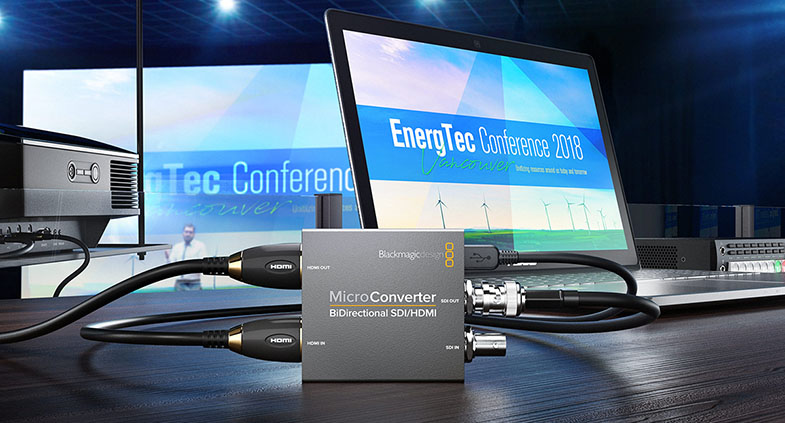
Blackmagic Design introduced Blackmagic Micro Converter BiDirectional SDI/HDMI, an incredibly small pocket size, broadcast quality video converter that simultaneously converts SDI to HDMI and HDMI to SDI in all SD and HD formats up to 1080p60. Blackmagic Micro Converter BiDirectional SDI/HDMI is available now from 59 EUR ex. VAT.
The Blackmagic Micro Converter BiDirectional SDI/HDMI converts signals between professional SDI broadcast equipment and HDMI sources such as computers, projectors and big screen televisions. The converter can send different video formats in both directions at the same time. For example, customers could use it to convert NTSC format video from SDI to HDMI in one direction, while simultaneously converting 1080p60 video from HDMI to SDI in the other direction.
Blackmagic Micro Converter BiDirectional SDI/HDMI features professional 3G-SDI connections for working with all SD and HD equipment and formats up to 1080p60, including Level A and B devices. Unlike other small video converters, Blackmagic Micro Converters feature the highest quality broadcast technology, miniaturized into an industrial strength durable metal enclosure. Customers get the same broadcast quality 10-bit video processing found in full size converters. In addition, Blackmagic Micro Converter BiDirectional SDI/HDMI also has SDI re-clocking on the 3G-SDI input which regenerates the SDI video signal, reduces SDI jitter and improves SDI eye pattern before the signal is processed. This allows longer cable lengths and makes them incredibly reliable for use in professional broadcast.
Blackmagic Micro Converter BiDirectional SDI/HDMI can be powered via micro USB from a laptop computer, big screen television or mobile phone battery back. It can also be powered using an optional DC plug pack which supports 110 to 240V AC and comes with 4 different international AC socket adapters so customers can plug them into outlets anywhere in the world.
Blackmagic Micro Converters are part of a large family of professional broadcast converters that includes even more advanced models with a massively increased range of features. This range includes 3G, 6G and 12G-SDI models that are compatible with SD, HD and Ultra HD all the way up to high frame rate 2160p60. Blackmagic Mini Converters and Teranex Mini converters feature support for a wide range of connections such as balanced analog and AES/EBU audio, redundant inputs, analog video, optical fiber and more.
Blackmagic Micro Converter BiDirectional SDI/HDMI Key Features
Full size HDMI and 3G-SDI connections for working with all SD and HD formats up to 1080p60.
Durable metal enclosure designed to be rugged enough to use anywhere.Professional Blackmagic Design broadcast quality 10-bit video processing.
SDI re-clocking on 3G-SDI input to reduce SDI jitter and improve SDI eye pattern.
Blackmagic Micro Converter BiDirectional SDI/HDMI powers via micro USB connection from devices such as laptop computers, phone chargers, and televisions.
Optional DC plug pack with external 110V - 240V AC power supply is available.
Blackmagic Micro Converter BiDirectional SDI/HDMI wPSU also powers via micro USB connection or from the included DC plug pack with external 110V - 240V AC power supply.
Availability and Price
Blackmagic MultiView 4 HD is available now for 59 EUR ex. VAT.
Press Photography
Product photos of all Blackmagic Design products, are available at www.blackmagicdesign.com/press/images.
About Blackmagic Design
Blackmagic Design creates the world’s highest quality video editing products, digital film cameras, color correctors, video converters, video monitoring, routers, live production switchers, disk recorders, waveform monitors and real time film scanners for the feature film, post production and television broadcast industries. Blackmagic Design’s DeckLink capture cards launched a revolution in quality and affordability in post production, while the company’s Emmy™ award winning DaVinci color correction products have dominated the television and film industry since 1984. Blackmagic Design continues ground breaking innovations including 6G-SDI and 12G-SDI products and stereoscopic 3D and Ultra HD workflows. Founded by world leading post production editors and engineers, Blackmagic Design has offices in the USA, UK, Japan, Singapore and Australia. For more information, please go to www.blackmagicdesign.com.
Date: 13. 04. 2018,
Category: News
FULL ARTICLE
Press Release
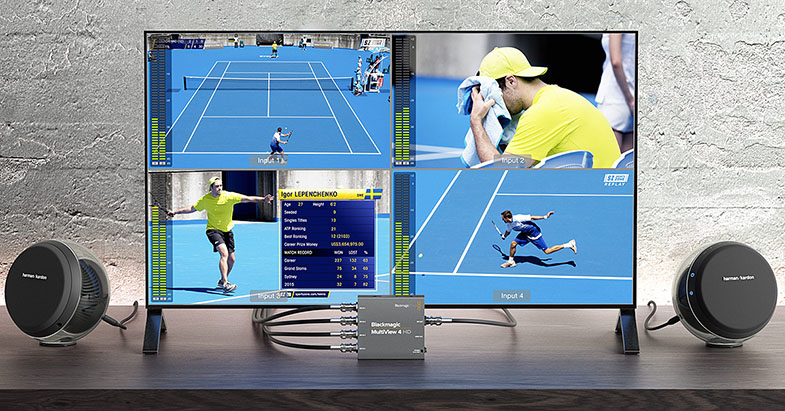
Blackmagic Design announced Blackmagic MultiView 4 HD, a new multi viewer that lets customers monitor 4 completely independent SDI video sources on a single display. Customers can monitor any combination of SD and HD formats and frame rates at the same time. Blackmagic MultiView 4 HD features both SDI and HDMI outputs so it can be used with both professional SDI broadcast displays or big screen consumer HD televisions. Blackmagic MultiView 4 HD is available immediately for only 159 EUR ex. VAT.
Blackmagic MultiView 4 HD includes four completely independent multi rate 3G-SDI inputs that are compatible with existing SD and HD equipment, including Level A and B devices. All inputs feature automatic frame re-synchronization, so customers can mix and match any combination of video standards and frame rates, including referenced or non-referenced NTSC, PAL, 720p, 1080i and 1080p60 frames per second, all on the same display at the same time.
With Blackmagic MultiView 4 HD, customers no longer have to connect multiple monitors, dozens of cables or run extra power to view all of their sources. They simply plug in cameras, decks, switchers, routers and feeds into the SDI connections on Blackmagic MultiView 4 HD and can see everything on a single HD display. That means there’s less equipment to carry around and set up.
Blackmagic MultiView 4 HD features both HDMI and 3G-SDI outputs so customers can connect to either a professional SDI broadcast monitor or a low cost big screen HDMI television. When combined with an HDMI television, Blackmagic MultiView 4 HD gives customers the world’s most affordable professional multiview solution, making it perfect for use in control rooms, outside broadcast trucks, or on location shooting at live events.
Designed to be plug and play, connected sources will instantly be displayed in a standard 2x2 grid layout. Customers can use the mini switches to turn on audio meters, choose which audio to output, as well as create custom labels, and more.
Blackmagic MultiView 4 HD Key Features
Display up to 4 SDI sources on a single HD display via SDI or HDMI.
4 multi rate 3G-SDI inputs.
Compatible with all SD and HD equipment and formats up to 1080p60.
Automatic frame re-sync allows simultaneous display of mixed SD and HD formats.
Standard quad split 2x2 view or SOLO.
1920 x 1080 supported output resolution.
90V-240V DC power supply with international AC adapters for use worldwide.
Availability and Price
Blackmagic MultiView 4 HD is available now for 159 EUR ex. VAT.
Press Photography
Product photos of all Blackmagic Design products, are available at www.blackmagicdesign.com/press/images.
About Blackmagic Design
Blackmagic Design creates the world’s highest quality video editing products, digital film cameras, color correctors, video converters, video monitoring, routers, live production switchers, disk recorders, waveform monitors and real time film scanners for the feature film, post production and television broadcast industries. Blackmagic Design’s DeckLink capture cards launched a revolution in quality and affordability in post production, while the company’s Emmy™ award winning DaVinci color correction products have dominated the television and film industry since 1984. Blackmagic Design continues ground breaking innovations including 6G-SDI and 12G-SDI products and stereoscopic 3D and Ultra HD workflows. Founded by world leading post production editors and engineers, Blackmagic Design has offices in the USA, UK, Japan, Singapore and Australia. For more information, please go to www.blackmagicdesign.com.
Date: 12. 04. 2018,
Category: News
FULL ARTICLE
Press Release
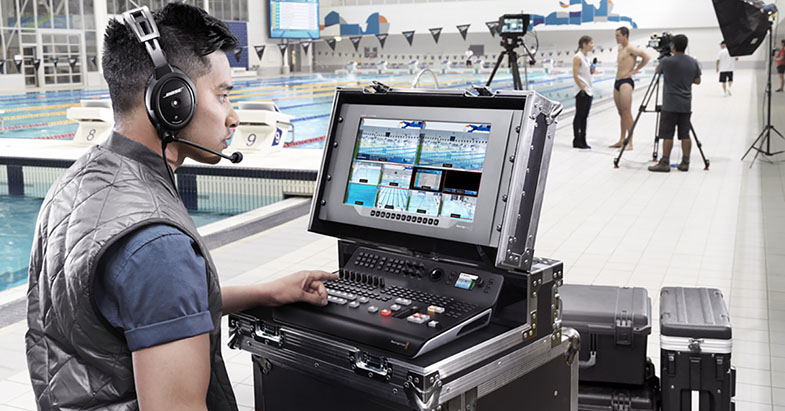
Blackmagic Design announced ATEM Television Studio Pro 4K, a professional all in one Ultra HD live production switcher with integrated hardware control panel. ATEM Television Studio Pro 4K features 8 independent 12G-SDI inputs, built in Fairlight audio mixer, ATEM Advanced Chroma Keyer, multiview, auxiliary and program outputs, analog audio inputs, built in talkback, two flash based media players, professional creative transitions, a DVE for effects and more. ATEM Television Studio Pro 4K is available now for 2.545 EUR ex. VAT.
ATEM Television Studio Pro 4K combines a professional broadcast hardware control panel with a powerful 8 input 12G-SDI switcher for working with all HD and Ultra HD formats up to 2160p59.94. All of the 12G-SDI inputs feature full re-sync and independent format and frame rate conversions. That means customers can connect a total of up to 8 different sources with various different frame sizes and frame rates, and cleanly switch between them. The switcher automatically converts everything to the program’s output format and frame rate.
Professional Fairlight audio mixing is built in to the ATEM Television Studio Pro 4K. Fairlight has been used for extremely high end feature film and television audio post production for years and now, for the first time ever, Blackmagic Design has integrated these incredible Fairlight audio tools into a live production switcher. ATEM Television Studio Pro 4K gives customers independent 6 band parametric equalizers on every single input. In addition, it also includes expander/gate, compressor and limiter dynamics on each input.
In addition to 12G-SDI, ATEM Television Studio Pro 4K also includes two channels of analog audio in, RS-422, Ethernet and a built in IEC power supply, along with program and auxiliary outputs. Customers also get both SDI and HDMI multiview outputs so they can monitor all sources, preview and program outputs, along with labels, audio meters and more, all on a single big screen television or broadcast monitor.
Featuring a portable design, ATEM Television Studio Pro 4K is packed with high end broadcast features that make it possible to create an entire live switched program, complete with effects and transitions. The hardware panel features large illuminated buttons for switching between sources, along with corresponding audio buttons, one touch transition buttons, downstream keyers, fade to black, media player, cut buttons and more. There’s also a built in LCD screen for previewing source and program video, a spin knob and additional buttons for menus and to adjust settings. Customers simply press the button for the source that they want to see next in the program, then hit the cut or auto button to switch sources, add effects, or even key in graphics.
ATEM Television Studio Pro 4K gives customers true broadcast quality transitions, effects and graphics. Transitions such as mixes, wipes and dips are done by simply pressing a button on the control panel. There are 37 included transitions, giving customers massive creative options because they can customize things such as border, border color and width, position, direction and more. In addition, there’s a built in 2D DVE for adding digital video effects that can position, resize and scale live video, all in real time. That means customers can create professional picture-in-picture effects, use DVE powered transitions like squeeze and slide between sources, or create graphic wipe transitions with their own graphics.
When used with Blackmagic Studio, URSA Mini, URSA Broadcast and Micro Studio cameras, customers get a complete remote control solution that includes talkback, tally, color correction, camera control and more, without having to add any additional cables or proprietary control boxes. These cameras feature a built in color corrector that can be remote controlled, making it possible to balance camera color and create unique looks, all from the control panel. In addition, customers can adjust focus and iris on compatible lenses, change camera settings, and even remote control PTZ heads.
ATEM Television Studio Pro 4K features the all new next generation ATEM Advanced Chroma Keyer. This new keyer gives customers adjustable on screen controls for selecting and sampling a region of color, adjustment controls for foreground, background and edges, and chroma correction tools for spill and flare suppression. That means ATEM Television Studio Pro 4K can pull extremely clean keys to replace a blue or green screen for professional broadcast quality composites.
ATEM Television Studio Pro 4K has a built in media pool that can store 90 frames of Ultra HD, 360 frames of 1080HD or 1440 frames of 720HD video that can be used with the two built in media players. The media pool uses flash memory, so images are saved even after the power is turned off. That means customers can create completely custom graphics to use in their own programs. In addition, there is an upstream keyer with full chroma keying for green screen shots so customers can add weather maps, graphics, or even virtual sets. The upstream keyer works with chroma, patterns, shapes and linear keys.
ATEM Television Studio Pro 4K also features 2 downstream keyers for adding graphics, logos and bugs to video. Customers can use a HyperDeck Studio Mini with ATEM Television Studio Pro 4K as a source for ProRes 4:4:4:4 motion graphics files with alpha channels. That means customers can get fill and key graphics composited over live video, or they can use motion graphics with alpha as transitions between sources, all in real time.
ATEM Television Studio Pro 4K also includes a built in talkback converter for SDI cameras. The talkback information is sent back to the camera via the SDI program return feed on the rarely used SDI audio channels 15 and 16. When working live with a reporter in the field, there can be a slight delay that causes them to hear themselves as an echo in their headset. ATEM Television Studio Pro 4K includes mix minus which sends back all of the program audio to the camera but removes the reporter’s own voice, so they don’t hear a distracting echo of themselves while reporting.
For maximum speed and flexibility in live productions, ATEM Television Studio Pro 4K includes a free software control panel for Mac and Windows that allows multiple users to be connected at the same time. That means customers can have one person switching the program while another mixes the audio and another uploads or changes graphics, while another person remotely color balances and controls the cameras.
ATEM Television Studio Pro 4K Features
Integrated broadcast switcher and professional hardware control panel.
8 x 12G-SDI inputs, all with auto re‑sync and format and frame rate converters.
Supports all video formats from HD to Ultra HD 2160p at 59.94 frames per second.
1 x built in multiview for 8 sources, as well as preview and program.
Built in media pool graphics storage for 90 frames of Ultra HD, 360 frames of 1080HD or 1440 frames of 720HD video.
Built in DVE with borders and drop shadow.
Transitions include cut, mix, dip, SMPTE wipes and more.
1 upstream keyer including chroma keyer plus 2 downstream keyers.
1 auxiliary output with aux switching buttons and LCD screen for viewing.
Built in audio mixer live mixes embedded audio from all video inputs and independent audio inputs.
Balanced XLR stereo analog audio inputs.
Internal sources include black, color bars, two color generators and 2 media player outputs.
Ethernet connection for computer connection.
Mac and Windows control panel software included.
Compatible with all ATEM Broadcast Control Panels.
Black Burst and HD-Tri-Sync genlock input for integration into large systems.
Availability and Price
The ATEM Television Studio Pro 4K is available for 2.545 EUR ex. VAT.
Press Photography
Product photos of all Blackmagic Design products, are available at www.blackmagicdesign.com/press/images.
About Blackmagic Design
Blackmagic Design creates the world’s highest quality video editing products, digital film cameras, color correctors, video converters, video monitoring, routers, live production switchers, disk recorders, waveform monitors and real time film scanners for the feature film, post production and television broadcast industries. Blackmagic Design’s DeckLink capture cards launched a revolution in quality and affordability in post production, while the company’s Emmy™ award winning DaVinci color correction products have dominated the television and film industry since 1984. Blackmagic Design continues ground breaking innovations including 6G-SDI and 12G-SDI products and stereoscopic 3D and Ultra HD workflows. Founded by world leading post production editors and engineers, Blackmagic Design has offices in the USA, UK, Japan, Singapore and Australia. For more information, please go to www.blackmagicdesign.com.
Date: 11. 04. 2018,
Category: News
FULL ARTICLE