Press Release
Blackmagic Design announced HyperDeck Extreme 8K HDR a new innovative broadcast deck with advanced H.265 8K recording combined with touch screen user interface and traditional broadcast deck controls. HyperDeck Extreme 8K HDR will be available in June 2019 for 4779 EUR ex. VAT.
The new HyperDeck Extreme 8K HDR features the trusted reliability of HyperDeck combined with new innovations such as space saving H.265 files, optional internal cache, 3D LUTs, native 8K and HDR support. With the ability to record native 8K in H.265, customers get reduced storage costs and amazing image quality. The large touch screen ensures a perfect view of their recording as well as control over all deck settings. Customers can then add HyperDeck Extreme Control to transform it into a traditional broadcast deck. This means HyperDeck Extreme is the perfect solution for the next generation of broadcast, live production and digital signage.
HyperDeck Extreme has an innovative touch screen user interface with deck controls as well as a large screen to view their recording. Then add a HyperDeck Extreme Control for traditional broadcast deck controls and a large shuttle knob that feels incredibly luxurious to use. Customers can even rack mount the HyperDeck and the controller. HyperDeck Extreme also includes 2 media slots, Quad 12G-SDI for 8K, analog connections for archiving, USB-C external disk recording, plus a front panel speaker and headphone jack. There's also an optional cache that eliminates dropped frames if their media becomes full or is too slow. Both AC and DC power connections are also included for studio or on location use.
With its amazing versatility, HyperDeck Extreme is also great for live production as a master recorder, clip player and for recording ISO cameras. The analog inputs allow customers to record from old video tapes, so legacy programming can be used on the latest streaming services or for use in editing. Digital signage in 8K is easy with HyperDeck Extreme as it has 10G Ethernet for fast media uploads, plus it features a simple remote control protocol. Customers can even use it as a field recorder as it includes HDMI, SDI and analog inputs with built in scopes and 3D LUTs. The scopes also help customers QA masters to ensure compliance with broadcast standards before streaming and broadcast.
HyperDeck Extreme Control lets customers connect to legacy broadcast decks, set an in and an out point, then edit. Just add HyperDeck Extreme 8K and HyperDeck Extreme Control to each legacy deck to keep them all archiving constantly with just one operator. It’s even possible to edit across formats by using Teranex Express to convert tapes from SD to HD in one step. Customers can control a wide range of decks, including Digital Betacam, 1 inch C format, and Betacam SP.
The latest Quad Link 12G-SDI is included so it’s possible to record and playback in full resolution 8K for amazing quality. The SDI connections are multi-rate, so customers can use Quad Link 12G-SDI to get compatibility with other 8K products, or switch to SD, HD or Ultra HD using the single link 12G-SDI connection. To allow regular CFast cards to be recorded at high resolution 8K, HyperDeck Extreme uses modern H.265 files for 8K recording and playback. This means HyperDeck Extreme 8K is perfect for connecting to the latest 8K televisions and projectors.
The innovative touch LCD user interface provides incredible control. On screen, there are dedicated buttons for play, stop and record, plus a mini timeline for scrolling through their recordings. Customers can even image swipe to jog. The LCD includes a heads up display of timecode, video standard, media status as well as audio meters. Scopes can be enabled via the touch screen as well as focus and exposure assist. There's also an extensive range of settings all controlled from the large LCD. Plus customers can load and save 3D LUTs. Customers also get direct buttons for transport control, enabling the 3D LUT and remote enable.
HyperDeck Extreme Control extends their HyperDeck Extreme to add traditional broadcast deck controls. It works like a traditional broadcast deck with a familiar layout. Customers can control up to 8 decks via industry standard RS-422 control. Customers can even rack mount to the HyperDeck Extreme to create a single "broadcast deck" unit. Because it uses standard RS-422, customers can control old broadcast decks and perform edits using set in and out points. That's perfect for archiving work. Plus customers can even edit between frame rates if standards converting between formats.
CFast media support allows customers to record to commonly available flash memory cards. The H.265 files are small enough to allow long recordings on standard CFast cards. Plus there are 2 CFast card slots so customers can swap out any full cards even during recording, allowing infinite length recording. CFast cards are perfect for broadcast because they are small, high speed and affordable. With H.265, customers can record 498 minutes at 8Kp60 on a 1 TB card, 1,059 minutes in 2160p60 Ultra HD and 2,354 minutes in 1080p59.94 on a 1 TB card. That’s over 8 hours in 8K and over 39 hours in HD.
If recording to other media types is required, then the USB-C Expansion port lets customers plug in an external flash disk for recording. Adding a Blackmagic MultiDock 10G also makes it easy to use SSDs for compatibility with other HyperDeck models. Customers even get on screen menus for managing external disks using the touch screen.
Sometimes their media can fill before customers change to a blank card, or if the card is too slow, then customers can get dropped frames in their recording. To eliminate this problem, customers can install a PCIe flash disk into HyperDeck Extreme 8K to use as a record cache. This eliminates problems with CFast media or external disks, as the cache will automatically take over and record any content the media could not capture. Even if a card fills, recording will continue to the cache until it’s swapped. The cache even lets customers record formats that are too fast for the media card or external disk.
HyperDeck Extreme 8K features a wide range of video and audio connections such as multi-rate Quad Link 12G-SDI for SD, HD, Ultra HD and 8K SDI devices. The 12G-SDI outputs support fill and key when playing RGBA 4:4:4:4 files. HDMI is included for consumer televisions and video projectors. For archiving work, HyperDeck also includes both balanced analog, HiFi audio plus timecode connections. For monitoring there's even a down converted monitor SDI output that includes overlays. The latest 10G Ethernet is included for high speed upload using FTP protocols.
Customers will be ready for the latest HDR workflows with support for the latest HDR standards and an extremely bright screen with a wide color gamut. The built in scopes even change to HDR scopes when working in HDR formats. Files are tagged with the correct HDR information then SDI and HDMI inputs will also automatically detect HDR video standards. Static metadata PQ and HLG formats are handled according to the ST2084 standard. The bright LCD has a wider color gamut so can handle both Rec. 2020 and Rec. 709 colorspaces. The built in HyperDeck Extreme 8K HDR LCD color gamut can even handle 100% of the DCI-P3 format.
HyperDeck Extreme features full internal waveform monitoring so customers can ensure compliance to broadcast standards when used on high end work. The waveform display provides a traditional luminance (brightness) levels view of their input or playback signal. The vectorscope display allows customers to see the intensity of color at 100% SDI reference levels. Customers also get RGB and YUV parade displays which are ideal for color correction and checking for illegal levels. Histogram shows the distribution of white to black detail in their images and highlights or shadows clipping. The built in scopes can be overlaid on live video, or as a small picture in picture view at the top right of the scope.
The SDI and HDMI connections are multi-rate, so handle SD, HD, Ultra HD and 8K. SD formats include NTSC and PAL. 720p HD standards include 720p50 and 59.94p. 1080i HD interlaced formats include 1080i50 and 59.94. 1080p HD formats include 1080p23.98, 24, 25, 29.97, 30, 50, 59.94 and 60p. Customers can even do 1080 PsF formats. Ultra HD is supported up to 2160p59.94. 2K and 4K DCI rates are available up to 25p. 8K standards are included at 4320p23.98, 24, 25, 29.97, 50, 59.94 and 60p.
8K has 4 times as many pixels as Ultra HD so HyperDeck Extreme 8K uses H.265 files for 8K recording to reduce costs and make working with 8K files easy. H.265 files are extremely small and range from 60:1 to 285:1 compression ratios which means much lower file sizes. Customers can use H.265 for all 8K, Ultra HD or progressive HD formats. HyperDeck Extreme 8K even supports ProRes 422 HQ, ProRes 422, ProRes 422 LT for recording and playback plus ProRes 4444 for playback to fill and key out.
HyperDeck Extreme 8K HDR includes professional audio for modern broadcasters or archiving from older broadcast decks. When working in SDI formats, customers can record 2, 4, 8 or 16 channels of audio in real time. For capturing legacy programming there are 4 XLR analog audio inputs that let customers record all 4 channels from Betacam SP decks. Customers can monitor using 4 on screen audio meters with user selectable VU or PPM ballistics. For consumer devices such as VHS, DVD and set top boxes, there are also direct HiFi audio inputs. HyperDeck Extreme 8K HDR might be the latest in 8K technology, however the analog connections have also been designed to low noise and low distortion broadcast specifications.
Multiple languages are fully supported so customers don't need to learn another language to use it. Support is included for English, Chinese, Japanese, Korean, Spanish, German, French, Russian, Italian, Portuguese and Turkish.
With 10G ethernet, HyperDeck Extreme 8K HDR is perfect for digital signage because remote uploads are extremely fast. All models use an easy text based protocol plus customers can use Telnet to test control commands. To upload media files remotely, customers can use FTP, or even use simple FTP client software. When the ethernet protocol and FTP is used with large USB-C disk arrays, HyperDeck Extreme becomes a great broadcast server for ingest, media management and playout.
There's a wide range of Blackmagic Design products customers can use with HyperDeck Extreme, including the HyperDeck Extreme Control for adding traditional broadcast deck controls. Plus it uses the industry standard RS-422 deck control protocol so it works with any broadcast deck. It's possible to add the new Blackmagic MultiDock 10G to use regular SSDs for compatibility with media from other HyperDeck models. HyperDeck Extreme 8K is also a perfect mastering recorder with the new ATEM Constellation 8K, or for clip playback and ISO reordering. For monitoring, the Teranex SDI to HDMI 8K allows broadcast monitoring on a television and it also has monitor calibration, 3D LUTs and on screen scopes.
The files from HyperDeck Extreme 8K are common they are compatible with all operating systems or in most video software. Media can be formatted using ExFAT or HFS+ so customers can easily access the media on computers and access the files like regular disks. DaVinci Resolve is perfect for use with HyperDeck because it features editing, color correction, audio post production and visual effects all in one software application.
Availability and Price
HyperDeck Extreme 8K HDR will be available in June 2019 for 4779 EUR ex. VAT.
Press Photography
Product photos of all Blackmagic Design products, are available at www.blackmagicdesign.com/press/images.
About Blackmagic Design
Blackmagic Design creates the world’s highest quality video editing products, digital film cameras, color correctors, video converters, video monitoring, routers, live production switchers, disk recorders, waveform monitors and real time film scanners for the feature film, post production and television broadcast industries. Blackmagic Design’s DeckLink capture cards launched a revolution in quality and affordability in post production, while the company’s Emmy™ award winning DaVinci color correction products have dominated the television and film industry since 1984. Blackmagic Design continues ground breaking innovations including 6G-SDI and 12G-SDI products and stereoscopic 3D and Ultra HD workflows. Founded by world leading post production editors and engineers, Blackmagic Design has offices in the USA, UK, Japan, Singapore and Australia. For more information, please go to www.blackmagicdesign.com.
Press Release
Blackmagic Design announced DaVinci Resolve Editor Keyboard, a new premium keyboard for DaVinci Resolve that dramatically improves the speed of editing because it allows the use of 2 hands while editing so transport control and selecting clips can be done while performing edits. DaVinci Resolve Editor Keyboard will be available in August for 895 EUR.
More than just a simple keyboard, the DaVinci Resolve Editor Keyboard has been designed as an alternative way to edit that’s much faster than a mouse because customers can simultaneously use both hands at the same time. Customers also get an integrated search dial built right into the keyboard.
The all metal design is more robust because it’s been designed for professional editors who spend hours each day editing and demand a premium keyboard solution. Unlike modern keyboards with flat keys, the keys have a tiered profile so it’s easy to feel their way around. The key switches are the same type used by eSports keyboards and each key is certified for over a million operations. The integrated search dial is machined from solid metal and allows very precise transport and trimming control. Plus the keys caps, hand rest and key switches are all available as spare parts so the keyboard can be refreshed and repaired over time.
The reason the DaVinci Resolve Editor Keyboard is so fast is customers can use both hands when editing. Unlike a mouse, customers can use their right hand to control the position in a clip, while their left hand is setting in and out points as well as applying edits. This means customers can move, mark in and out points, apply an edit, then move again, repeatedly, one after the other, again and again. It’s an extremely fast way to work, using both hands at once.
The integrated search dial is machined metal with rubber coating so it feels very nice to use and customers always feel they have solid control over DaVinci Resolve’s clip or timeline. There's an integrated electronic clutch that creates end stops when used for shuttle and position, all under software control. With multiple roller bearings, the search dial is very smooth and it can be spun in jog mode to allow a natural timeline scroll.
Entering edit points is one of the most used functions in editing, so we designed the in and out point buttons larger in size, and to include a small space above to allow locating them by feel. That helps customers when doing transport control with their right hand and punching in and out points using their left hand. Then once the in and out points are set, they just reach their fingers up to the edit buttons.
The editing functions are located just above the in and out keys, to allow a simple movement of their fingers to activate the edit customers require. Because editing with a keyboard is quite different to editing on a computer’s user interface, the editing functions have been optimized to take advantage of the speed of a keyboard. Most edits can be performed on the source clip without needing to place edit points on the timeline itself. That's much faster as it eliminates time wasted switching between source and timeline. The edit points can automatically locate the nearest timeline edit, or even match timecode. A good example is smart insert, which locates the nearest edit and inserts at that point.
With a high quality search dial built in, customers get an extremely accurate and fast way to do trimming of edit points. Using roll trimming is easy and is operated by pressing and holding one of the roll buttons, depending on the type of trim customers need to do, while then rotating the search dial.
The cut key will remove any transition on an edit point and leave it as a simple edit between the 2 clips. Pressing dissolve will add a 1 second dissolve between the two clips, and using roll duration will set the desired transition length. There's also a smooth cut button to allow jump cuts to be removed at the press of a button.
The new DaVinci Resolve Editor Keyboard also includes a revised qwerty key layout that’s been updated using feedback from professional editors. However customers still get all the traditional editing features for both the cut and edit pages in DaVinci Resolve, so the core qwerty part of the keyboard still operates in a familiar way. All the standard edit modes are included on the main keyboard. But customers still get new features in the revised layout, such as a viewer button to allow instant change to full screen view, and it’s even possible to edit from the keyboard in full screen view.
When entering edit points and durations numerically, there's a keypad specifically designed for timecode entry. The F/TC button allows switching between timecode or frames. Just press the F/TC button and entry changes to frames. When typing longer timecode values, there's also a double zero button so customers don't have to press the standard zero key as often. The plus and minus keys allow time values as offsets to current values vs absolute entry.
Availability and Price
DaVinci Resolve Editor Keyboard will be available in August for 895 EUR ex. VAT.
Press Photography
Product photos of all Blackmagic Design products, are available at www.blackmagicdesign.com/press/images.
About Blackmagic Design
Blackmagic Design creates the world’s highest quality video editing products, digital film cameras, color correctors, video converters, video monitoring, routers, live production switchers, disk recorders, waveform monitors and real time film scanners for the feature film, post production and television broadcast industries. Blackmagic Design’s DeckLink capture cards launched a revolution in quality and affordability in post production, while the company’s Emmy™ award winning DaVinci color correction products have dominated the television and film industry since 1984. Blackmagic Design continues ground breaking innovations including 6G-SDI and 12G-SDI products and stereoscopic 3D and Ultra HD workflows. Founded by world leading post production editors and engineers, Blackmagic Design has offices in the USA, UK, Japan, Singapore and Australia. For more information, please go to www.blackmagicdesign.com.
Press Release
Blackmagic Design announced Blackmagic Pocket Battery Grip, a new battery adapter that features a slide out tray designed to hold two L-series batteries. This allows customers to power external flash disks or run the camera for over 2 hours of record time before charging. Blackmagic Pocket Camera Battery Grip will be available in August for 225 EUR.
Designed for the Blackmagic Pocket Cinema Camera 4K, the new Pocket Camera Battery Grip lets customers replace the camera’s standard LP-E6 battery with two L-series batteries so they can shoot for over 2 hours on a single charge. It’s perfect for anyone that needs to shoot for extended periods of time. Featuring a unique carbon fiber design, non-slip hand grips, and a slide out tray that holds 2 L-series batteries, the Pocket Camera Battery Grip also makes it easier to hold the camera on longer shoots. L-Series batteries are standard batteries used for a variety of professional lighting equipment, so they’re readily available. Customers can even charge the batteries in the grip via the camera’s 12V DC connection in between takes.
Unlike traditional external battery packs that hang off the side of the camera, the Pocket Camera Battery Grip has a unique design that makes it part of the Blackmagic Pocket Cinema Camera 4K. Simply remove the detachable LP-E6 battery door cover from the camera, slide the pocket grip in and lock it into place. There’s even a storage slot built into the grip for the battery door cover. Because the Pocket Camera Battery Grip becomes part of the camera, customers get larger non-slip hand grips that make holding the camera even easier. Best of all, there’s no extra gear hanging off the camera so customers still have a compact camera that can go anywhere.
Availability and Price
Blackmagic Pocket Camera Battery Grip will be available in August for 225 EUR ex. VAT.
Press Photography
Product photos of all Blackmagic Design products, are available at www.blackmagicdesign.com/press/images.
About Blackmagic Design
Blackmagic Design creates the world’s highest quality video editing products, digital film cameras, color correctors, video converters, video monitoring, routers, live production switchers, disk recorders, waveform monitors and real time film scanners for the feature film, post production and television broadcast industries. Blackmagic Design’s DeckLink capture cards launched a revolution in quality and affordability in post production, while the company’s Emmy™ award winning DaVinci color correction products have dominated the television and film industry since 1984. Blackmagic Design continues ground breaking innovations including 6G-SDI and 12G-SDI products and stereoscopic 3D and Ultra HD workflows. Founded by world leading post production editors and engineers, Blackmagic Design has offices in the USA, UK, Japan, Singapore and Australia. For more information, please go to www.blackmagicdesign.com.
Press Release
Blackmagic Design announced Fusion 16 Studio, a major new upgrade that brings all of the improvements made to Fusion built into DaVinci Resolve available to VFX artists using the stand alone version of Fusion Studio! Fusion 16 Studio public beta is available for download now from the Blackmagic Design web site. Fusion 16 Studio is being demonstrated on the Blackmagic Design NAB 2019 booth #SL216.
Fusion 16 Studio is a major upgrade that brings all of the improvements made to Fusion inside of DaVinci Resolve to the stand alone version of Fusion. Customers get an updated and more modern user interface, along with dramatically faster performance. All 3D operations are GPU accelerated, making Fusion much more responsive and interactive. In addition, there are dozens of GPU accelerated tools such as time effects, dissolves, stereo 3D tools, vector motion blur, corner positioning, color tools and more. B-spline and bitmap mask operations are accelerated, as are the planar and camera trackers. Improved memory management makes large compositions with high tool counts more reliable, making Fusion 16 dramatically faster and more stable than ever before.
Availability and Price
Fusion 16 Studio public beta is available now for download from the Blackmagic Design web site.
Press Photography
Product photos of all Blackmagic Design products, are available at www.blackmagicdesign.com/press/images.
About Blackmagic Design
Blackmagic Design creates the world’s highest quality video editing products, digital film cameras, color correctors, video converters, video monitoring, routers, live production switchers, disk recorders, waveform monitors and real time film scanners for the feature film, post production and television broadcast industries. Blackmagic Design’s DeckLink capture cards launched a revolution in quality and affordability in post production, while the company’s Emmy™ award winning DaVinci color correction products have dominated the television and film industry since 1984. Blackmagic Design continues ground breaking innovations including 6G-SDI and 12G-SDI products and stereoscopic 3D and Ultra HD workflows. Founded by world leading post production editors and engineers, Blackmagic Design has offices in the USA, UK, Japan, Singapore and Australia. For more information, please go to www.blackmagicdesign.com.
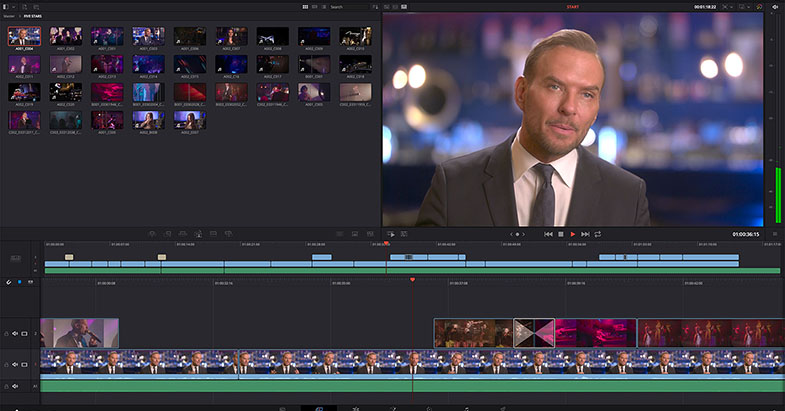
Grass Valley EDIUS 9.40 will be released in May 2019, at the NAB Show 2019 a preview version is shown. The update is free for all EDIUS 9 users, and features: