
 CZ
CZ SK
SK HU
HU AT
AT DE
DE ES
ES SI
SI HR
HR
Nothing in the basket.

- Search
-
Login

-
0
Comparison
Add products to compare, then they will appear here and you can compare parameters.
-
0
0 €
Blog
This update adds support for start/stop record trigger via SDI for backup recording to external devices and ProRes 444 to URSA Mini 4K, as well as optimizing camera performance at start up in very cold temperatures. Also adds B4 lens control support for analog zoom servos on URSA Mini 4K PL, and performance improvements and enhancements for Blackmagic URSA Viewfinder.
What's new in Blackmagic Camera Setup 3.1
New support for URSA Mini 4.6K
New support for Micro Cinema Camera
Blackmagic URSA Mini 4K
Adds B4 lens control support for analog zoom servos on Blackmagic URSA Mini 4K PL
Adds ProRes 444 codec support
Adds Camera start stop record trigger via SDI for backup recording to external devices
Optimized camera performance when starting in cold temperatures
Blackmagic URSA Viewfinder
Performance improvements and enhancements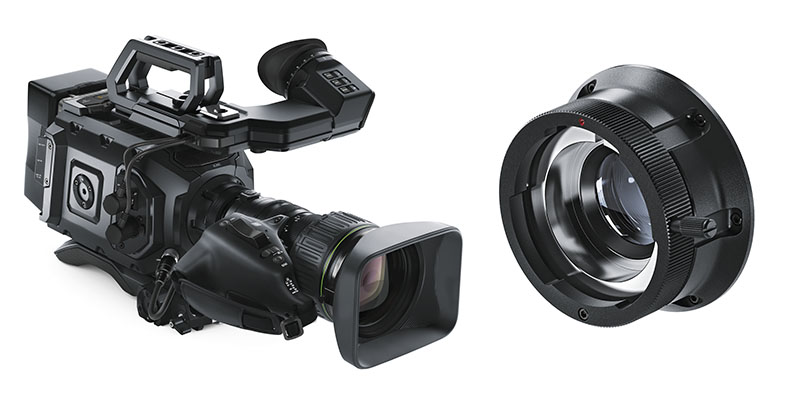
Date: 29. 03. 2016,
Category: News
FULL ARTICLE
Press Release
Blackmagic Design announced that Micro Studio Camera 4K and Video Assist were used for live video feeds and video introductions on Sir Elton John’s “All the Hits” world tour. Blackmagic Design Teranex Mini, UltraStudio Express and DaVinci Resolve Studio were also used for concert production on the tour.
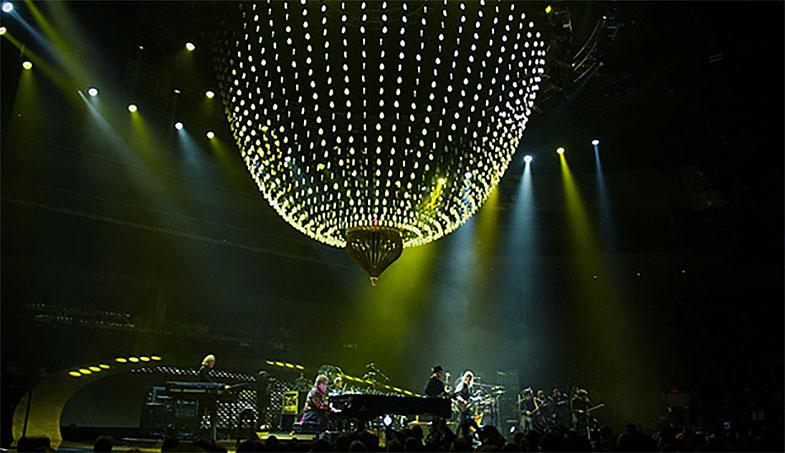
With a career spanning almost 50 years, award winning music legend Elton John is one of the world’s top selling artists of all time. His “All the Hits” tour, which spanned North America, Europe and Oceania for much of 2015, featured performances of hits like “Tiny Dancer” and “Your Song,” as well as iconic songs like “Candle in the Wind” and “Bennie and the Jets” from his highly acclaimed album Goodbye Yellow Brick Road, which recently celebrated its 40th anniversary.
The video team behind the tour included Video Director John Steer, Drum and Percussion Technician Chris Sobchack and Automation, LED and Programming Technician Lars Kristiansen. John initially chose to use the Micro Studio Camera 4K and Video Assist to help facilitate an electronic press kit and impromptu video messages from Elton to help promote the tour, but the products ended up helping him with so much more.
“I used the Micro Studio Camera 4K as a POV camera to give me more live shots and angles, hence greater video coverage of each show,” said John. “The Video Assist helped me check lines to see if I was getting the correct signal and frequency into our media server. Or I’d use it at the end of a long cable run or to see if a bit of kit was operating correctly. I also used it as a recorder and was able to get ISO recordings.”
He continued, “The Micro Studio Camera 4K is so small and versatile. It’s amazing how much you can push the camera protocols without it being detrimental to the image. I also like the fact that it has interchangeable batteries and that it is so easy to dial in the color temperature and choose what codec you want to record in. The onboard microphone is also very good. And what can I say about the Video Assist, except that it is so versatile and light, you can use it anywhere and anyhow. We toured throughout the Far East, Australia and New Zealand, with shows in seven countries, so it was a Godsend during the show set up.”
The tour’s stage setup also featured an impressive 40 foot computer controlled LED chandelier running a combination video presentation on the custom designed LED video wall that curved up the back of the stage floor. The chandelier was the focal centerpiece of the set, changing formation throughout the show, in sync with the songs being played and their respective lighting schemes. Lars Kristiansen used an UltraStudio Express and two Teranex Mini HDMI to 12G-SDI models with Smart Panels to receive inputs from the cameras and send SDI feeds from the media server out to the video wall and the chandelier.
“The dual output of SDI on the Teranex Mini was very helpful as it allowed me to send the signal to both the video screen and the chandelier simultaneously, and it eliminated the potential need for an SDI distribution amplifier,” said Lars. “The Teranex Minis have also been very reliable and user friendly. The Smart Panel on the front of each unit includes a color display and user controls so we could quickly monitor video and make sure that a signal was received, as well as change settings right from the front of the converter. On top of everything else, they are also very portable, making it easy for us to transport them from country to country.”
For any video on the tour that required post production work, such as video introductions for the openers or messages from Elton to the audience, Chris Sobchack turned to DaVinci Resolve Studio.
“DaVinci Resolve Studio is like the can opener of all editing programs,” Chris said. “I used it to help re edit, resize and recodec bits of our production video content. It has been amazing when we need to do a high quality, quickly produced video introduction or testimonial that must be shot under less than ideal situations. Resolve’s color correction suite is nothing short of miraculous. Because of the intelligent controls and user friendly layout, I was able to do all of this in one program, in less than 10 minutes, in a crowded production office, in a press box on a 15” MacBook Pro, and that is pretty amazing.”
Press Photography
Product photos of Blackmagic Micro Studio Camera 4K, Video Assist, DaVinci Resolve Studio, Teranex Mini, UltraStudio Express and all other Blackmagic Design products are available at www.blackmagicdesign.com/press/images.
About Blackmagic Design
Blackmagic Design creates the world’s highest quality video editing products, digital film cameras, color correctors, video converters, video monitoring, routers, live production switchers, disk recorders, waveform monitors and real time film scanners for the feature film, post production and television broadcast industries. Blackmagic Design’s DeckLink capture cards launched a revolution in quality and affordability in post production, while the company’s Emmy™ award winning DaVinci color correction products have dominated the television and film industry since 1984. Blackmagic Design continues ground breaking innovations including 6G-SDI and 12G-SDI products and stereoscopic 3D and Ultra HD workflows. Founded by world leading post production editors and engineers, Blackmagic Design has offices in the USA, UK, Japan, Singapore and Australia. For more information, please go to www.blackmagicdesign.com.
Date: 29. 03. 2016,
Category: News
FULL ARTICLE
Press Release
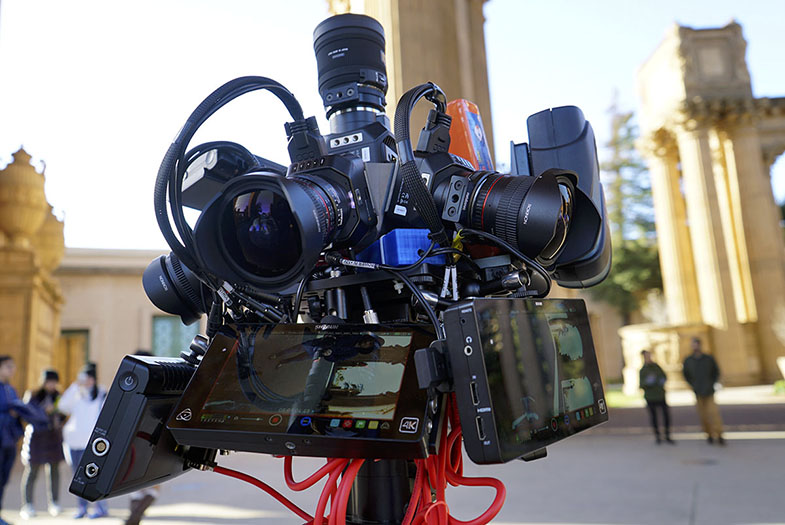
Blackmagic Design announced that three Micro Cinema Cameras were used to shoot live 360 video on the 2016 Oscars red carpet. Alx Klive, founder and CEO of San Francisco-based 360 Designs, used the Micro Cinema Cameras as part of the new Mini EYE 3 compact camera rig to create a captivating virtual reality experience, immersing viewers in the glitz and glamour of the Hollywood red carpet.
“For the Oscars, our main priority was to provide a live 360 video feed, which meant live stitching the output of the cameras into a VR-capable stream. We used a compact three-camera rig, designed primarily for live VR use, with the Micro Cinema Cameras,” explained Alx. “The Micro Cinema Cameras’ wide dynamic range was particularly helpful in the Oscars press gantry, as there were many press lights in view, which couldn’t be hidden from view with a 360 camera.”
The three-camera rig had a central genlock and power control box, and Alx and his team ran SDI via a converter to a stitching station several feet away. From there, the stitched 360 video was sent several hundred feet over SDI to a satellite truck and beamed to a facility in New York. Once there, it was encoded and uploaded to three different content delivery networks before being distributed to multiple test players, including a live player on the AP website, YouTube and several smartphone apps.
“We recorded internally to ProRes on SD cards, and it was reliable, even over several hours of recording,” said Alx. “We have also been post producing and stitching the footage into a higher quality archival output. This involves using stitching software, as well as Blackmagic’s Fusion Studio for stitching, which is showing promising results.”
360 Designs invents, designs and manufactures high-end, professional 360 cameras and live streaming solutions for virtual reality. The company had been looking for a compact, professional camera to build VR rigs around for several years. “Our needs included a compact form factor, genlock, active cooling, excellent reliability, remote control capability, interchangeable lenses, good mounting options and cinematic grade picture quality,” noted Alx. “We’d experimented with other small form factor and action cameras in the past, but could not get past their reliability issues, which are multiplied when you have many cameras in a 360 rig. Reliability is critical for us for professional use. The Blackmagic Micro Cinema Cameras ticked all the boxes, and we’ve been very happy with the results.”
One of the most exciting things for Alx and his team has been the Micro Cinema Camera’s expansion port, which allows creative technical use of the camera. “We’d been working with this connector for many months and are using a number of its features to design ‘command and control' options for the cameras,” said Alx. “With the products we have in late stage development, we are able to start and stop multiple cameras at once, control the white balance, ISO and other settings of the cameras in the rig, as well as provide remote live video monitoring, among other things. This is unprecedented in a 360 rig, and we’re very excited about what it means for DPs and anyone shooting professional 360 video.”
Alx noted that prior to using Blackmagic Micro Cinema Cameras, the options for creating VR rigs were limited. “With the Micro Cinema Camera, and even the Micro Studio Camera 4K, we are able to offer a new option: excellent picture quality in a convenient form factor. For many in the fashion, broadcast, sports, cinematic and commercial sectors, this is an ideal sweet spot. Our customers are really happy, and we’re super excited where the 360 industry is heading.”
He concluded, “The reaction to live 360 streaming itself has been immense. It’s still very early days, but essentially for us, live 360 streaming represents a kind of teleportation. In a few years it will seem trivial to virtually attend any event or happening, wherever it is in the world. The opportunities to live 360 stream sports, concerts and other live events is significant.”
Press Photography
Product photos of Blackmagic Micro Cinema Camera, Micro Studio Camera 4K, Fusion Studio and all other Blackmagic Design products are available at
www.blackmagicdesign.com/press/images
.
About Blackmagic Design
Blackmagic Design creates the world’s highest quality video editing products, digital film cameras, color correctors, video converters, video monitoring, routers, live production switchers, disk recorders, waveform monitors and real time film scanners for the feature film, post production and television broadcast industries. Blackmagic Design’s DeckLink capture cards launched a revolution in quality and affordability in post production, while the company’s Emmy™ award winning DaVinci color correction products have dominated the television and film industry since 1984. Blackmagic Design continues ground breaking innovations including 6G-SDI and 12G-SDI products and stereoscopic 3D and Ultra HD workflows. Founded by world leading post production editors and engineers, Blackmagic Design has offices in the USA, UK, Japan, Singapore and Australia. For more information, please go to www.blackmagicdesign.com.
Date: 24. 03. 2016,
Category: News
FULL ARTICLE
Press Release
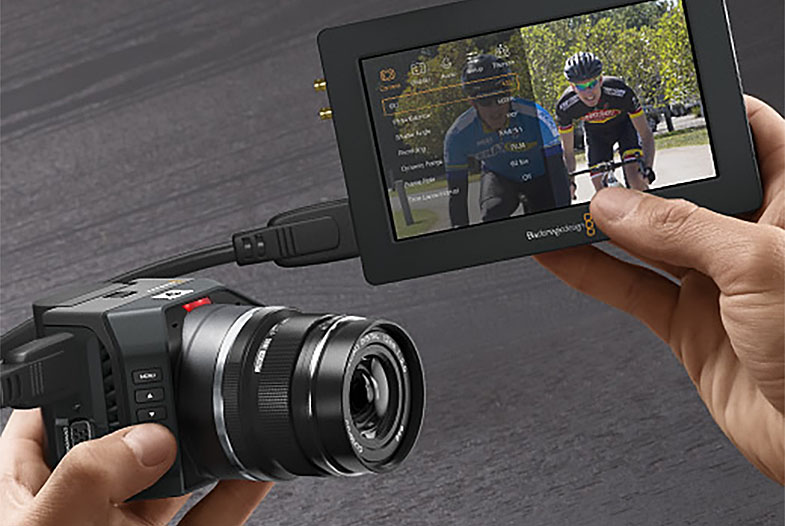
Blackmagic Design announced that nine Micro Studio Camera 4Ks and nine Video Assists were used to shoot high-end fashion brand Chromat’s Fall/Winter 2016 runway show at New York Fashion Week. Working alongside Director Winslow Porter, Josh and Jason Diamond, for their VR company SUPERSPHERE, used the Micro Studio Camera 4Ks and Video Assists as part of their 360Design “Diamond EYE” rig to capture 360-degree shots of the models walking down the runway.
The VR rig was situated at the top of the U-shaped runway to capture the best possible viewpoint and main view of the runway. “We shot from the press area, so viewers not only feel like they are sitting at the fashion show, but also get the immersive experience of being embedded among the press and paparazzi,” explained Josh, who was a producer on the project.
The collection was inspired by light and luminescence, and the show switched between bright lighting and complete darkness, during which the models were illuminated by garments lined with bright neon lights. Jason, who was the VR camera supervisor on the shoot, explained, “The show featured complete darkness with flashes of neon light from the clothing, all the way up to bright lighting. We couldn’t adjust the camera settings or iris on the fly, so we needed a camera that could capture it all and handle the wide range of lighting.”
He continued, “The Micro Studio Camera 4K’s dynamic range was essential to capturing the large variance between dark and light in the same shots. We shot in ProRes, 10-bit, 60 fps and at 1080p to get the most information possible out of the cameras’ sensors. Some of the more desired components to shooting VR include larger sensors and dynamic range, production-ready file formats, high frame rates and the ability to use high-quality lenses all in a very small form factor so you can place the cameras close together. The Micro Studio Camera 4K hits all the marks and more. You get the highest image quality, SDI and HDMI connections, the ability to record to the Video Assist at ProRes HQ 1080p, 60 fps; it’s a big deal.”
The “Diamond EYE” rig features a custom central mounting point, and all the Micro Studio Camera 4Ks were connected to it and calibrated for the final stitched frame. Each of the nine Micro Studio Camera 4Ks were connected via SDI to its own Video Assist, mounted to the cameras on tiny ball heads so they could be rotated. Two custom Switronix battery plates, each with nine 12v connectors from XLR cables, along with Switronix Gold Mount Batteries, were used to power the cameras and Video Assists.
Josh noted how the Video Assist’s flexibility proved useful for the shoot. “They are small, lightweight, touchscreen, have solid mounting points and record ProRes to SD cards, all of which makes our workflow easy and streamlined,” he said.
Jason concluded, “The Micro Studio Camera 4K’s breakout cable and the fact that Blackmagic Design is open with the protocol really increases flexibility as well. I was able to reroute power and genlock away from the base of the rig for better organization, and I didn’t have to worry about forcing too much stress on one thing or running too many cables on the rig. You can pretty much make whatever cable you want to suit your needs.”
The virtual reality experience is now airing on Littlstar, a global VR cinema network dedicated to immersive 360-degree video and photos. To view the video, please visit: http://littlstar.com/videos/b737641c
Press Photography
Product photos of Blackmagic Micro Studio Camera 4K, Video Assist and all other Blackmagic Design products are available at www.blackmagicdesign.com/press/images.
About Blackmagic Design
Blackmagic Design creates the world’s highest quality video editing products, digital film cameras, color correctors, video converters, video monitoring, routers, live production switchers, disk recorders, waveform monitors and real time film scanners for the feature film, post production and television broadcast industries. Blackmagic Design’s DeckLink capture cards launched a revolution in quality and affordability in post production, while the company’s Emmy™ award winning DaVinci color correction products have dominated the television and film industry since 1984. Blackmagic Design continues ground breaking innovations including 6G-SDI and 12G-SDI products and stereoscopic 3D and Ultra HD workflows. Founded by world leading post production editors and engineers, Blackmagic Design has offices in the USA, UK, Japan, Singapore and Australia. For more information, please go to www.blackmagicdesign.com.
Date: 23. 03. 2016,
Category: News
FULL ARTICLE
New Blackmagic Camera 3.0 software update adds support for the new Blackmagic Micro Cinema Camera and Blackmagic URSA Mini 4.6K models, as well as providing support for the URSA Viewfinder. Users also need to update to DaVinci Resolve 12.3.1 for support for these cameras. DaVinci Resolve 12.3.2 Studio update adds support for Blackmagic 4.6K film color science used in the new Blackmagic URSA Mini 4.6K camera. RAW clips from this camera now default to BMD Film color space and gamma, and improvements have been made to the Rec. 709 conversion of this footage.
What's new in DaVinci Resolve 12.3.2
Support for Blackmagic 4.6K Film color science
Blackmagic camera RAW clips now default to BMD Film for color space and gamma
Additional BMD Video gamma option in the camera raw controls for 4.6K DNG clips
New Blackmagic 4.6K Film to video and Rec.709 LUTs
Ability to optionally add source clip frame count to individual clip renders
General performance and stability improvements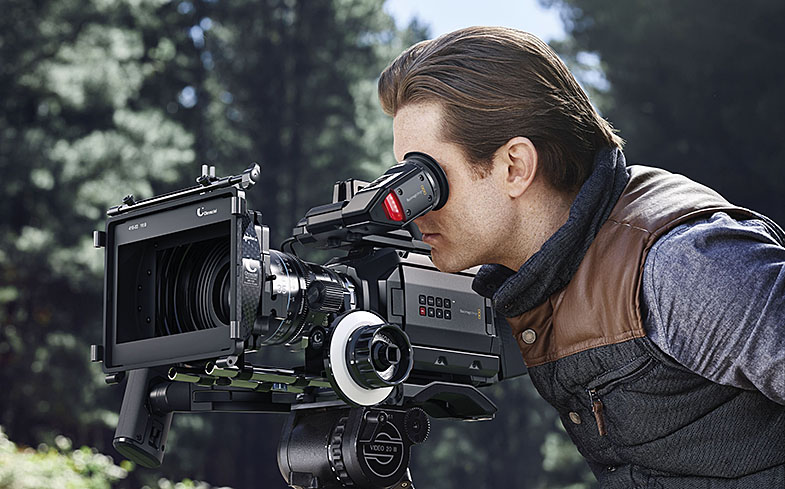
Date: 22. 03. 2016,
Category: News
FULL ARTICLE