
 CZ
CZ SK
SK HU
HU AT
AT DE
DE ES
ES SI
SI HR
HR
Nothing in the basket.

- Search
-
Login

-
0
Comparison
Add products to compare, then they will appear here and you can compare parameters.
-
0
0 €
Blog
The SmallHD OS3 update has something to offer for every filmmaker! This free downloadable update comes with a host of new features for all current SmallHD on-camera and production monitors (FOCUS, 500 Series, 700 Series, UltraBrights, 1300 Series, 1700 Series, 2400 Series, and 3200 Series):
Auto-Calibration
Using the official SmallHD color probe, auto-calibration can be initiated simply by attaching the probe to the monitor via USB and letting the monitor do its thing. Watch our Auto-Calibration How-To Video (this feature is not available for the 701 and 702 Lite monitors)
Customizeable False Color (Exposure Assist)
Creating a visual, data-driven exposure tool has never been this customizable. Create up to 10 different IRE ranges, with custom color assignments, and start using False Color exactly how you want to.
Spot Metering in LUMA Waveform
Adding to SmallHD’s customizable Waveform tool is the ability to highlight and monitor critical areas of your image. Using a spot meter box with an adjustable size, the targeted area’s data becomes easy to see on the Waveform.
Image Gallery Viewer
Screen captures and images loaded onto SmallHD monitors via SD card can now be accessed in an image gallery. Quickly glance at dozens of frame grabs from a day of shooting, and do so without being connected to your camera.
Adjustable White Point
We’ve added support for the following white points for the desired input space and monitor calibration: D65, DCI-P3, 3000K, 5000K, 5600K, 9300K.
SmallHD FOCUS now accepts 4K30
The SmallHD FOCUS monitor will now accept video signals up to 4K30 via HDMI. Shooters will see an improvement in image quality while shooting in 4K and using the Zoom feature to magnify their image.
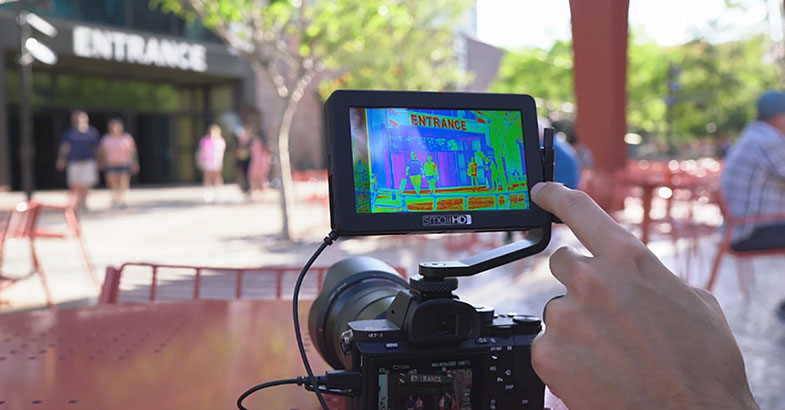
How to update a SmallHD Monitor
- 1. Download the latest Firmware Package (3.1.2)
- 2. Extract the .zip file and drag and drop the .bin file onto an SD card (must be 16gb or smaller – FAT or FAT32 for Windows, MS-DOS (FAT) for Mac)
- 3. Remove SD Card from computer or card reader attached to computer
- 4. Insert SD card into your SmallHD monitor
- 5. Turn on the monitor and navigate to the monitor’s Settings Menu
- 6. Scroll to the bottom of the settings list to the “Firmware” Item, located in the “System” section. Your Firmware section should display “Upgrade To Firmware 3.1.2.” Select this option and follow the on-screen instructions.
- 7. Once the firmware is installed and the on-screen prompts tell you to reboot your monitor – hold down the power button for at least 5 seconds and then release.
- 8. Press the power button again to begin operating your monitor with the new firmware installed.
Date: 22. 11. 2017,
Category: News
FULL ARTICLE
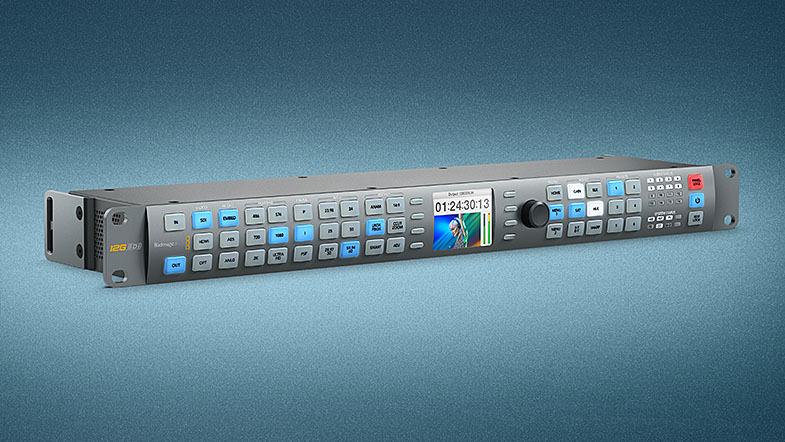
This update includes new features for all Blackmagic Design's Teranex standards converters such as updated input information on the LCD, remote lock and panel locking via the Teranex Setup application. New features for Teranex AV include options for low latency frame rate conversions, horizontal motion on test patterns, HDMI YUV/RGB output selection, HDMI output conversions for PsF and 2K formats, variable transition times between input, black, still and freeze frames, and more. Teranex AV and Teranex Express updated features include audio meters, 3G-SDI level indication on the LCD and test tone levels set to -20dB(FS).
What's new in Teranex Utility 6.1
Updates for the Teranex AV including:
- Reduced latency for frame rate conversions in Lowest Latency mode
- Horizontal motion for Test Pattern Generator
- Variable transition times for Output Options
- Capture a Still from Freeze
- Transfer of Stills to/from computer via Setup Utility
- HDMI outputs progressive for PsF output formats
- HDMI Output Color Space selection
- Improved accuracy and graphic for audio meters (Express as well)
Updates across all Teranex 1RU rack converters include:
- Enabled REM lock button on Front Panel
- Panel Lock via the Setup Utility Application
Date: 21. 11. 2017,
Category: News
FULL ARTICLE
Press Release
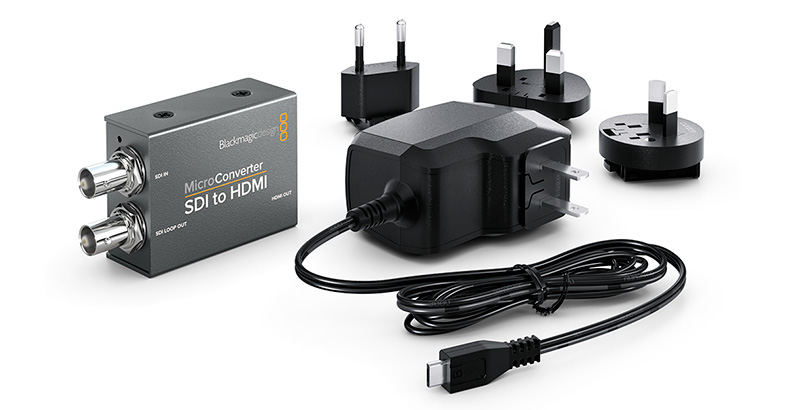
Blackmagic Design announced new lower cost USB powered micro converters, repacked without the power supply so customers can use the power supplies they already own. The new repackaged, incredibly small, Micro Converter HDMI to SDI is available now from Blackmagic Design resellers for only US$39, and the Micro Converter SDI to HDMI is also now available for only US$45.
The existing models, which include the micro converter and an AC power supply, have also been reduced in price. The Micro Converter HDMI to SDI wPSU can now be purchased for US$55, and Micro Converter SDI to HDMI wPSU can now be purchased for US$59.
The Micro Converter SDI to HDMI converts signals from professional broadcast equipment such as cameras, decks, switchers and routers, and converts it into HDMI so customers can monitor video using big screen televisions and projectors. The Micro Converter HDMI to SDI model lets customers connect their HDMI equipment, such as laptop computers, gaming consoles and consumer video cameras, to professional broadcast equipment.
Both models are USB powered and feature the same micro USB connection that’s used on smartphones. This means customers can power the converters from devices with a USB port, such as laptop computers, big screen televisions, or even a smartphone charger. An optional 110 to 240V AC power adapter is available separately and includes 4 different AC socket adapters so customers can plug them into outlets anywhere in the world.
Blackmagic Micro Converters feature full size HDMI and professional 3G-SDI connections for working with all SD and HD formats up to 1080p60. Unlike other small video converters, Blackmagic Micro Converters feature the highest quality broadcast technology, miniaturized into a proper metal enclosure. Customers get the same broadcast quality 10-bit video processing found in full size converters. In addition, Blackmagic Micro Converters also have SDI re-clocking on the 3G-SDI input which regenerates the SDI video input, reduces SDI jitter and improves SDI eye pattern before the signal is processed. This allows longer cable lengths and makes them incredibly reliable for use in professional broadcast.
Blackmagic Micro Converters are part of a large family of professional broadcast converters that include even more advanced models with a massively increased range of features. This range includes 3G, 6G and 12G-SDI models that are compatible with SD, HD and Ultra HD all the way up to high frame rate 2160p60. Blackmagic Mini Converters and Teranex Mini converters feature support for a wide range of connections such as balanced analog and AES/EBU audio, redundant inputs, analog video, optical fiber and more.
Press Photography
Product photos of all Blackmagic Design products, are available at www.blackmagicdesign.com/press/images.
About Blackmagic Design
Blackmagic Design creates the world’s highest quality video editing products, digital film cameras, color correctors, video converters, video monitoring, routers, live production switchers, disk recorders, waveform monitors and real time film scanners for the feature film, post production and television broadcast industries. Blackmagic Design’s DeckLink capture cards launched a revolution in quality and affordability in post production, while the company’s Emmy™ award winning DaVinci color correction products have dominated the television and film industry since 1984. Blackmagic Design continues ground breaking innovations including 6G-SDI and 12G-SDI products and stereoscopic 3D and Ultra HD workflows. Founded by world leading post production editors and engineers, Blackmagic Design has offices in the USA, UK, Japan, Singapore and Australia. For more information, please go to www.blackmagicdesign.com.
Date: 20. 11. 2017,
Category: News
FULL ARTICLE
Press Release
Blackmagic Design announced new broadcast quality 6G‑SDI mini converters for converting SDI to HDMI and HDMI to SDI. These new models include more advanced features and new lower prices than the previous 3G‑SDI and 4K models that they replace. Mini Converter HDMI to SDI 6G is available now from Blackmagic Design resellers worldwide for US$145, and Mini Converter SDI to HDMI 6G is also available for US$185.
The Mini Converter SDI to HDMI 6G and Mini Converter HDMI to SDI 6G models make it possible to convert SDI to HDMI or HDMI to SDI in all formats up to 2160p30. Both models feature professional multi rate 6G‑SDI and are compatible with all existing SDI broadcast equipment. They also feature HDMI along with analog and AES/EBU audio inputs or outputs, depending on the model.
The SDI to HDMI 6G model also includes HDMI instant lock and 33 point 3D LUT support, which are new advanced features that were not available in previous models.
HDMI televisions and projectors can take a long time to lock onto a signal when a new source is connected. To solve this problem, Mini Converter SDI to HDMI 6G features HDMI Instant Lock which continuously sends an active HDMI signal to the display. That means customers get glitch free clean switching when changing to sources that are the same format and frame rate as the previous signal.
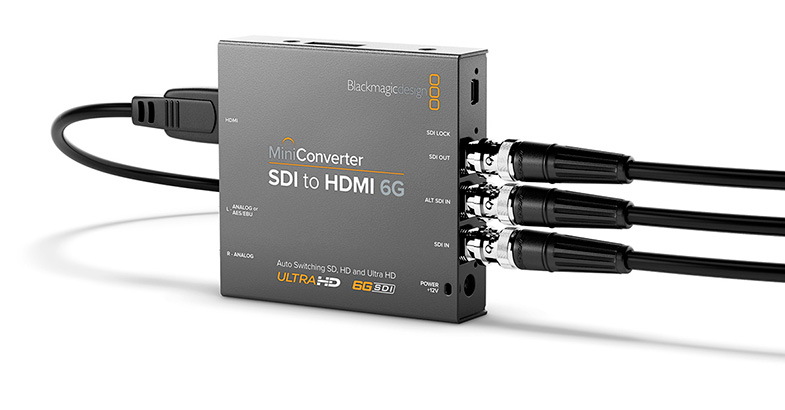
For example, customers can connect Mini Converter SDI to HDMI 6G to the output of a video router and monitor signals on a big screen HDMI television. When the router output changes, the HDMI television will instantly lock to the new signal without having to resynchronize.
Mini Converter SDI to HDMI 6G also includes a full 33 point 3D lookup table for extremely high precision, feature film quality color conversions. That means LUTs can be applied to create custom looks, color and gamma changes in realtime while monitoring on set. This also means that customers can use Mini Converter SDI to HDMI 6G as a 3D LUT processor. 3D LUTs are also compatible with DaVinci Resolve, so customers can use the same LUTs on set and in post for consistent color.
For audio, the Mini Converter SDI to HDMI 6G model can de‑embed audio from SDI to HDMI, AES/EBU or balanced audio out. The HDMI to SDI 6G model can embed incoming audio signals into the SDI output from the HDMI, balanced analog or digital AES/EBU audio inputs.
Blackmagic Mini Converters are part of a large family of professional broadcast converters that include incredibly affordable Micro Converters as well as advanced models with a massively increased range of features. This range includes 3G, 6G and 12G‑SDI models that are compatible with SD, HD and Ultra HD all the way up to high frame rate 2160p60. Blackmagic Mini Converters and Teranex Mini converters feature support for a wide range of connections such as balanced analog and AES/EBU audio, redundant inputs, analog video, optical fiber and more.

Press Photography
Product photos of all Blackmagic Design products, are available at www.blackmagicdesign.com/press/images.
About Blackmagic Design
Blackmagic Design creates the world’s highest quality video editing products, digital film cameras, color correctors, video converters, video monitoring, routers, live production switchers, disk recorders, waveform monitors and real time film scanners for the feature film, post production and television broadcast industries. Blackmagic Design’s DeckLink capture cards launched a revolution in quality and affordability in post production, while the company’s Emmy™ award winning DaVinci color correction products have dominated the television and film industry since 1984. Blackmagic Design continues ground breaking innovations including 6G-SDI and 12G-SDI products and stereoscopic 3D and Ultra HD workflows. Founded by world leading post production editors and engineers, Blackmagic Design has offices in the USA, UK, Japan, Singapore and Australia. For more information, please go to www.blackmagicdesign.com.
Date: 20. 11. 2017,
Category: News
FULL ARTICLE
Press Release
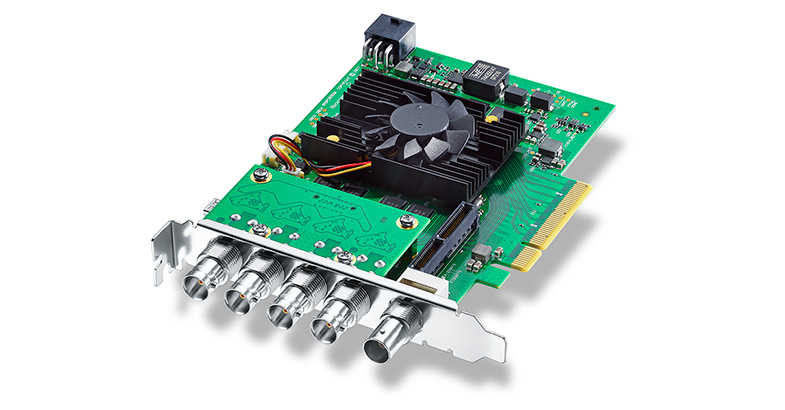
Blackmagic Design announced DeckLink 8K Pro, a new high performance capture and playback card featuring quad link 12G‑SDI to allow real time high resolution 8K workflows. This new DeckLink 8K Pro breaks new ground in high quality as it supports all film and video formats from SD all the way up to 8K DCI, 12‑bit RGB 4:4:4, plus it also handles advanced color spaces such as Rec. 2020 for deeper color and higher dynamic range. DeckLink 8K also handles a massive 64 channels of audio, stereoscopic 3D, high frame rates and more.
DeckLink 8K Pro will be available in early January for 555 EUR ex. VAT. In addition, Blackmagic Design has also announced a new low price of 765 EUR ex. VAT for DeckLink 4K Extreme 12G.
DeckLink 8K Pro is the ultimate digital cinema capture and playback card. Featuring four quad link multi rate 12G‑SDI connections, DeckLink 8K Pro can work in all SD, HD, Ultra HD, 4K, 8K and 8K DCI formats and is compatible with all existing professional SDI equipment. The 12G‑SDI connections are also bi-directional so they can be used to either capture or playback quad link 8K, or for the simultaneous capture and playback of single or dual link SDI sources.
When it comes to quality, DeckLink 8K Pro is better than any other solution because it lets customers work with both more pixels than ever before and better pixels than ever before. The 8K images have 16 times more pixels than a regular 1080 HD image, which lets you reframe or scale shots with incredible fidelity and precision. DeckLink 8K Pro also works in 12‑bit RGB 4:4:4 as well as Rec. 2020, which is a massive color space designed for high dynamic range Ultra HD and digital cinema work in 4K and 8K.
The combination of higher resolution, a vastly larger color space and incredible dynamic range means that DeckLink 8K Pro delivers the sharpest and most vivid images customers have ever seen for editing, color and high end visual effects work.
DeckLink 8K Pro supports capture and playback of 8 or 10-bit YUV 4:2:2 video and 10 or 12‑bit RGB 4:4:4. Video can be captured as uncompressed or to industry standard broadcast quality ProRes and DNx files. DeckLink 8K Pro lets customers work at up to 60 frames per second in 8K and supports stereoscopic 3D for all modes up to 4K DCI at 60 frames per second in 12‑bit RGB.
The advanced broadcast technology in DeckLink 8K Pro is built into an easy to install 8 lane generation 3 PCI Express for Mac, Windows, and Linux workstations. Customers get support for all legacy SD and HD formats, along with Ultra HD, DCI 4K, 8K and DCI 8K, as well as Rec. 601, 709 and 2020 color.
DeckLink 8K Pro is designed to work seamlessly with the upcoming DaVinci Resolve 14.2 Studio for an incredibly seamless editing, color and audio post production workflow that lets you master full resolution high dynamic range projects in full 8K resolution. In addition, DeckLink 8K Pro also works with other professional applications such as Final Cut Pro X, Media Composer, Premiere Pro, After Effects, ProTools, Nuke and more. There’s even a free software development kit so customers and OEMs can build their own custom solutions.
Press Photography
Product photos of all Blackmagic Design products, are available at www.blackmagicdesign.com/press/images.
About Blackmagic Design
Blackmagic Design creates the world’s highest quality video editing products, digital film cameras, color correctors, video converters, video monitoring, routers, live production switchers, disk recorders, waveform monitors and real time film scanners for the feature film, post production and television broadcast industries. Blackmagic Design’s DeckLink capture cards launched a revolution in quality and affordability in post production, while the company’s Emmy™ award winning DaVinci color correction products have dominated the television and film industry since 1984. Blackmagic Design continues ground breaking innovations including 6G-SDI and 12G-SDI products and stereoscopic 3D and Ultra HD workflows. Founded by world leading post production editors and engineers, Blackmagic Design has offices in the USA, UK, Japan, Singapore and Australia. For more information, please go to www.blackmagicdesign.com.
Date: 17. 11. 2017,
Category: News
FULL ARTICLE