
 CZ
CZ SK
SK HU
HU AT
AT DE
DE ES
ES SI
SI HR
HR
Nothing in the basket.

- Search
-
Login

-
0
Comparison
Add products to compare, then they will appear here and you can compare parameters.
-
0
0 €
Blog
Blackmagic Design: Windows Thunderbolt, PCI Express, and USB 3.0 System Requirements (1/2018)
In addition to the hardware and software required below, it is recommended the PCs have an absolute minimum of 4GB of memory, an accelerated graphics card, and a CPU that meets or exceeds the system requirements of the software application you are planning on using. Apple QuickTime needs to be installed for some applications to function with a Blackmagic capture card.
Supported Operating Systems
Blackmagic Design Thunderbolt devices are compatible with:
Windows 7 64bit
Windows 8 64bit
Windows 10 64 bit
The following laptops are compatible with Blackmagic Design Thunderbolt devices:
DELL – Precision 7720
DELL – Precision 7520
DELL – XPS
The following Intel NUC is compatible with Blackmagic Design Thunderbolt devices:
Intel Nuc – NUC7i7BNH
Supported Hardware
The following motherboards are compatible with Blackmagic Design Thunderbolt devices:
ASRock Z87 Extreme 4
ASRock Z87 Extreme4/TB4
ASRock Z87 Extreme11/ac
Asus Z87-Expert
Asus Z87 Deluxe/Quad
Gigabyte GA-Z87X-UD7 TH
Gigabyte Z77MX-D3H TH
Gigabyte Z77X-UP4 TH
Gigabyte Z77X-UP5 TH
Gigabyte Z97X-UD7 TH
*Gigabyte Z270X-UD3 with TB3 card
MSI Z77A-G45 Thunderbolt
SuperMicro X10SAT
SuperMicro C7Z87-OCE (Legacy)
Windows PCI Express System Requirements
Operating Systems
Blackmagic Design Capture cards are compatible with the following Windows-based operating systems:
Windows 7 64 bit
Windows 8 64 bit
Windows 10 64 bit
Certified PC Workstations
The following workstations are certified for use with DeckLink and Intensity capture cards:
Dell Precision 7910
Dell T7610
Hewlett Packard Z420
Hewlett Packard Z440
Hewlett Packard Z620
Hewlett Packard Z640
Hewlett Packard Z820
Hewlett Packard Z840
*Precision 7920 Tower
*Precision 7920 Rack (not recommended for DeckLink Quad card)
Hewlett Packard XW8600 (Legacy, not recommended for DeckLink PCI or PCI-X cards)
Hewlett Packard XW9300 (Legacy)
Hewlett Packard Z400 (Legacy)
Hewlett Packard Z600 (Legacy)
Hewlett Packard Z800 (Legacy)
Recommended Motherboards
The following motherboards are recommended for use with DeckLink, Multibridge and Intensity capture cards:
*ASRock H270M-ITX/ac
ASRock Z87 Extreme 6
ASRock Z87 Extreme11/ac
ASRock Z87 Extreme4/TB4
ASRock Z87 Extreme4 (not recommended for DeckLink Studio 4K)
ASRock Z87E-ITX
Asus Z87 Deluxe/Quad
Asus Z87-Expert
Asus Z87-Gryphon
Asus Z87-A
Asus Z87-PLUS
Asus Z87-PRO
Gigabyte H81-D3
Gigabyte GA-H87M-D3H (not recommended for DeckLink Duo)
Gigabyte Q87M-D2H
Gigabyte X170 Extreme ECC
Gigabyte X99-UD4-CF
Gigabyte Z68X-UD3H-B3
Gigabyte Z77MX-D3H TH
Gigabyte Z77X-UP4 TH
Gigabyte Z77X-UP5 TH
Gigabyte Z87X-UD4H
Gigabyte GA-Z87X-UD7 TH
Gigabyte Z97-UD5H
Gigabyte Z97-WIFI
Gigabyte Z97X-UD7 TH
Gigabyte Z170X GAMING 5
*Gigabyte Z270X-UD3
MSI Z77A-G45 Thunderbolt
SuperMicro C7H170-M
SuperMicro C7X99-OCE
*SuperMicro C7X99-OCE - F
SuperMicro C7Z170-SQ
SuperMicro C7Z87-OCE
SuperMicro C7Z97-OCE (not recommended for DeckLink Studio 2)
SuperMicro X10SAT (not recommended for DeckLink Studio 4K)
SuperMicro X10SLV (not recommended with DeckLink SDI)
SuperMicro X10SLV-Q (not recommended with DeckLink SDI)
The following motherboards have been discontinued but are known to work in legacy configuration.
3DBoxx 4920
Asus P5B
Asus P5E
Asus P5Q Pro Turbo
Asus P6T
Asus P6X58D
Asus P6X58D-E WS
Asus P8P67 PRO (Rev 3.1)
Asus P9X79 WS
Gigabyte EP45-DS3
Gigabyte G1.Sniper (X58 chipset)
Gigabyte GA-P67A-UD7-B3 (rev. 1.0)
Gigabyte x48DQ6
Gigabyte X79-UD5
Intel D975XBX
Intel DX58SO
Supermicro C7Z97-M
XFX 790i Ultra
Windows USB 3.0 System Requirements
Operating Systems
Blackmagic Design USB 3.0 devices are compatible with the following Windows based operating systems:
Windows 7 64-bit
Windows 8 64-bit
Windows 10 64 bit
Certified PC Workstations
The following workstations are certified for use with UltraStudio Pro, UltraStudio SDI, Intensity Shuttle, ATEM 1 M/E, ATEM 2 M/E and Pocket UltraScope devices with USB 3.0 Expander cards:
Hewlett Packard Z420
Hewlett Packard Z620
Hewlett Packard Z820
Hewlett Packard Z400 - (discontinued)
Hewlett Packard Z600 - (discontinued)
Hewlett Packard Z800 - (discontinued)
Certified Notebook Computers
Notebooks certified for use with UltraStudio Pro, UltraStudio SDI and Intensity Shuttle.
MSI GE620 - (discontinued)
Presently there are no certified notebook computers for use with Pocket UltraScope. Testing is being conducted on several new notebook models and the results are expected soon. We will update this support note when we find new notebook models which can be reliably used with Pocket UltraScope. We advise against purchasing notebook computers for use with it until certification testing has been successfully completed.
The following notebook computers have not been verified by Blackmagic Design but have been reported by end-users as working with UltraStudio Pro, UltraStudio SDI, Intensity Shuttle, ATEM 1 M/E, and ATEM 2 M/E. Blackmagic Design cannot guarantee full compatibility.
Alienware M18x r2
ASUS G75VW
ASUS G74SX
ASUS G55VW
ASUS G53SW
ASUS K75
ASUS N56VZ
Lenovo P580-308725U
Lenovo W520
Lenovo T420
HP ProBook 4740S
Dell Precision M6600
Dell Precision M4600
MSI GT683 DXR
MSI FX720
MSI GS627 Core2 Quad Q9000
Acer 5755G i7-2670QM
Samsung RC512
Samsung SF411
Toshiba Satellite P775-S7215
Custom built - Clevo P170EM, HM77 Express Chipset, i7 Quad Core Mobile Processor, GeForce GTX 680M
Recommended Motherboards
The following motherboards have onboard USB 3.0 and have been tested to work with UltraStudio Pro, UltraStudio SDI, Intensity Shuttle, ATEM 1 M/E, ATEM 2 M/E, and Pocket UltraScope.
ASUS P6X58D-Premium
ASUS P6X58D-E
ASUS Crosshair IV Formula
Gigabyte GA-X58A-UD7
Gigabyte GA-X58A-UD5
Gigabyte G1.Sniper (rev. 1.0)
The following motherboards have not been verified by Blackmagic Design but have been reported by end-users as working with UltraStudio Pro, UltraStudio SDI, Intensity Shuttle, ATEM 1 M/E, ATEM 2 M/E, and Pocket UltraScope. Blackmagic Design cannot guarantee full compatibility.
ASUS P8Z77-M
ASUS P8Z77-V LK
ASUS P9X79
ASUS P6T Deluxe (with Renesas PCIe expansion card)
Intel DX58SO (with Renesas PCIe expansion card)
*) New.
Date: 12. 01. 2018,
Category: News
FULL ARTICLE
Upgrade your Panasonic camera with NewTek NDI HX. Compatible Cameras: AW-UE70 (requires firmware 1.38 or later), AW-HE40 (1.68+), AW-HE38 (1.68+). Imagine the possibilities of a camera that can serve as a live video input for any NDI-compatible hardware or software from anywhere on your network. Integrated and automatic tally support via NDI, motor-driven pan-tilt-zoom operation with preset positions, remote control over IP, remote capture and recording all via NewTek Studio Monitor.
Date: 12. 01. 2018,
Category: News
FULL ARTICLE
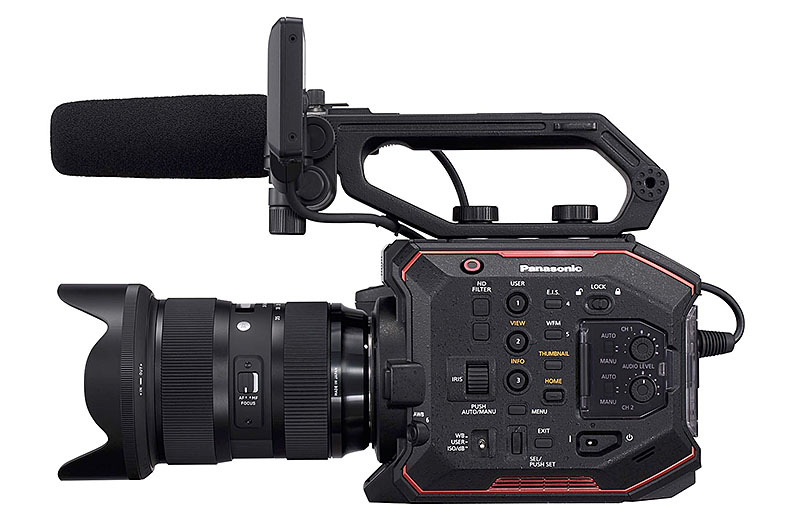
Panasonic released a new firmware update for its AU-EVA1 digital cinema camera. The updated contains several fixes for HDMI output, Focus Assist, or Wi-Fi communication. To install, copy the downloaded update file to an SD memory card, and follow the installation procedure.
Panasonic AU-EVA1 1.10 improvements
- When the HDMI output is connected to BT-LH1850 monitor and displayed on it, once the monitor’s input setting is switched to SDI, "No Signal" is shown and no image will be displayed any more even if the setting is put back to HDMI. This problem is fixed.
- Display of SENSOR TEMP at low temperatures is improved.
- Panning at high speed may cause ghosting. This problem is fixed.
- Focus Assists are not displayed on the SDI output destination when the LCD panel is disconnected. This problem is fixed.
- An image on the LCD is defective when Open Iris F. A. is enabled. This problem is fixed.
- Error in information superimposed on SDI (payload) at 24.00 Hz is corrected to 60.00.
- Even if the Wi-Fi setting is switched from INFRA to DIRECT, the display of IP address will not change. This problem is fixed.
- The camera cannot connect to Wi-Fi using D-Link DWA-171 (For Australian Market). This problem is fixed.
Date: 11. 01. 2018,
Category: News
FULL ARTICLE
Panasonic is proud to introduce the new hybrid Digital Single Lens Mirrorless Camera LUMIX GH5S with expanded video recording capability and enhanced image quality. Designed and developed for professional filmmakers, the LUMIX GH5S achieves highest-ever image sensitivity and video image quality in the history of LUMIX cameras, especially in low-light situations.
Packed with big features to satisfy demanding photographers and videographers alike The new 10.2-megapixel Digital MOS Sensor with Dual Native ISO Technology and Venus Engine 10 faithfully reproduce even dark parts of the image, allowing high ISO capture when the use of supplemental lighting may not be possible. This sensor is a multi-aspect type with a sufficient margin for realizing the same angle of view in 4:3,17:9,16:9 and 3:2 aspect ratios. The sensor also enables photo shooting in 14-bit RAW format, providing higher flexibility for professional RAW stills development workflows. When shooting in dark environments, videographers can now focus on filming that perfect shot as they no longer need to worry
about noise which often results from having to use higher ISOs. The Dual Native ISO Technology suppresses noise to produce cleaner footage when taken in all light. Both videographers and photographers can now enjoy the same diagonal field of view across all aspect ratios with the True “Multi-Aspect Ratio” Function. This feature means you can easily swap between difference aspect ratios giving you the accuracy you want from your lenses, and making the process easier while producing and editing in post-production. The LUMIX GH5S is compatible with Time Code IN and OUT, like the professional camcorders, which is easy to set using the flash sync terminal and bundled conversion cable for a standard BNC terminal. This is especially important for “lip synchronization” when using multiple cameras.
The LUMIX GH5S can be used as Time Code generator for other GH5S cameras and professional camcorders. The Time Code IN/OUT functionality makes a production teams job pain-free as it provides synchronization for both video and audio devices used on multi-cam productions.
The LUMIX GH5 achieved 4KUHD 60p video recording for the first time as a digital mirrorless camera in 2017.2The new LUMIX GH5S establishes a new milestone by realizing the world’s first 4K 60p video recording in Cinema 4K (4096x2160), 3 capable of internal4:2:2
10-bit video recording up to Cinema 4K30p and internal 4:2:0 8-bit Cinema 4K60p. This is a color subsampling commonly used for film production, for even more faithful color reproduction.4
The LUMIX GH5S also records 4:2:2 10-bit 400-Mbps All-Intra in 4K 30p/25p/24p and 200- Mbps All-Intra in Full-HD.
Continuing the LUMIX GH tradition, there is no time limit for both Full-HD and 4K video recording. The LUMIX GH5S complies with 4K HDR video with Hybrid Log Gamma (HLG) mode in Photo Style. A low-bit-rate recording mode, 4K HEVC for HLG, is available. This enables playback on AV equipment compatible with the HLG Display format, such as Panasonic 4K HDR TVs.
The VFR (Variable Frame Rate) function lets users record overcranked (time-lapse) and
undercranked (slo-mo) video in C4K/4K (60 fps, maximum 2.5x slower) and FHD (240 fps, maximum 10x slower). A V-LogL and Rec.709 LUT (Look Up Table) are pre-installed in the camera, so users can play videos recorded in V-LogL without having to separately purchase a Software Upgrade Key. Four additional LUTs can be installed using the Panasonic Varicam (.VLT) file format.
DFD (Depth From Defocus) technology and ultra-high-speed digital signal processing achieve fast auto focusing of approximately 0.07 sec 6 with 12 fps (AFS) / 8 fps (AFC) in 12- bit RAW and 10 (AFS) / 7 (AFC) fps in 14-bit RAW high-speed burst shooting. In addition to a total of 225 focus areas, The options for Face/Eye Recognition, Tracking AF, 1-area AF and Pinpoint AF are available for precise focusing. The 4K PHOTO enables 60 fps high-speed capture in approximately 8-megapixel equivalent resolution.
Achieve outstanding footage in any environment, especially in low light
As a camera that excels in shooting in low light, the LUMIX GH5S boasts -5EV luminance detection performance with Low Light AF thanks to the higher sensitivity and optimized tuning of the sensor. Live Boost is another practical feature that makes it possible to check the composition even in total darkness, by boosting the sensitivity just for Live View. The magnification ratio in MF assist is increased from conventional 10x to 20x, which is convenient especially for astronomical photography. An AF Point Scope function, first introduced in the Lumix G9 and Night mode are also integrated.
In order to make the GH5S tough enough to withstand even heavy field use, it is composed of a magnesium alloy full die-cast front, rear and top frame that is not only splashproof7 and dustproof but also freezeproof down to -10 degrees Celsius. The GH5S is equipped with a double SD Memory Card slot, compatible with the high-speed, high-capacity UHS-II and Video Speed Class 90. Users can flexibly choose the recording method from Relay Recording, Backup Recording or Allocation Recording. The HDMI Type A terminal is provided, along with the USB-C Gen1 interface.
Exceptional image capture without concern
The GH5S has a large LVF (Live View Finder) with a stunningly high magnification ratio of approximately 1.52x/0.76x (35mm camera equivalent) providing smooth display at 120 fps. A high-precision, high-speed OLED (Organic Light-Emitting Diode) display features 3,680K-dot resolution and 100% field of view. In addition to dual dials, an omni-directional joystick enables more intuitive and flexible operation.
The GH5S includes Bluetooth and Wi-Fi® connectivity to offer a more flexible shooting experience and instant image sharing with easy operation. Compatibility with Bluetooth 4.2 (called BLE: Bluetooth Low Energy) enables constant connection with a smartphone/tablet with minimum power consumption. For Wi-Fi, 5 GHz (IEEE802.11ac)8 can be selected in addition to the conventional 2.4 GHz (IEEE 802.11b/g/n) for an even more secure and stable connection.
For extended battery life and a more stable hold, the new Battery Grip DMW-BGGH5 (sold separately) is available. The XLR Microphone Adaptor DMW-XLR1 (sold separately) allows high-res sound recording with an external XLR microphone.9
The Panasonic LUMIX GH5s will be available from end of February 2 and will retail for $2499 (body only).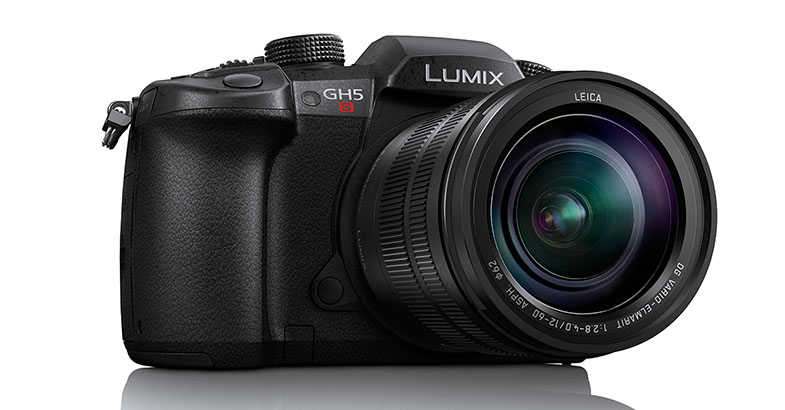
Date: 10. 01. 2018,
Category: News
FULL ARTICLE
NewTek, Inc., released LightWave 2018, the new iteration of their comprehensive 3D animation system. The software for Windows and Mac operating systems is available as of January 1, 2018. LightWave 2018 introduces new features that are ideal for physically based rendering, VR rendering, and more. It also extends the functionality of popular features like the buffer system, FiberFX, cel-shading, object deformations, and others.
LightWave 2018 highlights include:
Physically Based Rendering System: Completely rewritten rendering, shading and lighting architecture for greater realism, accuracy and ease-of-use
Render and Light Buffers: Expanded workflow for render and light buffers that simplifies compositing and offers more flexibility, including real-time preview of new buffers in any viewport using VPR, as well as custom buffers using the node editor
Volumetric Engine and Open VDB Support: Using the new volumetric render primitives, artists can specify physically based properties, Scattering, Absorption and Emission parameters, along with powerful node networks
Light Capabilities: New lighting architecture brings physical lights that can be optionally visible to the camera, and improved loading of IES web files to better match the intensity of real manufactured lights
Surface Editor, Material Nodes and Surface Preview: The Surface Editor has been overhauled for the new shading system with powerful node-based materials that are presented with a familiar interface
Virtual Reality Camera: Includes both cylindrical and spherical modes for creating stereo 360-degree renders and animations for VR applications
Modifier Stack with New Deformation Nodes: Unlocks and simplifies the previously fixed order of operations for Bones, Morphs, Subdivision and Displacements with the ability to drag and drop to re-order mesh deformations interactively
Cel Shader and Enhanced Edge Rendering: Offers flexible non photoreal render control over material shading and allows gradient-based cel shading, while Edge Rendering uses any material available in the Surface Editor to shade any line
More Integrated FiberFX: Expanded to integrated closely with the new lighting and shading system and can use any material on the fibers. Fibers are now generated using the new primitive object architecture
Layout-based Parametric Shapes: Parametric shapes allow for creation of virtual primitive shapes in Layout that can be displaced, surfaced and rendered without needing any geometry
Noise Reduction Filter: Speeds up render times by using less Global Illumination rays and samples, while allowing for clean up of the resulting noise using filters instead of increased render settings
New Modeler Features: Layout View viewport shows the current camera view from Layout. Also new are fully interactive tools including Lattice, Smoothing, Array and Spline Bridge
Additionally, LightWave 2018 includes new enhancements to the Viewport Preview Renderer (VPR) and introduces many additional new features and improvements such UDIM texture support, more supported presets, FiberFX, Unity 5 support, and more.
Date: 09. 01. 2018,
Category: News
FULL ARTICLE