
 CZ
CZ SK
SK HU
HU AT
AT DE
DE ES
ES SI
SI HR
HR
Nothing in the basket.

- Search
-
Login

-
0
Comparison
Add products to compare, then they will appear here and you can compare parameters.
-
0
0 €
Blog
New DaVinci Resolve Studio 16 Public Beta 4 adds support for audio crossfades on the Fairlight page, support for Rec. 2020 tagging on video monitoring outputs, improved YouTube render settings, better handling of resizing between editing and Fusion, improved alpha channel support in color managed workflows, the ability to apply presets to Fairlight buses for equalizer, dynamic, plugins, channel setup and more. In addition, DaVinci Resolve Studio 16 Public Beta 4 improves consistency for undoing changes when in cinema mode, improves temporal effects in Fusion compositions, and improves the behavior of Audio Units on Macs with the Fairlight Audio Accelerator. Get it here.
Date: 12. 06. 2019,
Category: News
FULL ARTICLE
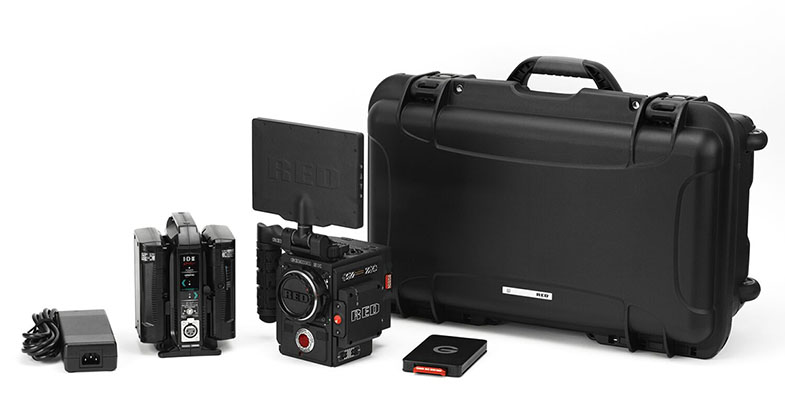
Everything you need to start shooting (minus lens) with the RED DSMC2 Gemini in one awesome little package. You will save about 7% off the total price of buying all the the parts separately.
- DSMC2 GEMINI 5K S35
- DSMC2 RED Touch 7.0” LCD
- DSMC2 Outrigger Handle
- DSMC2 V-lock with I/O Expander
- S35 AI Canon Mount
- IDX Duo C98 Battery and IDX VL-2X Battery Charger
- RED Mini-Mag (960 GB) with G-Technology EV Series Reader
- Custom Nanuk Camera Case
Date: 10. 06. 2019,
Category: News
FULL ARTICLE
Press Release
Blackmagic Design announced Teranex Mini SDI to DisplayPort 8K HDR, an advanced 8K DisplayPort monitoring solution with dual on screen scope overlays, HDR, 33 point 3D LUTs and monitor calibration that’s been specifically designed for the professional film and television market and to take advantage of a new generation of monitors such as the Pro Display XDR. Teranex Mini SDI to DisplayPort 8K HDR will be available in October 2019 for 1145 EUR ex. VAT.
Teranex Mini SDI to DisplayPort 8K HDR is an advanced 8K monitoring solution for DisplayPort computer displays or high quality monitors such as the new Pro Display XDR. Unlike basic converters, Teranex Mini SDI to DisplayPort 8K HDR can use third party calibration probes to accurately align connected displays for precise color. There's even 2 on-screen scopes that can be selected between WFM, Parade, Vector and Histogram. Teranex Mini SDI to DisplayPort 8K HDR is perfect for film studios and broadcasters who need professional but affordable color accurate monitoring. Customers also get an elegant design with color LCD for monitoring and control of settings.
The front panel includes controls and a color display for input video, audio meters and the video standard indicator. The rear panel has Quad Link 12G-SDI for HD, Ultra HD as well as 8K formats. There's 2 DisplayPort connections for regular computer monitors or USB-C style DisplayPort monitors such as the new Pro Display XDR. The built in scaler will ensure the video input standard is scaled to the native resolution of the connected DisplayPort monitor. Customers can even connect both 2SI or Square Division inputs.
Teranex Mini SDI to DisplayPort 8K HDR has everything for the latest HDR workflows. All that’s required is to connect a HDR compatible DisplayPort monitor to allow HDR SDI monitoring. Static metadata PQ and Hybrid Log Gamma (HLG) formats in the VPID are handled according to the ST2108-1, ST2084 and the ST425 standards. Teranex Mini SDI to DisplayPort 8K HDR handles ST425 which defines 2 new bits in the VPID to indicate transfer characteristic of SDR, HLG or PQ. Plus the ST2108-1 standard defines how to transport HDR static or dynamic metadata over SDI. Plus there is support for ST2082-10 for 12G SDI as well as ST425 for 3G-SDI sources. Both Rec.2020 and Rec.709 colorspaces are supported and 100% of the DCI-P3 format.
Two fully independent on screen scopes are included so compliance with broadcast standards is easy when doing critical high end work. Scopes are overlaid on screen so they can customize position, size and opacity. Customers can select from a range of scopes, including waveform for displaying luminance levels of their input signal. The vectorscope display allows customers to see the intensity of color at 100% SDI reference levels. Customers also get RGB and YUV parade displays, which are ideal for color correction and checking for illegal levels. Histogram shows the distribution of white to black detail in their images and highlights or shadows clipping.
Teranex Mini SDI to DisplayPort 8K HDR includes the same high quality 33 point 3D LUTs as used in the film industry. It's even possible to calibrate the connected display by connecting a third party USB color probe and Teranex Mini SDI to DisplayPort 8K HDR will analyze the monitor and generate a 3D LUT to correct for color differences between displays. Two independent 3D LUTs can be loaded and customers can select between them from the front panel.
It’s always difficult to know if a monitor is the correct color because every display is slightly different, even between the same model. Teranex Mini SDI to DisplayPort 8K HDR solves this problem as it can use a third party USB probe for automatically aligning their monitor. SpectraCal C6, X-Rite i1 Display Pro or the Klein K10-A probes are supported and plug into the front of the converter. The converter takes care of all the work and will automatically generate test signals on the monitor during the calibration process.
All Quad Link 12G-SDI inputs have outputs for looping to other equipment. Plus all HD, Ultra HD and 8K standards are supported allowing broadcast or film industry use. In 720p customers get support for 50p, 59.94p up to 60p. In 1080i formats, they get 50i, 59.94i up to 60i. 1080p, 1080PsF as well as 2160p formats are supported from 23.98 to 60 fps. Customers even get support for 2K and 4K DCI film formats from 23.98p to 60p. 4320p 8K formats are supported at 23.98, 24, 25, 29.97, 50, up to 59.94. With 2SI to Square Division conversion built in, an 8K source will be automatically converted for the monitor. Teranex Mini SDI to DisplayPort 8K HDR even handles both Level A or B 3G-SDI plus YUV and RGB SDI formats.
The front panel LCD provides confidence monitoring with both images and accurate audio level meters. There are menus for all functions and it’s easy to scroll through menu "pages" to find settings that need changing. The 3D LUTs can be enabled just by pressing the 1 or 2 buttons. Calibration is also started via the menus and customers simply follow the prompts to calibrate their display. The audio meters can even be switched between VU or PPM ballistics. There are settings for configuring scopes, their on screen location or opacity. Customers can even view and edit network settings.
For rack mounting, customers can simply add a Teranex Mini Rack Shelf. This consists of a metal tray that holds the converter and allows it to be screwed down before the whole shelf is bolted into the rack. Of course Teranex Mini SDI to DisplayPort 8K HDR includes rubber feet that customers can attach to the underside of the converter if customers want to place it on a desktop.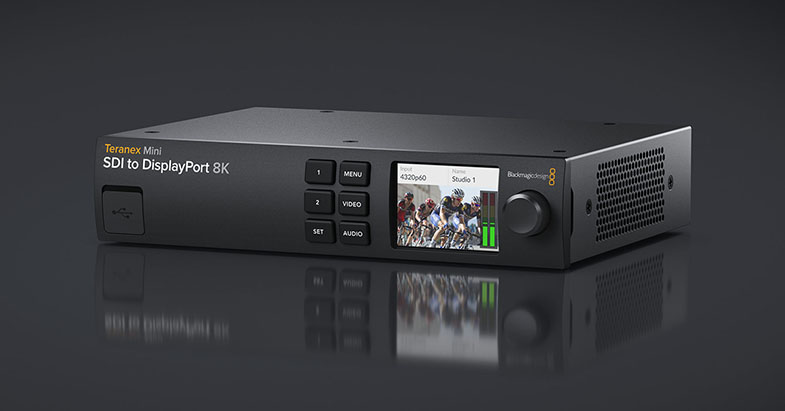
Availability and Price
Teranex Mini SDI to DisplayPort 8K HDR will be available in October 2019 for 1145 EUR ex. VAT.
Press Photography
Product photos of all Blackmagic Design products, are available at www.blackmagicdesign.com/press/images.
About Blackmagic Design
Blackmagic Design creates the world’s highest quality video editing products, digital film cameras, color correctors, video converters, video monitoring, routers, live production switchers, disk recorders, waveform monitors and real time film scanners for the feature film, post production and television broadcast industries. Blackmagic Design’s DeckLink capture cards launched a revolution in quality and affordability in post production, while the company’s Emmy™ award winning DaVinci color correction products have dominated the television and film industry since 1984. Blackmagic Design continues ground breaking innovations including 6G-SDI and 12G-SDI products and stereoscopic 3D and Ultra HD workflows. Founded by world leading post production editors and engineers, Blackmagic Design has offices in the USA, UK, Japan, Singapore and Australia. For more information, please go to www.blackmagicdesign.com.
Date: 06. 06. 2019,
Category: News
FULL ARTICLE
The new expressP2 card C Series enables even faster data transfer speeds. And a new card with 512 GB, twice the capacity of P2 card, also joins the line-up. The card C Series supports high-quality, high-frame-rate recording of 4K/120 fps and HD/240 fps with the VariCam Series.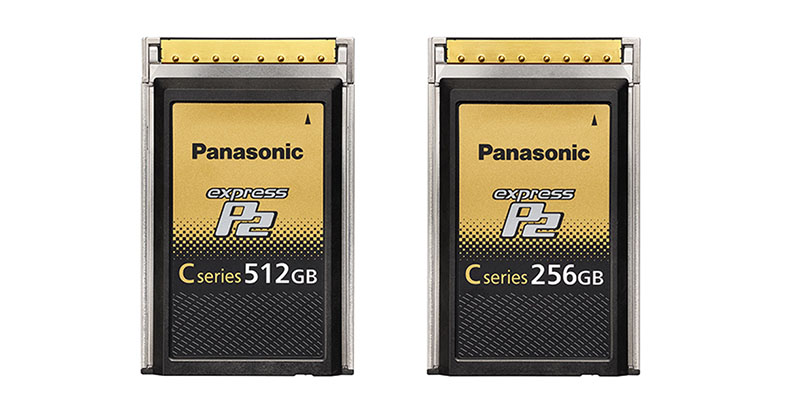
Date: 04. 06. 2019,
Category: News
FULL ARTICLE
What media should I use with Blackmagic Pocket Cinema Camera 4K?
This Information Note identifies CFast cards, SD cards and USB-C drives recommended for use when shooting with Blackmagic Pocket Cinema Camera 4K.
The following CFast 2.0 cards are recommended for recording 4K DCI Blackmagic RAW 3:1 up to 60 fps.
- Angelbird AV PRO CF 512GB
- Angelbird AV PRO CF 1TB
- Cinedisk 510MB/s CFast 2.0 256GB
- Hagiwara Solutions DC-SMAN64GA CFast 2.0 64GB
- Hagiwara Solutions DC-SMANA1GA CFast 2.0 128GB
- KomputerBay 3400x CFast 2.0 64GB
- KomputerBay 3400x CFast 2.0 128GB
- Lexar Professional 3400x CFast 2.0 128GB
- Lexar Professional 3500x CFast 2.0 256GB
- ProGrade Digital 550MB/s CFast 2.0 128GB
- ProGrade Digital 550MB/s CFast 2.0 256GB
- ProGrade Digital 550MB/s CFast 2.0 512GB
- SanDisk Extreme Pro CFast 2.0 SDCFSP-256G-x46D 512GB
- WISE CFast 2.0 3400x 128GB
- WISE CFast 2.0 3400x 256GB
- WISE CFast 2.0 3500x 512GB
- WISE CFast 2.0 3500x 1TB*
The following CFast 2.0 cards are recommended for 4K DCI ProRes HQ up to 60 fps.
- Angelbird AVpro CF 128GB
- Angelbird AVpro CF 256GB
- Angelbird AVpro CF 512GB
- Cinedisk 510MB/s CFast 2.0 256GB
- Hagiwara Solutions DC-SMAN64GA CFast 2.0 64GB
- Hagiwara Solutions DC-SMANA1GA CFast 2.0 128GB
- KomputerBay 3400x CFast 2.0 128GB
- ProGrade Digital 550MB/s CFast 2.0 256GB
- ProGrade Digital 550MB/s CFast 2.0 512GB
- SanDisk Extreme Pro CFast 2.0 SDCFSP-64G-x46D 64GB
- SanDisk Extreme Pro CFast 2.0 SDCFSP-128G-x46D 128GB
- SanDisk Extreme Pro CFast 2.0 SDCFSP-256G-x46D 256GB
- Sony CFast 2.0 G Series CAT-G64 64GB
- Sony CFast 2.0 G Series CAT-G128 128GB
- WISE CFast 2.0 3400x 128GB
- WISE CFast 2.0 3400x 256GB
- WISE CFast 2.0 3500x 512GB
The following CFast 2.0 cards are recommended for recording 4K DCI Lossless RAW up to 30 fps.
- Angelbird AVpro CF 128GB
- Angelbird AVpro CF 256GB
- Angelbird AVpro CF 512GB
- Cinedisk 510MB/s CFast 2.0 256GB
- KomputerBay 3400x CFast 2.0 128GB
- ProGrade Digital 550MB/s CFast 2.0 256GB
- ProGrade Digital 550MB/s CFast 2.0 512GB
- SanDisk Extreme Pro CFast 2.0 SDCFSP-64G-x46D 64GB
- SanDisk Extreme Pro CFast 2.0 SDCFSP-128G-x46D 128GB
- SanDisk Extreme Pro CFast 2.0 SDCFSP-256G-x46D 256GB
- Sony CFast 2.0 G Series CAT-G64 64GB
- Sony CFast 2.0 G Series CAT-G128 128GB
- WISE CFast 2.0 3400x 128GB
- WISE CFast 2.0 3400x 256GB
- WISE CFast 2.0 3500x 512GB
The following CFast 2.0 cards are recommended for 4K DCI 3:1 RAW up to 60 fps.
- Angelbird AVpro CF 128GB
- Angelbird AVpro CF 256GB
- Angelbird AVpro CF 512GB
- Cinedisk 510MB/s CFast 2.0 256GB
- KomputerBay 3400x CFast 2.0 128GB
- ProGrade Digital 550MB/s CFast 2.0 256GB
- ProGrade Digital 550MB/s CFast 2.0 512GB
- SanDisk Extreme Pro CFast 2.0 SDCFSP-64G-x46D 64GB
- SanDisk Extreme Pro CFast 2.0 SDCFSP-128G-x46D 128GB
- SanDisk Extreme Pro CFast 2.0 SDCFSP-256G-x46D 256GB
- Sony CFast 2.0 G Series CAT-G64 64GB
- Sony CFast 2.0 G Series CAT-G128 128GB
- WISE CFast 2.0 3400x 128GB
- WISE CFast 2.0 3400x 256GB
- WISE CFast 2.0 3500x 512GB
What SD cards should I use with Blackmagic Pocket Cinema Camera 4K?
The following SD cards are recommended for recording 4K DCI Blackmagic RAW 12:1 up to 30 fps.
- Angelbird AV PRO SD V90 64GB
- Delkin Devices Power UHS-II SDXC 64GB
- Delkin Devices Power UHS-II SDXC 128GB
- Lexar Professional 2000x UHS-II 300MB/s SDXC 64GB
- ProGrade Digital V90 UHS-II 250MB/s SDXC 256GB
- SanDisk Extreme Pro UHS-I 95MB/s SDXC 512GB
- Sony Tough SF-G64T 64GB
- Sony Tough SF-G128T 128GB
- Sony SF-G64 300MB/s UHS-II SDXC 64GB
- Toshiba Exceria Pro UHS-II N502 SDHC 32GB
- Toshiba Exceria Pro UHS-II 270MB/s SDXC 64GB
- WISE SDXC UHS-II 64GB
- WISE SDXC UHS-II 128GB
The following SD cards are recommended for recording 4K DCI ProRes HQ up to 60 fps.
- WISE SDXC UHS-II 64GB
- WISE SDXC UHS-II 128GB
- Sony Tough SF-G64T 64GB
- Sony Tough SF-G128T 128GB
The following SD cards are recommended for 4K DCI 4:1 RAW up to 60 fps.
- Sony Tough SF-G164T 64GB
- Sony Tough SF-G128T 128GB
- Toshiba Exceria Pro UHS-II N502 SDXC 32GB
The following SD cards are recommended for 1080p Lossless RAW up to 60 fps.
- WISE SDXC UHS-II 64GB
- WISE SDXC UHS-II 128GB
- Sony Tough SF-G164T 64GB
- Sony Tough SF-G128T 128GB
- Toshiba Exceria Pro UHS-II N502 SDXC 32GB
- Toshiba Exceria Pro UHS-II N502 SDXC 64GB
- Toshiba Exceria Pro UHS-II N502 SDXC 128GB
- Toshiba Exceria Pro UHS-II N502 SDXC 256GB
The following SD cards are recommended for 4K DCI Lossless RAW up to 24 fps.
- WISE SDXC UHS-II 64GB
- WISE SDXC UHS-II 128GB
- Toshiba Exceria Pro UHS-II N502 SDXC 32GB
- Sony Tough SF-G164T 64GB
- Sony Tough SF-G128T 128GB
What USB‑C drives should I use with Blackmagic Pocket Cinema Camera 4K?
The following USB-C drives are recommended for recording 4K DCI Blackmagic RAW 3:1 up to 60 fps.
- Angelbird SSD2GO PKT 512GB
- Angelbird SSD2GO PKT 2TB
- G-Technology G-DRIVE Mobile SSD 1 TB
- Samsung Portable SSD T5 2TB
- WISE Portable SSD 512GB
The following USB‑C drives are recommended for 4K DCI ProRes HQ up to 60 fps
- Angelbird SSD2GO PKT 512GB
- Angelbird SSD2GO PKT 2TB
- Glyph Atom 500GB
- Samsung Portable SSD T5 500GB
- Samsung Portable SSD T5 1TB
- Sandisk Extreme Portable SSD 1TB
- Seagate Fast SSD 250GB
- WISE Portable SSD 256GB
- WISE Portable SSD 512GB
- WISE Portable SSD 1TB
The following USB‑C drives are recommended for 4K DCI Lossless RAW up to 30 fps.
- Angelbird SSD2GO PKT 512GB
- Angelbird SSD2GO PKT 2TB
- Samsung Portable SSD T5 1TB
- WISE Portable SSD 256GB
- WISE Portable SSD 512GB
- WISE Portable SSD 1TB
The following USB‑C drives are recommended for 4K DCI 3:1 RAW up to 60 fps.
- Angelbird SSD2GO PKT 512GB
- Angelbird SSD2GO PKT 2TB
- Samsung Portable SSD T5 500GB
- Samsung Portable SSD T5 1TB
- WISE Portable SSD 256GB
- WISE Portable SSD 512GB
- WISE Portable SSD 1TB
*) New Item.
Date: 03. 06. 2019,
Category: News
FULL ARTICLE