Blog

Press Release

Blackmagic Design announced DaVinci Resolve Editor Keyboard, a new premium keyboard for DaVinci Resolve that dramatically improves the speed of editing because it allows the use of 2 hands while editing so transport control and selecting clips can be done while performing edits. DaVinci Resolve Editor Keyboard will be available in August for 895 EUR.

More than just a simple keyboard, the DaVinci Resolve Editor Keyboard has been designed as an alternative way to edit that’s much faster than a mouse because customers can simultaneously use both hands at the same time. Customers also get an integrated search dial built right into the keyboard.

The all metal design is more robust because it’s been designed for professional editors who spend hours each day editing and demand a premium keyboard solution. Unlike modern keyboards with flat keys, the keys have a tiered profile so it’s easy to feel their way around. The key switches are the same type used by eSports keyboards and each key is certified for over a million operations. The integrated search dial is machined from solid metal and allows very precise transport and trimming control. Plus the keys caps, hand rest and key switches are all available as spare parts so the keyboard can be refreshed and repaired over time.

The reason the DaVinci Resolve Editor Keyboard is so fast is customers can use both hands when editing. Unlike a mouse, customers can use their right hand to control the position in a clip, while their left hand is setting in and out points as well as applying edits. This means customers can move, mark in and out points, apply an edit, then move again, repeatedly, one after the other, again and again. It’s an extremely fast way to work, using both hands at once.

The integrated search dial is machined metal with rubber coating so it feels very nice to use and customers always feel they have solid control over DaVinci Resolve’s clip or timeline. There's an integrated electronic clutch that creates end stops when used for shuttle and position, all under software control. With multiple roller bearings, the search dial is very smooth and it can be spun in jog mode to allow a natural timeline scroll.

Entering edit points is one of the most used functions in editing, so we designed the in and out point buttons larger in size, and to include a small space above to allow locating them by feel. That helps customers when doing transport control with their right hand and punching in and out points using their left hand. Then once the in and out points are set, they just reach their fingers up to the edit buttons.

The editing functions are located just above the in and out keys, to allow a simple movement of their fingers to activate the edit customers require. Because editing with a keyboard is quite different to editing on a computer’s user interface, the editing functions have been optimized to take advantage of the speed of a keyboard. Most edits can be performed on the source clip without needing to place edit points on the timeline itself. That's much faster as it eliminates time wasted switching between source and timeline. The edit points can automatically locate the nearest timeline edit, or even match timecode. A good example is smart insert, which locates the nearest edit and inserts at that point.

With a high quality search dial built in, customers get an extremely accurate and fast way to do trimming of edit points. Using roll trimming is easy and is operated by pressing and holding one of the roll buttons, depending on the type of trim customers need to do, while then rotating the search dial.

The cut key will remove any transition on an edit point and leave it as a simple edit between the 2 clips. Pressing dissolve will add a 1 second dissolve between the two clips, and using roll duration will set the desired transition length. There's also a smooth cut button to allow jump cuts to be removed at the press of a button.

The new DaVinci Resolve Editor Keyboard also includes a revised qwerty key layout that’s been updated using feedback from professional editors. However customers still get all the traditional editing features for both the cut and edit pages in DaVinci Resolve, so the core qwerty part of the keyboard still operates in a familiar way. All the standard edit modes are included on the main keyboard. But customers still get new features in the revised layout, such as a viewer button to allow instant change to full screen view, and it’s even possible to edit from the keyboard in full screen view.

When entering edit points and durations numerically, there's a keypad specifically designed for timecode entry. The F/TC button allows switching between timecode or frames. Just press the F/TC button and entry changes to frames. When typing longer timecode values, there's also a double zero button so customers don't have to press the standard zero key as often. The plus and minus keys allow time values as offsets to current values vs absolute entry.

DaVinci Resolve Editor Keyboard

Availability and Price
DaVinci Resolve Editor Keyboard will be available in August for 895 EUR ex. VAT.

Press Photography
Product photos of all Blackmagic Design products, are available at www.blackmagicdesign.com/press/images.

About Blackmagic Design
Blackmagic Design creates the world’s highest quality video editing products, digital film cameras, color correctors, video converters, video monitoring, routers, live production switchers, disk recorders, waveform monitors and real time film scanners for the feature film, post production and television broadcast industries. Blackmagic Design’s DeckLink capture cards launched a revolution in quality and affordability in post production, while the company’s Emmy™ award winning DaVinci color correction products have dominated the television and film industry since 1984. Blackmagic Design continues ground breaking innovations including 6G-SDI and 12G-SDI products and stereoscopic 3D and Ultra HD workflows. Founded by world leading post production editors and engineers, Blackmagic Design has offices in the USA, UK, Japan, Singapore and Australia. For more information, please go to www.blackmagicdesign.com.

Date: 12. 04. 2019, Category: News
FULL ARTICLE

Press Release

Blackmagic Design announced Blackmagic Pocket Battery Grip, a new battery adapter that features a slide out tray designed to hold two L-series batteries. This allows customers to power external flash disks or run the camera for over 2 hours of record time before charging. Blackmagic Pocket Camera Battery Grip will be available in August for 225 EUR.

Designed for the Blackmagic Pocket Cinema Camera 4K, the new Pocket Camera Battery Grip lets customers replace the camera’s standard LP-E6 battery with two L-series batteries so they can shoot for over 2 hours on a single charge. It’s perfect for anyone that needs to shoot for extended periods of time. Featuring a unique carbon fiber design, non-slip hand grips, and a slide out tray that holds 2 L-series batteries, the Pocket Camera Battery Grip also makes it easier to hold the camera on longer shoots. L-Series batteries are standard batteries used for a variety of professional lighting equipment, so they’re readily available. Customers can even charge the batteries in the grip via the camera’s 12V DC connection in between takes.

Unlike traditional external battery packs that hang off the side of the camera, the Pocket Camera Battery Grip has a unique design that makes it part of the Blackmagic Pocket Cinema Camera 4K. Simply remove the detachable LP-E6 battery door cover from the camera, slide the pocket grip in and lock it into place. There’s even a storage slot built into the grip for the battery door cover. Because the Pocket Camera Battery Grip becomes part of the camera, customers get larger non-slip hand grips that make holding the camera even easier. Best of all, there’s no extra gear hanging off the camera so customers still have a compact camera that can go anywhere.

Blackmagic Pocket Camera Battery Grip

Availability and Price
Blackmagic Pocket Camera Battery Grip will be available in August for 225 EUR ex. VAT.

Press Photography
Product photos of all Blackmagic Design products, are available at www.blackmagicdesign.com/press/images.

About Blackmagic Design
Blackmagic Design creates the world’s highest quality video editing products, digital film cameras, color correctors, video converters, video monitoring, routers, live production switchers, disk recorders, waveform monitors and real time film scanners for the feature film, post production and television broadcast industries. Blackmagic Design’s DeckLink capture cards launched a revolution in quality and affordability in post production, while the company’s Emmy™ award winning DaVinci color correction products have dominated the television and film industry since 1984. Blackmagic Design continues ground breaking innovations including 6G-SDI and 12G-SDI products and stereoscopic 3D and Ultra HD workflows. Founded by world leading post production editors and engineers, Blackmagic Design has offices in the USA, UK, Japan, Singapore and Australia. For more information, please go to www.blackmagicdesign.com.

Date: 11. 04. 2019, Category: News
FULL ARTICLE

Press Release

Blackmagic Design announced Fusion 16 Studio, a major new upgrade that brings all of the improvements made to Fusion built into DaVinci Resolve available to VFX artists using the stand alone version of Fusion Studio! Fusion 16 Studio public beta is available for download now from the Blackmagic Design web site. Fusion 16 Studio is being demonstrated on the Blackmagic Design NAB 2019 booth #SL216.

Fusion 16 Studio is a major upgrade that brings all of the improvements made to Fusion inside of DaVinci Resolve to the stand alone version of Fusion. Customers get an updated and more modern user interface, along with dramatically faster performance. All 3D operations are GPU accelerated, making Fusion much more responsive and interactive. In addition, there are dozens of GPU accelerated tools such as time effects, dissolves, stereo 3D tools, vector motion blur, corner positioning, color tools and more. B-spline and bitmap mask operations are accelerated, as are the planar and camera trackers. Improved memory management makes large compositions with high tool counts more reliable, making Fusion 16 dramatically faster and more stable than ever before.

Blackmagic Design Fusion 16 Studio

Availability and Price
Fusion 16 Studio public beta is available now for download from the Blackmagic Design web site.

Press Photography
Product photos of all Blackmagic Design products, are available at www.blackmagicdesign.com/press/images.

About Blackmagic Design
Blackmagic Design creates the world’s highest quality video editing products, digital film cameras, color correctors, video converters, video monitoring, routers, live production switchers, disk recorders, waveform monitors and real time film scanners for the feature film, post production and television broadcast industries. Blackmagic Design’s DeckLink capture cards launched a revolution in quality and affordability in post production, while the company’s Emmy™ award winning DaVinci color correction products have dominated the television and film industry since 1984. Blackmagic Design continues ground breaking innovations including 6G-SDI and 12G-SDI products and stereoscopic 3D and Ultra HD workflows. Founded by world leading post production editors and engineers, Blackmagic Design has offices in the USA, UK, Japan, Singapore and Australia. For more information, please go to www.blackmagicdesign.com.

Date: 11. 04. 2019, Category: News
FULL ARTICLE

Grass Valley EDIUS 9.40 will be released in May 2019, at the NAB Show 2019 a preview version is shown. The update is free for all EDIUS 9 users, and features:


  • Apple ProRes Export and ProRes Raw Import
  • Enhanced Multicam Function with new sync options (incl. announcement of soon to come Audio Sync)
  • Optimized and easy to use HDR-SDR Conversion with soft-clip tone mapping
  • Optimized Mask Motion Tracker for better tracking results
  • Import/Export of Closed Captioning including burn to video
  • New High Speed H.265 Software Decoder for an improved performance concerning HEVC clips
  • New Format Import support for Sony Venice Raw, Panasonic P2 8K and faster Canon Cinema Raw Light performance
  • New Format Export support for H.264/H.265 as MOV, optimized H.264 low bitrate encoding and for Workgroup: DNxHR support
  • AJA IO 4K Plus and Kona 5 Preview support
  • More new features like HDR color bars, 0.1 steps for Gaussian blur, voice over level numeration, project wizard with overscan setting and more
  • Updated Mync version with support for all mentioned import formats
Date: 10. 04. 2019, Category: News
FULL ARTICLE

Press Release

Blackmagic Design announced DaVinci Resolve 16, a major update that adds a revolutionary new cut page specifically designed for editors that need to work quickly and on tight deadlines. In addition, DaVinci Resolve 16 includes dozens of other new features for professional editors, colorists, VFX artists and sound engineers. DaVinci Resolve 16 public beta is available for download now from the Blackmagic Design web site.

DaVinci Resolve 16 is being demonstrated on the Blackmagic Design NAB 2019 booth #SL216.

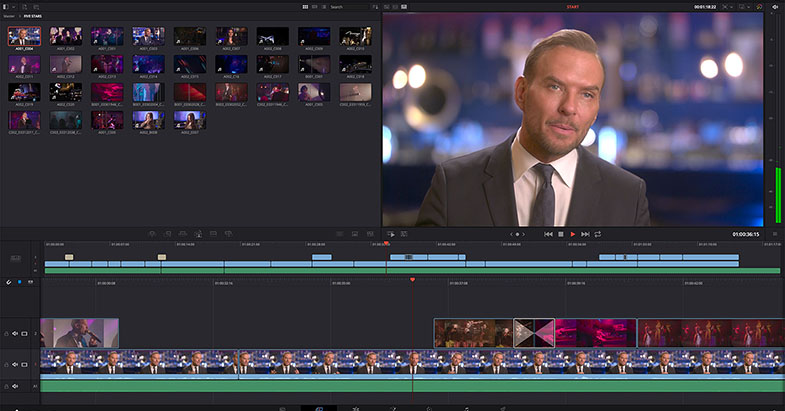
Designed specifically for editors working on high end fast turn around work such as television commercials and even news cutting, the cut page is all about speed. It’s an alternate edit page with a streamlined interface and revolutionary new tools that will help customers work faster than ever. The cut page lets customers import, edit, trim, add transitions, titles, automatically match color, mix audio and more. Whether you’re delivering for broadcast or for YouTube, the cut page has everything customers need to get the job done, all in one place. Plus, the regular edit page is still available so customers can switch between edit and cut pages to change editing style right in the middle of a job.

The cut page challenges the traditional way of working with innovative yet familiar concepts such as source tape mode and an A/B trim tool. Two modern features that are rooted in the past. The cut page isn’t about simplification, it’s about removing the things customers don’t need and building powerful, professional tools that help customers work more quickly. And, sometimes, it means borrowing the things that were great about the past and bringing them into the future.

Back in the days of tape, finding a clip was easy because customers could just spool up and down the tape to see their media and select shots. Today, finding the right clip in a bin with hundreds of files is slow. With source tape, customers no longer have to waste time hunting through bins to find the clip they need. Simply click on the source tape button and all of the clips in their bin appear in the viewer as a single long "tape". This makes it easy to scrub through all of the shots, find the parts they want, and quickly edit them to the timeline. It’s an old fashioned concept that’s completely modernized to help customers find the shots they need fast.

Zooming in and out and scrolling timelines is extremely slow. The new cut page features an innovative dual timeline so customers never have to zoom in or out again. The upper timeline shows customers the entire program while the lower timeline shows customers the current work area. Both timelines are fully functional, allowing customers to move and trim clips in whichever timeline is most convenient. Want to move a clip all the way to the end of a program? Simply pick it up from the lower timeline and drag it to the end of the upper timeline to move it down the edit.

The new DaVinci Neural Engine uses state of the art deep neural networks and learning, along with artificial intelligence to power new features such as speed warp motion estimation for retiming, super scale for up-scaling footage, auto color and color matching, facial recognition and more. The DaVinci Neural Engine is entirely cross-platform and uses the latest GPU innovations for AI and deep learning to provide unparalleled performance and quality. The DaVinci Neural Engine provides simple tools to solve complex, repetitive and time consuming problems. For example, it enables facial recognition to automatically sort and organize clips into bins based on people in the shot.

DaVinci Resolve 16 also introduces powerful new features that customers have asked for across the rest of the application. New adjustment clips let customers apply effects and grades to clips on the timeline below, quick export can be used to upload projects to YouTube and Vimeo from anywhere in the application, and new GPU accelerated scopes provide more technical monitoring options than before. The massively updated Fairlight page adds elastic wave alignment so customers can stretch waveforms to precisely sync dialog replacement with video, immersive 3D audio support, new bus tracks, automation previews, dialog sweetening tools and even more FairlightFX.

DaVinci Resolve Studio 16 features major improvements to existing ResolveFX, along with several new plugins that editors and colorists will like. There are new ResolveFX plugins for adding vignettes, drop shadows, removing objects, adding analog noise and damage, chromatic aberration, stylizing video and more. There are also improvements to the scanline, beauty, face refinement, blanking fill, warper, dead pixel fixer and colorspace transformation plugins. Plus, customers can now view and edit ResolveFX keyframes from the timeline curve editor on the edit page or from the keyframe panel on the color page.

Blackmagic Design DaVinci Resolve 16

DaVinci Resolve 16 Features
DaVinci Neural Engine for AI and deep learning features.
Dual timeline to edit and trim without zooming and scrolling.
Source tape to review all clips as if they were a single tape.
Trim interface to view both sides of an edit and trim.
Intelligent edit modes to auto sync clips and edit.
Timeline review playback speed based on clip length.
Built in tools for retime, stabilization and transform.
Render and upload directly to YouTube and Vimeo.
Direct media import via buttons.
Scalable interface for working on laptop screens.
Create projects with different frame rates and resolutions.
Apply effects to multiple clips at the same time.
DaVinci Neural Engine detects faces and auto creates bins.
Frame rate conversions and motion estimation.
Cut and edit page image stabilization.
Curve editor ease in and out controls.
Tape style audio scrubbing with pitch correction.
Re-encode only changed files for faster rendering.
Collaborate remotely with Frame.io integration.
Improved GPU performance for Fusion 3D operations.
Cross platform GPU accelerated tools.
Accelerated mask operations including B-Spline and bitmap.
Improved planar and tracker performance.
Faster user and smart cache.
GPU accelerated scopes with advanced technical monitoring.
Custom and HSL curves now feature histogram overlay.
DaVinci Neural Engine auto color and shot match.
Synchronize SDI output to viewer zoom.
Mix and master immersive 3D audio.
Elastic wave audio alignment and retiming.
Bus tracks with automation on timeline.
Foley sampler, frequency analyzer, dialog processor, FairlightFX.
500 royalty free foley sounds effects.
Share markers and notes in collaboration workflows.
Individual user cache for collaborative projects.
Resolve FX plugins with timeline and keyframes

Availability and Price
DaVinci Resolve 16 public beta is available now for download from the Blackmagic Design web site www.blackmagicdesign.com.


Press Photography
Product photos of all Blackmagic Design products, are available at www.blackmagicdesign.com/press/images.

About Blackmagic Design
Blackmagic Design creates the world’s highest quality video editing products, digital film cameras, color correctors, video converters, video monitoring, routers, live production switchers, disk recorders, waveform monitors and real time film scanners for the feature film, post production and television broadcast industries. Blackmagic Design’s DeckLink capture cards launched a revolution in quality and affordability in post production, while the company’s Emmy™ award winning DaVinci color correction products have dominated the television and film industry since 1984. Blackmagic Design continues ground breaking innovations including 6G-SDI and 12G-SDI products and stereoscopic 3D and Ultra HD workflows. Founded by world leading post production editors and engineers, Blackmagic Design has offices in the USA, UK, Japan, Singapore and Australia. For more information, please go to www.blackmagicdesign.com.

Date: 10. 04. 2019, Category: News
FULL ARTICLE