
 CZ
CZ SK
SK HU
HU AT
AT DE
DE ES
ES SI
SI HR
HR
Nothing in the basket.

- Search
-
Login

-
0
Comparison
Add products to compare, then they will appear here and you can compare parameters.
-
0
0 €
News
New York City and Los Angeles-area cinematographers and filmmakers are invited to attend an exclusive first look of Panasonic's new AU-EVA1 cinema camera. The events will include the screening of short films shot with the new cinema camera and a question-and-answer session with the films' cinematographers who will discuss shooting with the EVA1. The New York City event will be held on Monday, September 11th at the Angelika Film Center, while the Los Angeles event will be held on Thursday, September 14th at The Linwood Dunn Theater.
These events represent the first time shooters will be able to get hands-on with the EVA1; Panasonic cinema specialists will be on hand to answer questions. The EVA1 is a 5.7K handheld cinema camera that contains Dual Native ISOs of 800/2500, records footage to low cost SD cards, and captures 14-stops of dynamic range. It is tailor-made for a number of shooting applications, including narrative, documentary, music videos, live events and more. Panasonic recently announced that the EVA1 will ship this Fall with a suggested list price of 7,290 EUR.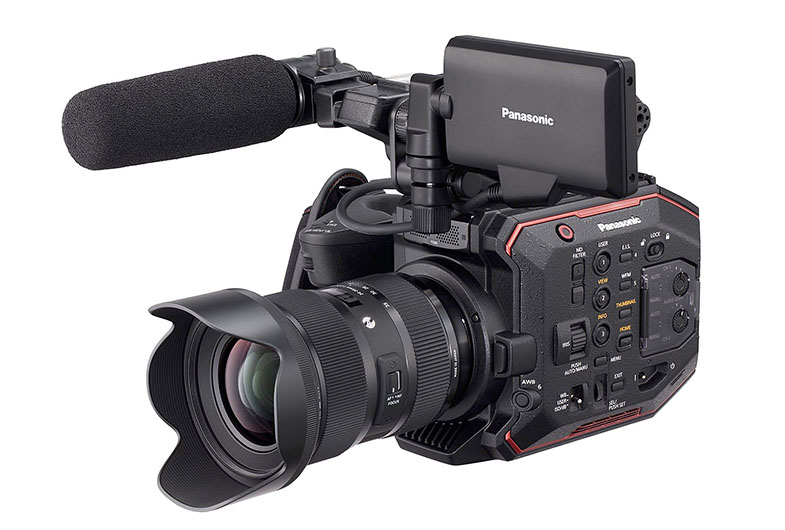
Date: 29. 08. 2017,
Category: News
FULL ARTICLE
Press Release
Blackmagic Design has announced its DaVinci Resolve Studio and DaVinci Resolve Advanced Panel were used to complete picture post in Ultra HD 4K on the third season of award winning Canal+ French drama series, “Le Bureau des Légendes.”
Post production for the ten part series now available on Amazon Prime was completed at Paris based Digital Factory by freelance colorist Guillaume Lips. “Not only did we grade the entire series from beginning to end in Resolve, but we also delivered in Ultra HD 4K for the first time,” he begins.
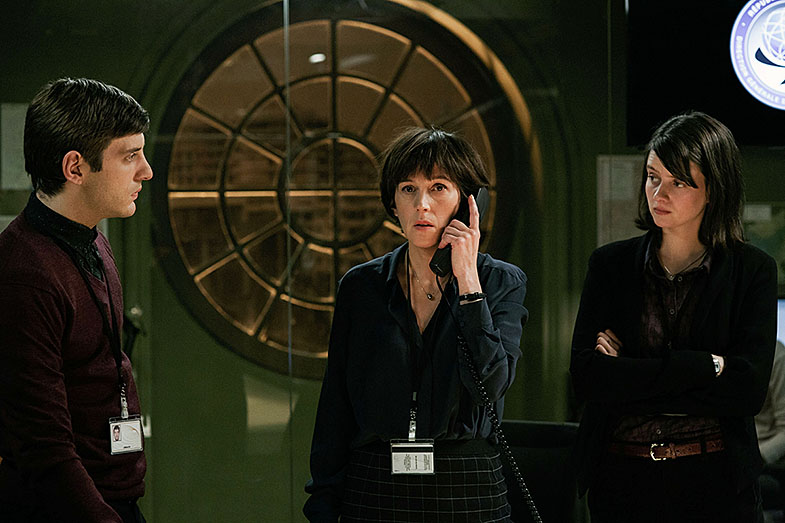
The turnaround for completing the DI on each episode was incredibly tight according to Lips. “With only two days to complete an episode our workflow needed to be both fast and efficient. Not only did Resolve’s realtime performance provide first-class shot tracking but it also meant that we could work with the project native materials in 4K.”
While the main unit captured to ProRes 4444, there was a whole raft of smaller cameras used by the production’s second unit to shoot the action scenes. “Resolve’s extensive format and multi-codec support proved invaluable,” explains Lips. “We carried out a basic technical grade to adjust contrast levels and correct for the differences in color space and that gave us our starting point for the final DI.”
When grading scenes from Syria, Lips drew on DaVinci Resolve’s extensive toolset and a series of power windows to unlock the rich deep tones and add a large amount of contrast while still retaining enough detail in the highlights and shadows.
“In order to achieve that, I used the HDR capabilities in Resolve to finesse the midtones,” he reveals. “And when it came to skin tones I wanted to bring back as much softness as possible to mitigate any over-definition resulting from the 4K delivery which Resolve proved highly adept at handling.”
“As an experienced colorist I have worked with a lot of different grading systems in my career and I firmly believe that DaVinci Resolve remains one of the very best in the market today,” concludes Lips. “Used alongside the DaVinci Resolve Advanced Panel you have a very efficient way of working, which allowed me to complete the grade on this particular project in record time.”

Press Photography
Product photos of all Blackmagic Design products, are available at www.blackmagicdesign.com/press/images.
About Blackmagic Design
Blackmagic Design creates the world’s highest quality video editing products, digital film cameras, color correctors, video converters, video monitoring, routers, live production switchers, disk recorders, waveform monitors and real time film scanners for the feature film, post production and television broadcast industries. Blackmagic Design’s DeckLink capture cards launched a revolution in quality and affordability in post production, while the company’s Emmy™ award winning DaVinci color correction products have dominated the television and film industry since 1984. Blackmagic Design continues ground breaking innovations including 6G-SDI and 12G-SDI products and stereoscopic 3D and Ultra HD workflows. Founded by world leading post production editors and engineers, Blackmagic Design has offices in the USA, UK, Japan, Singapore and Australia. For more information, please go to www.blackmagicdesign.com.
Date: 25. 08. 2017,
Category: News
FULL ARTICLE
This beta update adds basic HUI protocol support for compatibility with the Mackie Universal Control Surface, as well as support for attaching speakers to Blackmagic Design video I/O hardware or USB audio devices. In addition, it also includes Cineform encoding and decoding on all platforms, improved H.264 compatibility on Windows, and dozens of other fixes and performance improvements.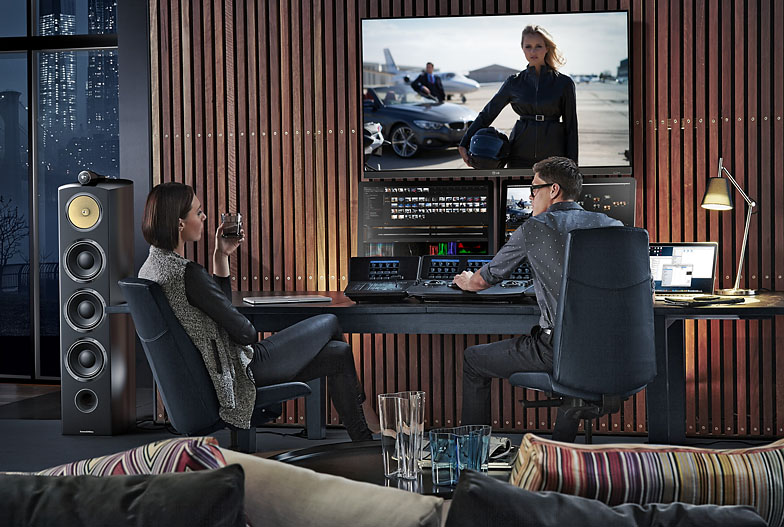
Date: 24. 08. 2017,
Category: News
FULL ARTICLE
In addition to the hardware and software required below, it is recommended the PCs have an absolute minimum of 4GB of memory, an accelerated graphics card, and a CPU that meets or exceeds the system requirements of the software application you are planning on using. Apple QuickTime needs to be installed for some applications to function with a Blackmagic capture card.
Supported Operating Systems
Blackmagic Design Thunderbolt devices are compatible with:
Windows 7 64bit
Windows 8 64bit
Windows 10 64 bit
The following laptops are compatible with Blackmagic Design Thunderbolt devices:
DELL – Precision 7720
DELL – Precision 7520
DELL – XPS
The following Intel NUC is compatible with Blackmagic Design Thunderbolt devices:
Intel Nuc – NUC7i7BNH
Supported Hardware
The following motherboards are compatible with Blackmagic Design Thunderbolt devices:
ASRock Z87 Extreme 4
ASRock Z87 Extreme4/TB4
ASRock Z87 Extreme11/ac
Asus Z87-Expert
Asus Z87 Deluxe/Quad
Gigabyte GA-Z87X-UD7 TH
Gigabyte Z77MX-D3H TH
Gigabyte Z77X-UP4 TH
Gigabyte Z77X-UP5 TH
Gigabyte Z97X-UD7 TH
MSI Z77A-G45 Thunderbolt
SuperMicro X10SAT
SuperMicro C7Z87-OCE (Legacy)
Windows PCI Express System Requirements
Operating Systems
Blackmagic Design Capture cards are compatible with the following Windows-based operating systems:
Windows 7 64 bit
Windows 8 64 bit
Windows 10 64 bit
Certified PC Workstations
The following workstations are certified for use with DeckLink and Intensity capture cards:
Dell Precision 7910
Dell T7610
Hewlett Packard Z420
Hewlett Packard Z440
Hewlett Packard Z620
Hewlett Packard Z640
Hewlett Packard Z820
Hewlett Packard Z840
Hewlett Packard XW8600 (Legacy, not recommended for DeckLink PCI or PCI-X cards)
Hewlett Packard XW9300 (Legacy)
Hewlett Packard Z400 (Legacy)
Hewlett Packard Z600 (Legacy)
Hewlett Packard Z800 (Legacy)
Recommended Motherboards
The following motherboards are recommended for use with DeckLink, Multibridge and Intensity capture cards:
ASRock Z87 Extreme 6
ASRock Z87 Extreme11/ac
ASRock Z87 Extreme4/TB4
ASRock Z87 Extreme4 (not recommended for DeckLink Studio 4K)
ASRock Z87E-ITX
Asus Z87 Deluxe/Quad
Asus Z87-Expert
Asus Z87-Gryphon
Asus Z87-A
Asus Z87-PLUS
Asus Z87-PRO
Gigabyte H81-D3
Gigabyte GA-H87M-D3H (not recommended for DeckLink Duo)
Gigabyte Q87M-D2H
Gigabyte X170 Extreme ECC
Gigabyte X99-UD4-CF
Gigabyte Z68X-UD3H-B3
Gigabyte Z77MX-D3H TH
Gigabyte Z77X-UP4 TH
Gigabyte Z77X-UP5 TH
Gigabyte Z87X-UD4H
Gigabyte GA-Z87X-UD7 TH
Gigabyte Z97-UD5H
Gigabyte Z97-WIFI
Gigabyte Z97X-UD7 TH
Gigabyte Z170X GAMING 5
MSI Z77A-G45 Thunderbolt
SuperMicro C7H170-M
SuperMicro C7X99-OCE
SuperMicro C7Z170-SQ
SuperMicro C7Z87-OCE
SuperMicro C7Z97-OCE (not recommended for DeckLink Studio 2)
SuperMicro X10SAT (not recommended for DeckLink Studio 4K)
SuperMicro X10SLV (not recommended with DeckLink SDI)
SuperMicro X10SLV-Q (not recommended with DeckLink SDI)
The following motherboards have been discontinued but are known to work in legacy configuration.
3DBoxx 4920
Asus P5B
Asus P5E
Asus P5Q Pro Turbo
Asus P6T
Asus P6X58D
Asus P6X58D-E WS
Asus P8P67 PRO (Rev 3.1)
Asus P9X79 WS
Gigabyte EP45-DS3
Gigabyte G1.Sniper (X58 chipset)
Gigabyte GA-P67A-UD7-B3 (rev. 1.0)
Gigabyte x48DQ6
Gigabyte X79-UD5
Intel D975XBX
Intel DX58SO
Supermicro C7Z97-M
XFX 790i Ultra
Windows USB 3.0 System Requirements
Operating Systems
Blackmagic Design USB 3.0 devices are compatible with the following Windows based operating systems:
Windows 7 64-bit
Windows 8 64-bit
Windows 10 64 bit
Certified PC Workstations
The following workstations are certified for use with UltraStudio Pro, UltraStudio SDI, Intensity Shuttle, ATEM 1 M/E, ATEM 2 M/E and Pocket UltraScope devices with USB 3.0 Expander cards:
Hewlett Packard Z420
Hewlett Packard Z620
Hewlett Packard Z820
Hewlett Packard Z400 - (discontinued)
Hewlett Packard Z600 - (discontinued)
Hewlett Packard Z800 - (discontinued)
Certified Notebook Computers
Notebooks certified for use with UltraStudio Pro, UltraStudio SDI and Intensity Shuttle.
MSI GE620 - (discontinued)
Presently there are no certified notebook computers for use with Pocket UltraScope. Testing is being conducted on several new notebook models and the results are expected soon. We will update this support note when we find new notebook models which can be reliably used with Pocket UltraScope. We advise against purchasing notebook computers for use with it until certification testing has been successfully completed.
The following notebook computers have not been verified by Blackmagic Design but have been reported by end-users as working with UltraStudio Pro, UltraStudio SDI, Intensity Shuttle, ATEM 1 M/E, and ATEM 2 M/E. Blackmagic Design cannot guarantee full compatibility.
Alienware M18x r2
ASUS G75VW
ASUS G74SX
ASUS G55VW
ASUS G53SW
ASUS K75
ASUS N56VZ
Lenovo P580-308725U
Lenovo W520
Lenovo T420
HP ProBook 4740S
Dell Precision M6600
Dell Precision M4600
MSI GT683 DXR
MSI FX720
MSI GS627 Core2 Quad Q9000
Acer 5755G i7-2670QM
Samsung RC512
Samsung SF411
Toshiba Satellite P775-S7215
Custom built - Clevo P170EM, HM77 Express Chipset, i7 Quad Core Mobile Processor, GeForce GTX 680M
Recommended Motherboards
The following motherboards have onboard USB 3.0 and have been tested to work with UltraStudio Pro, UltraStudio SDI, Intensity Shuttle, ATEM 1 M/E, ATEM 2 M/E, and Pocket UltraScope.
ASUS P6X58D-Premium
ASUS P6X58D-E
ASUS Crosshair IV Formula
Gigabyte GA-X58A-UD7
Gigabyte GA-X58A-UD5
Gigabyte G1.Sniper (rev. 1.0)
The following motherboards have not been verified by Blackmagic Design but have been reported by end-users as working with UltraStudio Pro, UltraStudio SDI, Intensity Shuttle, ATEM 1 M/E, ATEM 2 M/E, and Pocket UltraScope. Blackmagic Design cannot guarantee full compatibility.
ASUS P8Z77-M
ASUS P8Z77-V LK
ASUS P9X79
ASUS P6T Deluxe (with Renesas PCIe expansion card)
Intel DX58SO (with Renesas PCIe expansion card)
Date: 22. 08. 2017,
Category: News
FULL ARTICLE
Tutorials in the new EDIUS Basics series describe basic functionality of the Grass Valley EDIUS Pro 8 and Workgroup NLE applications.
Date: 21. 08. 2017,
Category: News
FULL ARTICLE