
 CZ
CZ SK
SK HU
HU AT
AT DE
DE ES
ES SI
SI HR
HR
Nothing in the basket.

- Search
-
Login

-
0
Comparison
Add products to compare, then they will appear here and you can compare parameters.
-
0
0 €
Blog
Grass Valley released an update to its popular video editing software EDIUS. In addition to numerous fixes (more in the Release History PDF), it adds several new features including H.265 (HEVC) support, BT.2020/BT.2010 color space support in the Primary Color Correction module, Hi-DPI display support, new H.264 encoder for better video quality and encode speed when exporting or burning Brlu-ray discs, support for Canon C700 RAW data, and automatic detection of Panasonic AG-UX90/180, and DC-GH5 color metadata for color correction.
New Features in EDIUS 8.50.1927 (EDIUS)
- Support to import H.265 (HEVC) clip
- Support to export XAVC Intra Class 480 clip
- Support to export Full HD (1920x1080) XDCAM 35M clip
- Support to export QFHD XAVC LongG 60M clip
- Support to display rec date and time of XAVC S clip
- Support to export QFHD XAVC LonG 422 clip
- Support BT.2020/BT.2010 PQ color space for Primary Color Correction
- Support to contain the video frame of Out Point
- Support to use on Hi-DPI display environment
- New H.264 encoder for better video quality and encode speed (available for AVCHD, Blu-ray, F4V, H.264/AVX and XAVS-S file exporter and burning Blu-ray discs)
- Support to decode Canon C700 RAW clip
- Support to adjust audio volume and pan by entering value in audio mixer
- Support to preserve width of Timeline Track Header
- Support to detect metadata of Panasonic AG-UX90/180, and DC-GH5 as source color space in Primary Color Correction
New Features in EDIUS 8.50.1927 (Built-in Mync Standard Edition)
- Mync automatically converts BT.2020/BT.2100 PQ color space to BT.709 to browse log clip
- New H.264 encoder for better video quality when exporting Storyboards
- Support to export Storyboard to FCP XML
- Support to browser Canon C700 RAW clip
- Displaying notifications on myncworld.com web site updates
- Mync automatically detects metadata of Panasonic AG-UX90/180, and DC-GH5 in order to broser the clip in correct color space
- Support to browse H.265 (HEVC) clips
Date: 25. 04. 2017,
Category: News
FULL ARTICLE
The New ZFC-L Zoom Focus Control is Libec's most innovative remote control for LANC (Sony, Canon, and JVC) cameras, plus the new ZFC-LP variant is tailored not only for LANC, but also for Panasonic cameras. This sleek designed controller features an Invert Switch that allows users to change the zoom direction when the control unit is attached vertically (grip top) or attached upside down in an underslung position.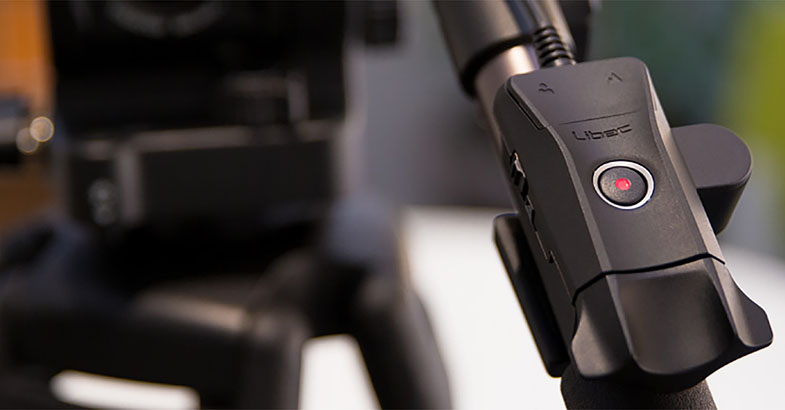
Date: 24. 04. 2017,
Category: News
FULL ARTICLE
At NAB 2017, Angenieux will announce a new compact zoom in the Optimo Style line of professional zoom lenses. The Optimo Style 48-130 T3 will weight just under two kilograms, delivering stunning optical performance, with a constant T3 aperture throughout the entire zoom range. Angénieux will also present two new accessories for its anamorphic lenses: Special Uncoated Element for Optimo 56-152 A2S and 30-72 A2S, and Special Coated Rear Element for Optimo 44-440 A2S. The attachments will provide cinematographers with an even more distinctive look to the anamorphic image painted by the Angenieux lenses. The uncoated front element offers a softer contrast image with additional flares around highlights, whereas the coated rear element for the Optimo 44-440 A2S enhances blue flare. These new accessories will be available Q3/2017. Angenieux also announced its new EZ-1 lens from the new EZ Series is now shipping, as first deliveries to customers are being realized.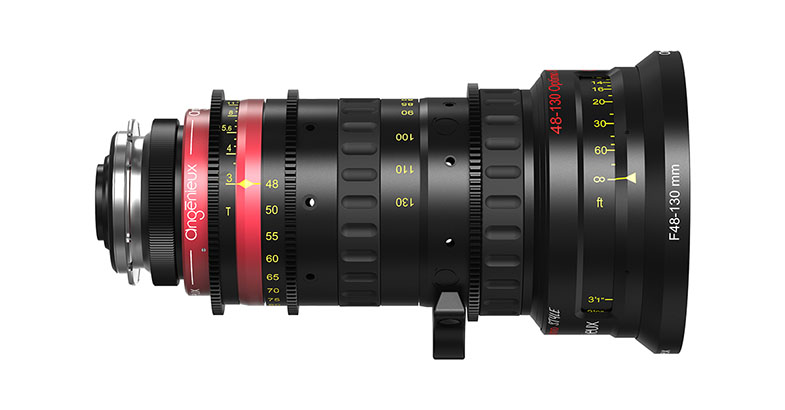
Date: 21. 04. 2017,
Category: News
FULL ARTICLE
Sound Devices introduced its new line of high-performance, ultra-compact audio recorders with USB audio streaming -- MixPre-3 & MixPre-6!
Sound Devices announced the launch of its groundbreaking new product line, the MixPre Series of audio recorders with integrated USB audio interface. The lightweight, high-resolution MixPre-3 & MixPre-6 audio recorders with USB audio streaming offer world-class sound quality combined with extreme durability -- perfect for musicians, sound designers, podcasters, videographers, YouTubers and field recordists.
The MixPre Series feature Sound Devices' innovative new Kashmir™ microphone preamps. These high-performance, ultra-low-noise, discrete, Class-A mic preamps were hand-crafted by Sound Devices. The mic preamps feature a -130dBV noise floor, analog limiters, and new 32-bit A-to-D converters to ensure high quality, stress-free, professional-grade audio recordings.
The MixPre-3 features 3 full-sized balanced XLR mic/line audio inputs, while the MixPre-6 features 4 balanced XLR/TRS combo jacks to connect microphones or line-level devices. Both have a 3.5 mm auxiliary input that can be used for plug-in power mics, 2-channel line-in audio, camera return, or timecode.
The versatile MixPre-3 and MixPre-6 make excellent USB audio interfaces, offering the unique ability to record audio to an SD card while simultaneously streaming multiple channels of audio via USB. Handy for interviews, podcasts, or simply as a backup recorder to your computer, the MixPre's can be used for Skype or Facetime interviews, and to record audio for podcasts or video blogs. As a musician's tool, the MixPre Series serves as a top-shelf USB interface with premium mic pres for use with a DAW, getting a quick song idea recorded without AC power handy, recording rehearsals or just adding a few more inputs to your PA system.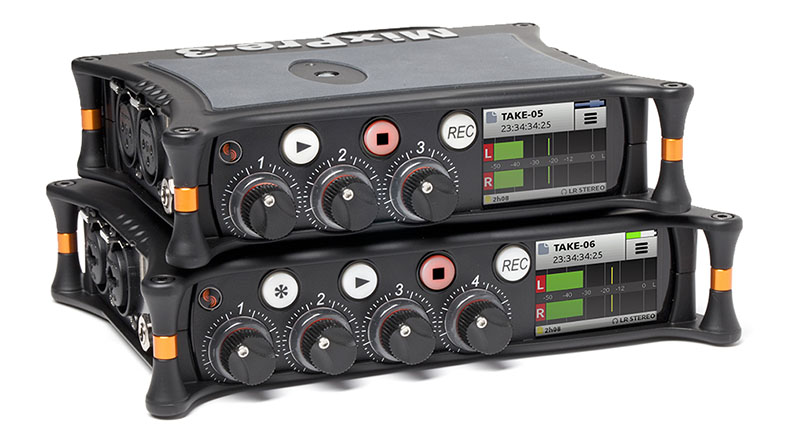
Features include:
- Ultra-compact & durable -- the MixPre Series will fit any production environment. The MixPre’s small stature allows you to wear it, or drop it into your pocket or a tech bag. Constructed with a die-cast aluminum chassis, the MixPre Series is both lightweight and incredibly robust.
- Responsive, capacitive touch screen -- for incredibly simple and intuitive operation, and a bright, IPS technology, sunlight-readable color LCD for the ultimate in convenient navigation.
- Full-featured mixer -- equipped with ergonomic gain control knobs for fast and accurate mixing. Other key features include pan and soloing plus easy-to-see ring LED metering per channel. also includes a 3.5mm jack for headphone monitoring with user-programmable presets from our custom-designed powerful, wide-bandwidth headphone amp.
- Built-in Bluetooth Smart technology -- allows for easy connection, control and metering via iOS devices from the Sound Devices free Wingman app.
- Intuitive operation -- with user-friendly navigation featuring Basic and Advanced modes. Basic mode allows users to record noise and distortion-free audio right out of the box – intended for stereo recording applications. The Advanced mode offers more experienced audio users access to multi-channel recording and advanced settings such as ISO metering, routing, timecode, mic pre gain, stereo and Mid/Side channel linking, headphone presets and more.
- Perfect camera companion -- offering HDMI Record triggering, timecode, and retractable 1/4-inch-20-thread mounting screw.
- Flexible powering -- for the ultimate in portability and convenience, the MixPre’s can be powered from AA batteries, Li-Ion batteries, a laptop’s USB-C or USB-A connectors, or AC wall outlet.
The MixPre Series is available to order from, and is anticipated to ship by the second week of May, 2017.
Date: 21. 04. 2017,
Category: News
FULL ARTICLE
New podcast in the EDIUS Podcast series covers Intel Quick Sync support for accelerated H.264 video encoding and decoding in EDIUS 8. Visit podcast.edius.net YouTube channel to watch the ongoing podcast series.
Date: 20. 04. 2017,
Category: News
FULL ARTICLE