Panasonic announced availability and pricing for its new AK-UB300 4K multi-purpose camera, designed for applications where a compact form-factor yet high-quality image is required. Ideal for broadcast and remote studios, weather and traffic reporting, remote live production, image magnification and sports, the UB300 is equipped with a one-inch MOS sensor that outputs a UHD signal up to 3840x2160/59.94p with the ability to simultaneously output HD up to 1080/59.94p. An HD Cropping feature allows an HD image to be cropped from the 4K picture, and the HD Cropping area can be controlled by a Panasonic AW-RP50 or AW-RP120 remote controller. The HD Cropping feature is especially useful as remote “Pan” or “Tilt” functionality can be accomplished electronically with a fixed POV type of camera without sacrificing image quality.
Streaming video outputs will be available from the UB300 in several forms and formats, and at a wide range of transmission speeds. For remote production and IP distribution, four simultaneous streams will be available in either H.264 or three streams in motion JPEG. Video resolutions of up to 1080/60p are available at rates of up to 24Mbps. For IP-Live remote monitoring and control, up to 16 cameras can be viewed simultaneously in a single browser window, with extensive on-screen camera controls available when a single camera is selected for monitoring. IP control enables system integration with Panasonic RP50/RP120 joysticks and AK series ROP panels (available later via firmware update).
An Intelligent Automatic Adjust function will automatically correct the image level and color temperature as the outdoor lighting conditions change. Intelligent Automatic Adjust Functions include Auto tracing white balance, which automatically adjusts the white balance or color temperature, and automatic control of lens aperture or iris, gain and ND filter.
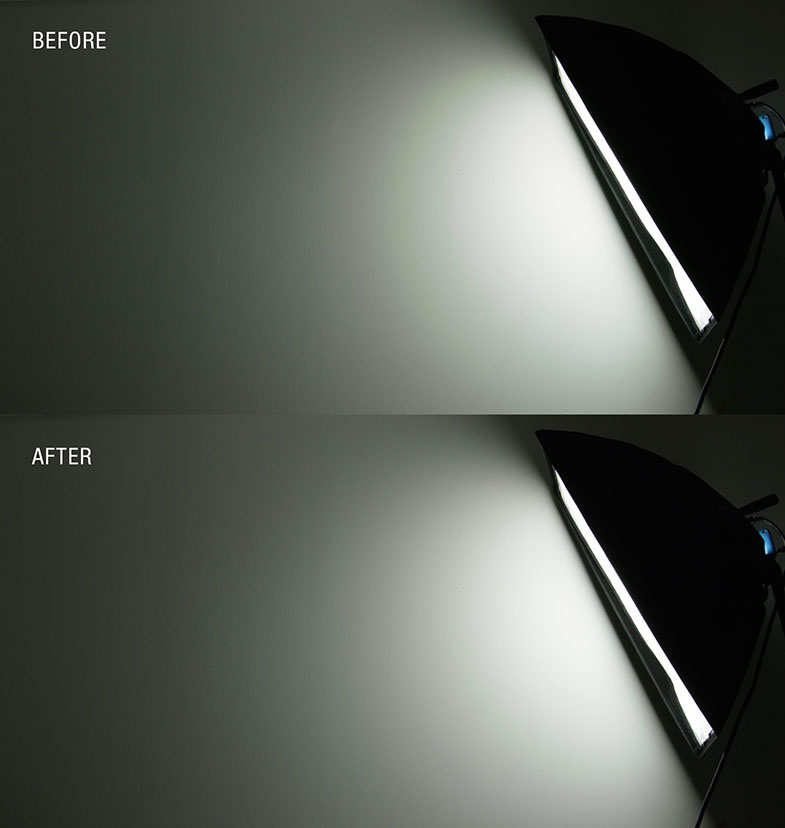
The UB300 boasts newly-developed haze-reduction technology--valuable for outdoor environments such as weather reporting--for ensuring optimal image reproduction. In certain situations, picture contrast may be low as result of environmental fog or haze conditions, and this Haze Reduction function will optimize camera image settings appropriately to assure that the subject of shooting is as clear as possible.
The UB300 is available at a suggested list price of $24,995 US. Additional video format and controller support will be available Q1 2017.
By Paul Isaacs, Director of Product Management and Design, Sound Devices, LLC
"The purpose of color correction is to fix any problems with exposure and color, ensuring the final image looks right. Color grading is used to set the mood by adjusting the colors of the video imagery to achieve a certain look or feel. At the core of color correction is tonal range: the range of brightness from dark (black) to light (white). When the tonal range is narrow, imagery will lack contrast and appear flat. Increasing the range will increase the contrast, providing brighter whites and deeper, darker blacks. This contrast often helps increase color saturation and can make a shot appear more vibrant.
Professionals often use cameras to record log-format video which allows for greater dynamic range and exposure detail to be captured in shadows and highlights for a given video bit depth. This requires that, while on set, having a quality monitor with precision scopes to properly analyze the video signal is even more vital.
There are a number of widely used exposure monitoring tools available today. Zebras and false colors are excellent for quickly identifying areas of over- or under-exposure and for setting an approximate correct exposure for skin tone. For more accurate monitoring of exposure and color balance, it is preferable to use scopes of which there are three commonly used varieties —waveform, histogram, and vectorscope.
Waveform is a tool designed to check and aid in the setting of exposure levels, both for brightness and color. Its vertical scale provides more accurate exposure level measurement than false colors or zebras. A monitor’s waveform can have three modes: luma, RGB overlay, and RGB parade. Regardless of mode, the waveform is a scope ideally suited for avoiding over-saturation of colors and checking exposure of skin tone, as well as consistent background lighting. It is also useful to ensure background separation on green screen shots."

Histogram is a tool for checking overall brightness (luma) or color level (chrominance) within an image. It displays how many pixels there are at each brightness or color level. Like waveform, the histogram can have three modes— luma, RGB overlay, and RGB parade. It can be used to quickly determine whether the full dynamic range is being captured. In other words, most pixels should be distributed broadly around the center of the horizontal axis. Too hard to the left, and the image is underexposed. Too hard to the right, and the image is overexposed.
Vectorscope is a circular graphical tool for monitoring color saturation and hues. It may be used to help make creative choices on overall look, eliminate unwanted color casts (offsets), and check white/black color balance. It’s also a crucial tool for ensuring that color saturation falls within a legal broadcast color gamut. While modern HD televisions can handle the full tonal range (for 8-bit, RGB 0,0,0 to 255,255,255), there are still specifications for “broadcast safe colors” that remain in effect worldwide and limit the range to 16,16,16 (safe black) to 235,235,235 (safe white). On a monitor’s vectorscope, color saturation is determined by the distance from the center of the scope; the greater the saturation or more vivid a color, the further its trace reach is from the center. Color hue is determined by the direction or angle of the trace. Small boxes represent target values for fully saturated REC 709 primary and secondary colors. There is also a line, between the red and yellow target boxes that indicates skin tone.
With today’s fast-paced, ever-evolving industry, a high-quality monitor with scopes is crucial for any professional to have in their arsenal. Proper color correction, with the application of the right scopes, can help to bring any video imagery to life.
****************
Základy měření video signálu
Produktový manažer společnosti Sound Devices, Paul Isaacs, připravil krátký článek věnující se softwarovým měřícím nástrojům moderních kamerových monitorů, např. Video Devices PIX-E:
„Účelem barevných korekcí je opravit problémy s expozicí a barevností a zajistit optimální vzhled výsledného obrazu. Barevný grading je naopak kreativní nástroj pro změnu nálady snímku prostřednictvím barevných úprav. Základním předpokladem úspěšných barevných korekcí je optimální tonální rozsah, tedy rozsah od tmavých tónů po světlé. Pokud je tonální rozsah příliš úzký, obraz nebude mít dostatečný kontrast a bude působit ploše. Optimální rozsah se projeví také lepší saturací obrazu a živějším barevným podáním.
Profesionálové často natáčí do logaritmických video formátů, které dovolují zaznamenat široký dynamický rozsah a tedy i velké množství detailů v extrémech jasového spektra. Tento přístup ale vyžaduje kvalitní kamerový monitor pro měření a analýzu video signálu během záznamu.
Existuje řada nástrojů pro měření expozice. Např. zebra nebo zobrazení ve falešných barvách jsou skvělé funkce pro rychlou identifikaci pod- nebo přeexponovaných částí obrazu resp. pro nastavení optimálních pleťových tónů. Pro přesnější měření expozice a vyvážení barev jsou ale vhodnější klasické měřící nástroje – monitor vlnového průběhu, histogram a vektorskop.
Monitor vlnového průběhu se hodí pro nastaven korektní expozice, jak v jasové oblasti, tak co se týče barevnosti. Jeho vertikální škála poskytuje přesnější informace o expozici, než náhled ve falešných barvách nebo zebra. Může pracovat ve třech režimech: luma, RGB overlay a RGB parade. Ať už je aktivován jakýkoliv z těchto režimů, monitor vlnového průběhu pomůže vyhnout se extrémně saturovaným záběrům, ale i při kontrole pleťových tónů nebo při kontrole osvětlení pozadí. Je také velmi užitečný při kontrole separace zeleného klíčovacího pozadí.
Histogram je nástroj pro kontrolu jasu (luma) a barevných úrovní (chrominance) obrazu. Znázorňuje distribuci pixelů jednotlivých jasových nebo barevných úrovní. Stejně jako monitor vlnového průběhu, i histogram nabízí tři režimy zobrazení: luma, RGB overlay a RGB parade. Dovolí snadno zkontrolovat, je-li zaznamenáván celý dynamický rozsah. Jinými slovy, většina pixelů by měla být distribuována rovnoměrně na horizontální ose histogramu. Příliš velká koncentrace pixelů v levé části histogramu značí podexponování obrazu. Příliš velká koncentrace pixelů vpravo je naopak známkou přeexponování.
Vektorskop je zvláštní druh osciloskopu s kruhovým referenčním displejem pro monitorování barevné saturace a přesnosti. Může pomoci při kreativní práci s barevností snímku, eliminaci barevného závoje a kontrole celkového barevného vyvážení. Je také zcela nezbytnou pomůckou při kontrole bezpečného barevného rozsahu pro TV vysílání. Ačkoliv moderní HD televizory zobrazují plný tonální rozsah (8 bitů, RGB hodnoty 0, 0, 0 až 255, 255, 255), stále jsou ve světe v platnosti vysílací normy, které specifikují bezpečný tonální rozsah, definují např. bezpečnou úroveň černé (16, 16, 16) nebo bezpečnou úroveň bílé (235, 235, 235). Na vektorskopu můžeme odečíst barevnou saturaci jako vzdálenost od středu; čím větší vzdálenost, tím vyšší je saturace. Barevný odstín je dán úhlem průběhu. Malé čtverce na displeji jsou cílové hodnoty plně saturovaných primárních a sekundárních barev např. normy REC 709. Linka mezi cílovými čtverci pro červenou a žlutou indikuje pleťové tóny.
V dnešním rychle se rozvíjejícím filmovém odvětví je kvalitní monitor s měřícími nástroji absolutní nezbytností. Barevné korekce spolu s přesnými měřícími prvky pomohou vdechnout vašim záběrům život.”
Steinberg announced the release of the first Dorico update, version 1.0.10. This update includes more than 200 enhancements and fixes, including substantial performance improvements throughout the application, initial support for VST Expression Maps, new Transpose dialog, and more. Steinberg also released a free 30-day trial version of Dorico. 
It is important to use a good quality HD cable with 12G-SDI products. As an example, Blackmagic Design uses a Belden 1694A cable when testing their 12G-SDI products, we can recommend Canare L-4.5CHD.
Distance for cable lengths are:

Press Release
Blackmagic Design announced that DP and lead producer Joey Fameli used several Micro Cinema Cameras to shoot a recent Arctic Circle expedition. Fameli also uses the Micro Cinema Cameras, along with Pocket Cinema Cameras, Studio Cameras and DaVinci Resolve Studio, to shoot and grade content for Tested, which is a website dedicated to covering ‘anything that’s awesome’ in science, exploration, nature, emerging technology, consumer technology and more.

Tested is Adam Savage’s (“MythBusters”) home on the web, and together with one of the website’s founders Norman Chan, they bring unique stories, videos, podcasts and more to readers. As Fameli explained, “Tested is geared towards a maker culture and encompasses all things in the STEM (science, technology, engineering and mathematics) field. As lead producer, I handle video content for the website, which can range from BTS footage of an experiment, special FX videos and visits to movie sets, build videos that chronicle Savage constructing a project, and even expeditions to the Arctic Circle.”
The Tested team was invited by astronaut Chris Hadfield as part of his Generator Arctic team on the Quark Expeditions tour. Traveling aboard the Russian Icebreaker Kapitan Khlebnikov, Fameli and his team spent 18 days sailing through Greenland and the Canadian High Arctic.

“The Micro Cinema Camera has a very small footprint with substantial battery life for the size, so they were perfect for capturing time-lapse and locked-off shots of the ship and its surroundings as we sailed through the Arctic,” said Fameli. “I mounted a few around the ship, taped hand warmers to the batteries and let them roll. In return, I got great time lapses of helicopters taking off, the ship slowly breaking through the ice, life aboard the legendary Russian ship and endless ice-covered landscapes.
“I also used the Micro Cinema Cameras to capture dash cam footage during a recent self-driving DeLorean shoot,” he continued. “I secured four Micro Cinema Cameras inside the car using gaffer tape and butyl to capture the driver, the passenger, a wide shot and outside the window. It was high noon, so we were dealing with harsh lights and dark shadows, and the cameras captured everything thanks to the quality and dynamic range. All the data was still there in post to bring the image back with DaVinci Resolve Studio.”
According to Fameli, Tested doesn’t shoot with a big crew and often times they have no control over the shooting environment. “Unless we are in the studio, we are usually shooting outdoors,” he explained. “That’s where the Micro Cinema Camera’s dynamic range really comes into play.

“We’ve also been using the Pocket Cinema Cameras for a few years now for a lot of run and gun work, on rigs and handheld, and the same is true for them,” he added. “When traveling as much as we do, you not only need that portability, but also broadcast professional quality that will match with other cameras. I’ve never been a DSLR shooter, as I came up through ENG, but I don't want H.264 footage. I want RAW, ProRes, film dynamic range and color grading all at an affordable price.”
With the Micro and Pocket Cinema Cameras as staples in his arsenal, Fameli again turned to Blackmagic Design when it was time to upgrade Tested’s in-house live studio. “We recently revamped our studio, and whereas before we were using a few different cameras with different color profiles, we knew going into the upgrade that we wanted to give the studio one uniform camera setup and look,” he said. “We decided to go with the Blackmagic Studio Cameras because we needed multiple cameras and knew they could deliver on the price, quality,1080 content platform requirement and they were built for live production, so we can easily push out through SDI to the mixers.”
Fameli concluded, “We are finishing up building out the studio now, but we have big plans for it. We want to not only continue using it for live productions, but also for our build videos, taking advantage of the Studio Camera setup to capture multiple angles and provide our audience with a better viewing experience.”

Press Photography
Product photos of all Blackmagic Design products, are available at www.blackmagicdesign.com/press/images.
About Blackmagic Design
Blackmagic Design creates the world’s highest quality video editing products, digital film cameras, color correctors, video converters, video monitoring, routers, live production switchers, disk recorders, waveform monitors and real time film scanners for the feature film, post production and television broadcast industries. Blackmagic Design’s DeckLink capture cards launched a revolution in quality and affordability in post production, while the company’s Emmy™ award winning DaVinci color correction products have dominated the television and film industry since 1984. Blackmagic Design continues ground breaking innovations including 6G-SDI and 12G-SDI products and stereoscopic 3D and Ultra HD workflows. Founded by world leading post production editors and engineers, Blackmagic Design has offices in the USA, UK, Japan, Singapore and Australia. For more information, please go to www.blackmagicdesign.com.