
 CZ
CZ SK
SK HU
HU AT
AT DE
DE ES
ES SI
SI HR
HR
Nothing in the basket.

- Search
-
Login

-
0
Comparison
Add products to compare, then they will appear here and you can compare parameters.
-
0
0 €
Panasonic AW-SF300Z Video Mixer Software Key
SKU: AW-SF300Z
The Panasonic Visual Presets Software Key enables intuitive, visual control of multiple PTZ cameras, allowing users to switch between cameras and preset positions بسهولة using a customizable GUI interface.
Call us for pricing information
Availability
on request
Product description
SPECIFICATIONS
PACKAGE CONTENT
Product description
The Panasonic Visual Presets Software Key enables intuitive, visual control of multiple PTZ cameras, allowing users to switch between cameras and preset positions بسهولة using a customizable GUI interface.
The Panasonic Visual Presets Software Key is a powerful add-on designed to enhance multi-camera PTZ production workflows by introducing an intuitive, visual control interface. Installed on a Windows-based control computer or server, this software integrates seamlessly with Panasonic’s free PTZ Control Center, enabling users to manage multiple PTZ cameras and their preset positions through an easy-to-use graphical interface.
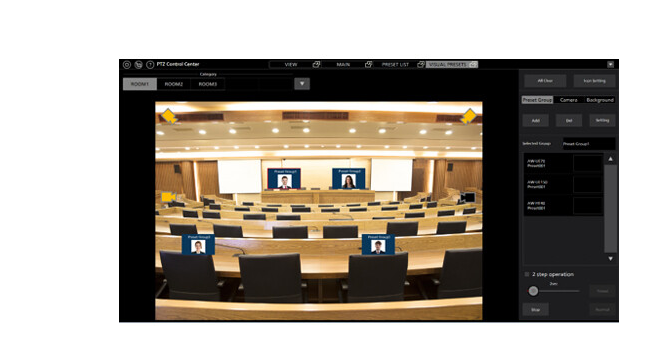
With this solution, users can group cameras and assign preset positions, then represent those presets visually using custom images or screenshots. These icons appear in the GUI, allowing operators to quickly select a camera angle or position simply by clicking on an image—making it especially useful for live productions, events, studios, or houses of worship.
The software also supports creating preset groups and visual layouts of shooting environments, enabling multiple room configurations and fast switching between setups. Camera positions are displayed as icons, and active cameras are highlighted, giving operators instant visual feedback. Its mouse-based control system makes it accessible even for users with limited technical experience.
Delivered electronically via email, this software key unlocks enhanced functionality for compatible Panasonic PTZ cameras, streamlining operations and improving production efficiency.
Key Features
- Visual control of multiple PTZ cameras and presets
- GUI interface with customizable photo-based preset icons
- Supports grouping of cameras and preset positions
- One-click switching between camera angles and preset groups
- Highlights active cameras for quick visual reference
- Mouse-based operation for ease of use
- Create custom layouts and diagrams for different environments
- Works with Panasonic PTZ Control Center software
- Includes EasyIP Setup Tool Plus
- Delivered electronically via email
PACKAGE CONTENT
- 1 × Panasonic Visual Presets Software License Key (Email Delivery)
SPECIFICATIONS
- Product Type: Software license key
- Platform: Windows (control computer/server)
- Delivery Method: Email (electronic license key)
- Software Requirement: Panasonic PTZ Control Center (free download)
- Interface: GUI with visual preset icons
- Control Method: Mouse-based operation
Compatible Panasonic PTZ Camera Models
- AW-UE150W/K
- AW-UE100W/K
- AW-HN130W/K, AW-HE130W/K
- AW-UN70W/K, AW-UE70W/K
- AW-HE42W/K
- AW-HN40HW/HK, AW-HE40SW/SK, AW-HE40HW/HK
- AW-HN38HW/HK, AW-HE38HW/HK
- AW-UE4WG/KG
News, training, and discounts from Syntex
Special offers and discounts for subscribers only · Free audio & video workshops · News and tips from the world of filmmaking