
 CZ
CZ SK
SK HU
HU AT
AT DE
DE ES
ES SI
SI HR
HR
Nothing in the basket.

- Search
-
Login

-
0
Comparison
Add products to compare, then they will appear here and you can compare parameters.
-
0
0 €
News
Press Release
Blackmagic Design announced the immediate availability of ATEM Switcher Update 6.3 which adds new advanced power macros that let customers operate dozens of switcher features instantly and in parallel with a single button press. The new power macros are unique because they are extremely easy to build and because they’re located in the switcher, they are available on every control panel for all users.
ATEM Switcher Update 6.3 is available for download now free of charge for all Blackmagic ATEM switcher customers. This includes the latest Ultra HD ATEM Production Studio 4K models, the ATEM Television Studio and the older discontinued ATEM Production Switcher models all get this update. In live production events can unfold in unpredictable ways, because it’s live. These new power macros allow complicated setups to be predefined so that dozens of settings can be selected with the push of a button, ensuring high production values and absolute error free live switching. Extremely complex scenes can be recalled or even animated in real time using the new built in power macros.
An example of the benefits of power macros is, if the director needs more keyers for a complex production than what the switcher has built in, a macro could be created for each camera, chroma key and background combination and then the switcher operator would cut between each by triggering the specific macro. The moment the macro is triggered the layers and the key would be set up and brought on line instantly. In some virtual set scenarios you can have over a dozen camera views and each view can be handled by a separate macro even though the switcher doesn’t have a dozen separate chroma keys built in.
Macros will always ensure automated sequences are precisely timed actions and can include transitions between video sources, graphics, media pool assets, key effects, audio mixer adjustments, camera control settings and even time delays, allowing macros to be used to create animations over time. That means customers can automate frequently used commands or create complex sequences for more sophisticated programs that would be impossible to do manually during a live production. Once created, macros can be recalled instantly with the touch of a button, from any of the control panels, ensuring repeatable and consistent results every time.
Custom macros can be built using the ATEM software control on Mac and Windows computers, or directly on the ATEM 1 M/E and 2 M/E hardware control panels. Power macros can also be copied between switchers so customers working on larger programs can use them across multiple panels at the same time, or save them to recall the settings at another location, or on another switcher. One of the reasons the new power macros are so flexible is because they can be saved as XML files when the customer saves the switcher state, which means these files can even be edited and reloaded into the switcher for customization.
Power macros can also include other macros when being created, so extremely complicated sequences can be designed that make it possible for simple changes and finessing of macros in the future.
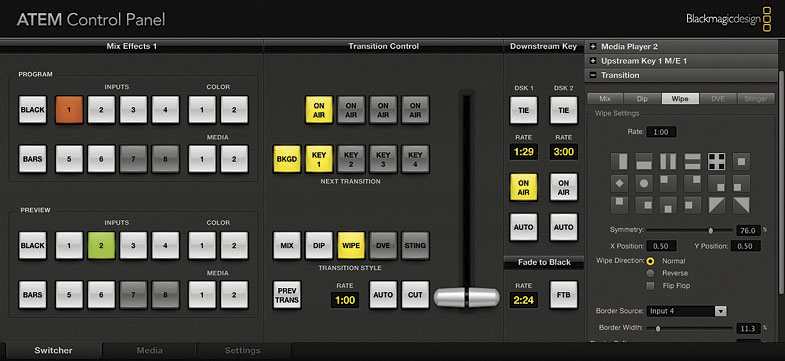
“We are extremely excited to release this powerful update for our ATEM switcher customers,” said Grant Petty, CEO of Blackmagic Design. “We can’t wait to see the unique program elements, like custom transitions and stingers, that customers will be able to create with power macros on their ATEM switchers! I’m especially pleased that macro recording and playback is available on every Blackmagic ATEM switcher, even including older discontinued models. With these powerful macros also being included in ATEM Television Studio, that retails for only US$995, no one will be denied the benefits of a high end broadcast grade macro system that provides the same creative capability as the most advanced switchers available today.”
Availability and Price
ATEM Switchers are available now starting from US$995 from Blackmagic Design resellers worldwide.
Press Photography
Product photos of ATEM Switchers, and all other Blackmagic Design products, are available at www.blackmagicdesign.com/press/images.
About Blackmagic Design
Blackmagic Design creates the world’s highest quality video editing products, digital film cameras, color correctors, video converters, video monitoring, routers, live production switchers, disk recorders, waveform monitors and real time film scanners for the feature film, post production and television broadcast industries. Blackmagic Design’s DeckLink capture cards launched a revolution in quality and affordability in post production, while the company’s Emmy™ award winning DaVinci color correction products have dominated the television and film industry since 1984. Blackmagic Design continues ground breaking innovations including 6G-SDI and 12G-SDI products and stereoscopic 3D and Ultra HD workflows. Founded by world leading post production editors and engineers, Blackmagic Design has offices in the USA, UK, Japan, Singapore and Australia. For more information, please go to www.blackmagicdesign.com.
Date: 12. 02. 2015,
Category: News
FULL ARTICLE
Press Release
Blackmagic Design announced that Toronto-based visual effects shop Intelligent Creatures is using Fusion Studio to complete VFX for the hit show “Orphan Black.” VFX work for the show will now include extensive effects for the new season of the show.
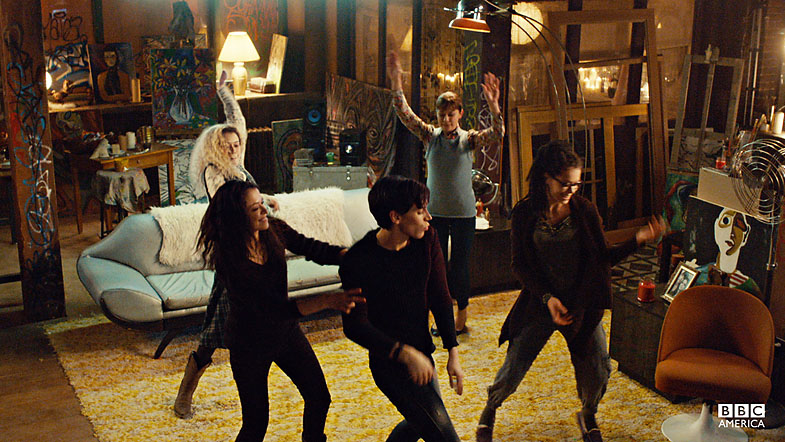
“Orphan Black” has become one of BBC America’s biggest international hits over the past two seasons, with the new season coming in the spring of 2015. The show follows a woman who has discovered she has been cloned and is thrust into a deadly international conspiracy, which includes meeting and working with her various clones. The sci fi drama includes a huge amount of VFX work, and Intelligent Creatures was chosen to provide VFX for showing the clones and the main character’s interactions with them.
Intelligent Creatures, one of the world’s most sought after VFX shops for film and television, was tasked with going beyond the standard “twinning” effect used in films going back to the 1940s, but also to stay within a television budget that was far less than typical techniques used in movies required. They combined their extensive experience in traditional effects with their innovative approach to VFX to create the cloned lead character of the show, and new clone scenes in the upcoming season. Fusion Studio was the main VFX software used by Intelligent Creatures for all of the clone effects.
“We have used Fusion exclusively on all three seasons of Orphan Black and Fusion has become the foundation to our pipeline at Intelligent Creatures. From ingesting footage, to compositing and dailies, to client review and final delivery – every frame runs through Fusion,” said Eric Doiron, VFX Supervisor at Intelligent Creatures. “I've been particularly impressed by Fusion's color workflow. On Orphan Black we have been able to maintain a consistent viewing experience for our clients, from on set monitoring, to editorial, to visual effects and final grading.”
The show’s clone scenes are shot with several motion control rigs and a variety of different twinning camera tricks, as well as different composite shots, which keep the show dynamic but also add to the complexity of the visual effects. Moving shots create a far more believable scene and Fusion's features allow these complex scenes to be constructed throughout the entire process.
"What makes Fusion so essential for us is that its powerful tool set allows us to face the unique challenges of any shot. Fusion's roto, paint, tracking and color nodes make compositing multiple clones together a seamless process. The clone dance party and shower scene from last season are perfect examples of how Fusion brings it all together," concluded Eric Doiron.
"One constant we rely on is a creative pipeline that adapts to the many innovative approaches we offer our clients. We are looking forward to working with Blackmagic and using Fusion Studio in our workflow," added Lon Molnar, VFX Supervisor & CEO of Intelligent Creatures.
Press Photography
Product photos of Fusion Studio and all other Blackmagic Design products are available at www.blackmagicdesign.com/press/images.
About Blackmagic Design
Blackmagic Design creates the world’s highest quality video editing products, digital film cameras, color correctors, video converters, video monitoring, routers, live production switchers, disk recorders, waveform monitors and real time film scanners for the feature film, post production and television broadcast industries. Blackmagic Design’s DeckLink capture cards launched a revolution in quality and affordability in post production, while the company’s Emmy™ award winning DaVinci color correction products have dominated the television and film industry since 1984. Blackmagic Design continues ground breaking innovations including 6G-SDI and 12G-SDI products and stereoscopic 3D and Ultra HD workflows. Founded by world leading post production editors and engineers, Blackmagic Design has offices in the USA, UK, Japan, Singapore and Australia. For more information, please go to www.blackmagicdesign.com.
Date: 10. 02. 2015,
Category: News
FULL ARTICLE
The following CFast 2.0 cards are recommended for 4K ProRes 422 HQ (up to 60 fps)
Lexar Professional 32GB 3400x
Lexar Professional 64GB 3400x
Lexar Professional 128GB 3400x
Lexar Professional 256GB 3400X
Wise CFast 2.0 128GB 3400X
The following CFast 2.0 cards are recommended for 4K RAW (up to 30 fps)
Lexar Professional 64GB 3400x
Lexar Professional 128GB 3400x
Lexar Professional 256GB 3400X
Wise CFast 2.0 128GB 3400X
Date: 09. 02. 2015,
Category: News
FULL ARTICLE
The following SD cards are recommended for Apple ProRes 422 (HQ) recording:
Delkin Devices 16GB Elite SDHC UHS-I
Delkin Devices 32GB Elite SDHC UHS-I
Sandisk 8GB 45 MB/sec Extreme SDHC UHS-I
Sandisk 16GB 45 MB/sec Extreme SDHC UHS-I
Sandisk 32GB 45 MB/sec Extreme SDHC UHS-I
Sandisk 64GB 45 MB/sec Extreme SDXC UHS-I
Sandisk 128GB 45 MB/sec Extreme SDXC UHS-I
Sandisk 8GB Extreme Plus 80 MB/sec SDHC UHS-I
Sandisk 16GB Extreme Plus 80 MB/sec SDHC UHS-I
Sandisk 32GB Extreme Plus 80 MB/sec SDHC UHS-I
Sandisk 64GB Extreme Plus 80 MB/sec SDXC UHS-I
Sandisk 128GB Extreme Plus 80 MB/sec SDXC UHS-I
Sandisk 32GB Extreme Pro 95 MB/sec SDHC UHS-I
Sandisk 64GB Extreme Pro 95 MB/sec SDXC UHS-I
Sandisk 128GB Extreme Pro 95 MB/sec SDXC UHS-I
Sandisk 256GB Extreme Pro 95 MB/sec SDXC UHS-I
Sandisk 512GB Extreme Pro 95 MB/sec SDXC UHS-I
The following SD cards are recommended for CinemaDNG RAW recording:
Sandisk 32GB Extreme Pro 95 MB/sec SDHC UHS-I
Sandisk 64GB Extreme Pro 95 MB/sec SDXC UHS-I
Sandisk 128GB Extreme Pro 95 MB/sec SDXC UHS-I
Sandisk 256GB Extreme Pro 95 MB/sec SDXC UHS-I
Sandisk 512GB Extreme Pro 95 MB/sec SDXC UHS-I
Date: 09. 02. 2015,
Category: News
FULL ARTICLE
Blackmagic Cinema Camera
Blackmagic Cinema Camera Certified SSDs (2/2015)
SSDs which are qualified for 2.5K RAW CinemaDNG video capture will also work well for compressed video capture. There are some SSDs which Blackmagic Design has tested and found to drop frames when capturing 2.5K RAW CinemaDNG video. However, they still work well when capturing compressed video.
The following SSDs are recommended for 2.5K RAW CinemaDNG capture or compressed video capture:
ADATA XPG SX900 256GB (ASX900S3-256GM-C)
Angelbird 240GB AV Pro
Angelbird 480GB AV Pro
Digistor 240GB SSD Professional Video Series (DIG-PVD240S, pre-formatted ExFat)
Digistor 480GB SSD Professional Video Series (DIG-PVD480S, pre-formatted ExFat)
Digistor 1TB SSD 4K Professional Video Series (DIG-PVD1000, pre-formatted ExFat)
Kingston 240 GB HyperX 3K (SH103S3/240G)
Kingston 480 GB HyperX 3K (SH103S3/480G)
Kingston 240 GB SSDNow KC300 (SKC300S37A/240G)
Kingston 480 GB SSDNow KC300 (SKC300S37A/480G)
Intel 335 Series 240GB SSD (SSDSC2CT240A4K5)
Intel 520 Series 240GB SSD (SSDSC2CW240A310)
Intel 520 Series 480GB SSD (SSDSC2CW480A310)
Intel 530 Series 180GB SSD (SSDSC2BW180A401)
Intel 530 Series 240GB SSD (SSDSC2BW240A401)
OWC 120 GB Mercury Extreme Pro 6G (OWCSSD7P6G120)
OWC 240 GB Mercury Extreme Pro 6G (OWCSSD7P6G240)
OWC 480 GB Mercury Extreme Pro 6G (OWCSSD7P6G480)
Samsung 256 GB 850 Pro (spacer required)
Samsung 512 GB 850 Pro (spacer required)
Samsung 1 TB 850 Pro (spacer required)
Sandisk Extreme 240GB (SDSSDX-240G-G25)
Sandisk Extreme 480GB (SDSSDX-480G-G25)
Sandisk Extreme Pro 240GB (SDSSDXPS-240G-G25)
Sandisk Extreme Pro 480GB (SDSSDXPS-480G-G25)
Sandisk Extreme Pro 960GB (SDSSDXPS-960G-G25)
PNY Prevail 240 GB (SSD9SC240GCDA-PB)
PNY Prevail 480 GB (SSD9SC480GCDA-PB)
PNY XLR8 480GB (SSD9SC480GMDA-RB)
Transcend 256GB SSD720 (TS256GSSD720)
Transcend 256 GB SSD370 (TS256GSSD370)
Transcend 512 GB SSD370 (TS512GSSD370)
Transcend 1 TB SSD370 (TS1TSSD370)
In addition to the above, these SSDs work ONLY for compressed video capture:
Crucial 256GB M4 (firmware 000F) (CT256M4SSD2)
OCZ Agility 3 240GB (AGT3-25SAT3-240G)
Sandisk Extreme 120GB (SDSSDX-120G-G25)
The following SSDs are either discontinued or only supported as part of a legacy configuration and may no longer be available with the required firmware:
Crucial 256GB C300 (CTFDDAC256MAG-1G1) - (discontinued)
Digistor 128GB SSD Professional Video Extreme (DIG-PVD128E, pre-formatted ExFat)
Kingston 64GB SSDNow V+100 (SVP100S2/64G) - (discontinued)
Kingston 128GB SSDNow V+100 (SVP100S2/128G) - (discontinued)
Kingston 512GB SSDNow V+100 (SVP100S2/512G) - (discontinued)
Kingston 120GB SSDNow V+200 (SVP200S3/120G) - (discontinued)
Kingston 240GB SSDNow V+200 (SVP200S3/240G) - (discontinued)
Kingston HyperX 240GB (SH100S3/240G) - (discontinued)
OCZ 240GB Vertex 3 (VTX3-25SAT3-240G) - (discontinued)
OCZ 480GB Vertex 3 (VTX3-25SAT3-480G) - (discontinued)
OCZ 240GB Deneva 2 (firmware 2.22) (D2CSTK251M21-0240) - (discontinued)
OWC Mercury Extreme Pro 6G SSD (firmware 5.0.2) (OWCSSDMX6G240T) - (discontinued)
OWC 120GB Mercury Extreme Pro 6G (Firmware Rev 5.0.7) (OWCSSDMX6G120T) - (discontinued)
OWC 240GB Mercury Extreme Pro 6G (Firmware Rev 5.0.6) (OWCSSDMX6G240T) - (discontinued)
OWC 480GB Mercury Extreme Pro 6G (Firmware Rev 5.0.6) (OWCSSDMX6G480) - (discontinued)
Crucial 512GB M4 (firmware 009 only) (CT512M4SSD2)
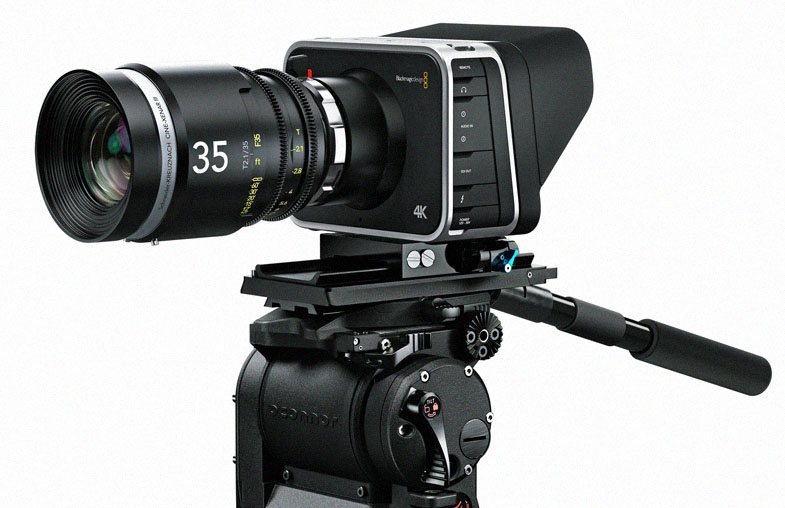
Blackmagic Production Camera 4K
Blackmagic Production Camera 4K Certified SSDs (2/2015)
The following SSDs are recommended for 4K RAW and ProRes captures:
Digistor 1TB SSD 4K Professional Video Series (DIG-PVD1000, pre-formatted ExFat)
Samsung 256 GB 850 Pro (spacer needed)
Samsung 512 GB 850 Pro (spacer needed)
Samsung 1 TB 850 Pro (spacer needed)
Sandisk Extreme Pro 240GB (SDSSDXPS-240G-G25)
Sandisk Extreme Pro 480GB (SDSSDXPS-480G-G25)
Sandisk Extreme Pro 960GB (SDSSDXPS-960G-G25)
The following SSDs are recommended 4K and 1080 Apple ProRes (HQ) 422 captures:
Transcend 256GB SSD720 (TS256GSSD720)
Intel 530 Series 180GB SSD (SSDSC2BW180A401)
Intel 530 Series 240GB SSD (SSDSC2BW240A401)
Kingston 240 GB HyperX 3K (SH103S3/240G)
Kingston 480 GB HyperX 3K (SH103S3/480G)
Kingston 240 GB SSDNow KC300 (SKC300S37A/240G)
Kingston 480 GB SSDNow KC300 (SKC300S37A/480G)
Sandisk Extreme 240GB (SDSSDX-240G-G25)
Sandisk Extreme 480GB (SDSSDX-480G-G25)
Transcend 256 GB SSD 370 (TS256GSSD370)
Transcend 512 GB SSD 370 (TS512GSSD370)
Transcend 1 TB SSD 370 (TS1TSSD370)
OWC 120 GB Mercury Extreme Pro 6G (OWCSSD7P6G120)
OWC 240 GB Mercury Extreme Pro 6G (OWCSSD7P6G240)
OWC 480 GB Mercury Extreme Pro 6G (OWCSSD7P6G480)
PNY Prevail 240 GB (SSD9SC240GCDA-PB)
PNY Prevail 480 GB (SSD9SC480GCDA-PB)
PNY XLR8 480GB (SSD9SC480GMDA-RB)
Digistor 240GB SSD Professional Video Series (DIG-PVD240S, pre-formatted ExFat)
Digistor 480GB SSD Professional Video Series (DIG-PVD480S, pre-formatted ExFat)
Angelbird 240GB AV Pro
Angelbird 480GB AV Pro
ADATA XPG SX900 256GB (ASX900S3-256GM-C)
Important Notes About SSD Speed
Some models of SSD can't save video data at the speed the manufacturer claims. This is due to the disk using hidden data compression to attain higher write speeds. This data compression can only save data at the manufacturer’s claimed speed when storing data such as blank data or simple files. Video data includes video noise and pixels which are more random so compression will not help, therefore revealing the true speed of the disk. Some SSDs can have up to 50% lower write speed than the manufacturer’s claimed speed. So even though the disk specifications claim an SSD has speeds fast enough to handle video, in reality the disk isn’t fast enough when used to store video data for real time capture. However, this mostly affects HD capture and often these disks can still be used for playback. Use Blackmagic Disk Speed Test to accurately measure whether your SSD will be able to handle uncompressed video capture and playback. Blackmagic Disk Speed Test uses data to simulate the storage of video so you get results similar to what you’ll see when capturing video to a disk. During Blackmagic testing, we have found newer, larger models of SSD and larger capacity SSDs are generally faster.
Date: 09. 02. 2015,
Category: News
FULL ARTICLE