
 CZ
CZ SK
SK HU
HU AT
AT DE
DE ES
ES SI
SI HR
HR
Nothing in the basket.

- Search
-
Login

-
0
Comparison
Add products to compare, then they will appear here and you can compare parameters.
-
0
0 €
News
Press Release
Blackmagic Design announced that the Blackmagic Pocket Cinema Camera was used to shoot “Watches & Wonders” promotional videos for Swiss luxury watch maker Vacheron Constantin. These promos were produced by Verawom, a leading social creative company based in Shanghai and part of digital media and communications firm Dentsu Aegis Network.
The four promos produced for Vacheron Constantin feature special guest interviews and product displays at Watches & Wonders 2014, the second edition of the Asia Haute Horlogerie (Fine Watchmaking) Exhibition in Hong Kong. The exhibition provides the latest information on the luxury watch maker and showcase its exceptional new models that combine technical mastery and aesthetic elegance. The four promos were completed within three days by a one man crew consisting of director Yu Gang.
This was the third time that Yu Gang shot exhibition promos for Vacheron Constantin. Based on his experience filming the previous two projects, he was well prepared for his third opportunity. “All of the equipment for the promos were taken from the Jiangsu province to Hong Kong, so every piece of equipment had to be perfect,” Yu said. “For the previous two exhibitions, I shot with a DSLR camera, which was portable but the image quality was not good enough. The Blackmagic Pocket Cinema Camera features both a compact design and excellent image quality, so I decided to use it this time.”
Yu assembled a dual camera rig for filming with two Blackmagic Pocket Cinema Cameras at the same time. On the rig, there was a Pocket Cinema Camera equipped with a Metabones Speed Booster and a Canon 24-70mm f2.8 lens and a Pocket Cinema Camera with a Panasonic 7-14mm f4 MFT lens. Also added to the rig was a common 12V 9800mAh polymer battery, which could support ten hour non stop operation of the two cameras.
“The Blackmagic Pocket Cinema Cameras were so light that it was very easy for me to carry two cameras and all the gear around the exhibition hall for two straight days,” said Yu. “We need to analyze the characteristics of the project and keep the tools as simple as possible accordingly to ensure our mobility. The more mobile you are, the more chances you will capture good shots.”
Yu got started on post production at night after he was done with shoots during the day. The following morning, the finished promo would be taken to the exhibition hall where it would be reviewed, revised if needed, and put on the Internet once the client approved. With a fast paced workflow, Yu finished the first overview promo on the first night and three more on the second night.
All footage was shot in film mode to take advantage of the Blackmagic Pocket Cinema Camera’s 13 stops of dynamic range and recorded to 1080HD 25p in Apple ProRes LT.
When grading the flat footage shot in film mode, Yu used the LUT he created in DaVinci Resolve to color the film efficiently. “I imported a shot that could represent most of the scenes into DaVinci Resolve, made adjustments until the footage had the same tone as Vacheron Constantin’s logo and then exported a 3D LUT. When finished with editing, I applied the LUT to the timeline and did some tweaks when necessary to produce the look that matched Vacheron Constantin.”
“The client was happy with the promos and we will continue our cooperation for Geneva Time Exhibition 2015,” Yu concluded.

Press Photography
Product photos of Blackmagic Pocket Cinema Camera and DaVinci Resolve are available at www.blackmagicdesign.com/press/images.
About Blackmagic Design
Blackmagic Design creates the world’s highest quality video editing products, digital film cameras, color correctors, video converters, video monitoring, routers, live production switchers, disk recorders, waveform monitors and real time film scanners for the feature film, post production and television broadcast industries. Blackmagic Design’s DeckLink capture cards launched a revolution in quality and affordability in post production, while the company’s Emmy™ award winning DaVinci color correction products have dominated the television and film industry since 1984. Blackmagic Design continues ground breaking innovations including 6G-SDI and 12G-SDI products and stereoscopic 3D and Ultra HD workflows. Founded by world leading post production editors and engineers, Blackmagic Design has offices in the USA, UK, Japan, Singapore and Australia. For more information, please go to www.blackmagicdesign.com.
Date: 05. 03. 2015,
Category: News
FULL ARTICLE
Press Release
Transform any HDMI camera into an HD live streaming device, affordably, and with wireless capabilities.
Livestream, the Brooklyn-based technology company streaming 300,000 live events to 40 million viewers a month, launches its newest product, the Livestream Broadcaster mini™.
The all-new Broadcaster mini is Livestream’s newest addition to its line of live streaming encoders. At about ? the size of the original Broadcaster™, it is small enough to fit in a pocket, and despite its size, it features the top notch specs that Livestream users have come to expect -- fast and reliable 5Ghz WiFi, streaming up to 1080p, an internal rechargeable Li-ion battery, full control and setup via the free Livestream app for iOS or Android, and more.
What really makes the Broadcaster mini stand out are its price and wireless capabilities.
“Today’s launch marks the latest in Livestream’s efforts to democratize live video and it offers a wireless solution to mobile live streaming at a more affordable price. Without having to be tethered to a wall with an ethernet cable, users are free to broadcast live from more locations, and more places within those locations,” said Livestream CEO and Co-founder, Max Haot.
The Broadcaster mini is priced at $295 US, well under comparable encoders on the market. To operate it, the user simply needs to connect the Broadcaster mini to an HDMI camera, pair it with the Livestream app, and be ready to go live to millions of viewers on any device. The Broadcaster mini is available for pre-order and ships March 16th. Visit livestream.com/broadcaster-mini for more information and locations where to buy one.
Additionally, Livestream will soon release an update to the original Broadcaster unit, now three years old. The Broadcaster Pro will make its debut in April 2015, keeping many of the great features of the original Broadcaster, with improved specs.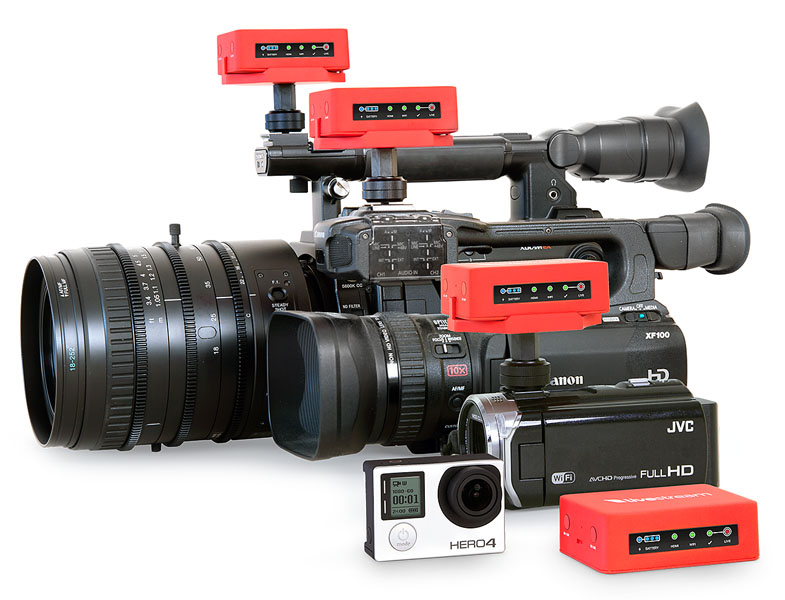
About Livestream
Livestream’s mission is to connect people and live events. Livestream offers event owners a complete set of hardware and software tools to share their events with a growing community online. More than 40 million viewers each month watch thousands of live events from customers including The New York Times, Facebook, ESPN, SpaceX and Warner Bros. Records. Founded in 2007, Livestream is headquartered in New York with offices in Los Angeles, London, Ukraine and India. www.livestream.com.
Date: 04. 03. 2015,
Category: News
FULL ARTICLE
Press Release
Blackmagic Design announced the new television mini series “Gallipoli” used Blackmagic URSA EF and Blackmagic Production Camera 4K cameras to capture a variety of scenes and shots throughout the show. This included using the URSA to capture the show’s stunning opening title sequence.
“Gallipoli” is one of the most anticipated television mini series of 2015, and follows the lives of soldiers from the initial landings to the withdrawals of troops from the shores of Turkey in one of the most devastating battles of World War I. “Gallipoli,” starring Kodi Smit-McPhee, directed by Glendyn Ivin and with cinematography by Germain McMicking, tells the story of the battle and the soldiers who fought in it through sweeping action scenes that captures the horror of battle and the emotional and physical impact on men and women.
To set the tone for the mini series, Ivin created a visually stunning opening title sequence aimed at capturing the overall drama that the mini series will present. He chose to shoot this opening title sequence with the URSA EF camera.
“The opening sequence has to set the viewer up emotionally, and I came up with a simple, but beautiful idea. We filled a fish tank with water and then dropped vegetable oil, ink and kids school paints into the water. We then projected photos of the cast and action scenes onto the fish tank as it swirled and moved around with the different textures adding depth to the projected images. A simple idea, but it had to convey some complex ideas and I needed a camera to capture the footage in slow motion at very high quality,” said Ivin.
Ivin shot the scenes in ProRes, over a weekend in a basic studio set up with minimal lighting and equipment. “The images we shot with the URSA captured the complex textures as they formed in the tank so well that people thought it was done with CGI, even though we used no CGI and most of what you see in the final piece was captured ‘in-camera’ ” said Ivin. “The sequence is visually stunning and people thought it was a far more complicated and expensive than it was. URSA made that possible and gave me great control in post, ease of use and amazing quality.”
Though Ivin has been a Blackmagic camera owner for several years, on the day he shot the title sequence he had never before been near an URSA camera.
“I walked into the studio where the fish tank was, and when I first saw the URSA set up it did not look like anything I had ever seen before. In particular I had never seen a camera with a big screen on the side like the URSA. But within 15 minutes of using it, I was thinking ‘why doesn’t every camera have a screen like this?’ It was so useful and I think it will become integral to the way I will work in the future,” Ivin continued. “And even though I had never seen an URSA before, within only a couple of minutes of handling it I was shooting confidently with it.”
Ivin used Blackmagic Production Camera 4K to capture VFX plates for CGI for the large number of battle scenes featured. Carrying the camera to the shores of Turkey with DOP John Brawley, Ivin was able to capture the plates in rugged terrain thanks to the camera’s lightweight yet tough build.
“We could carry that camera up valley walls and tough cliffs, and get the high rez shots we needed. We climbed into places we couldn’t have with other cameras, and we still got amazing 4K footage out in the wild that matched perfectly and easily back with all of our other footage,” Ivin said.

Press Photography
Product photos of Blackmagic URSA, Blackmagic Production Camera 4K and all other Blackmagic Design products are available at www.blackmagicdesign.com/press/images.
About Blackmagic Design
Blackmagic Design creates the world’s highest quality video editing products, digital film cameras, color correctors, video converters, video monitoring, routers, live production switchers, disk recorders, waveform monitors and real time film scanners for the feature film, post production and television broadcast industries. Blackmagic Design’s DeckLink capture cards launched a revolution in quality and affordability in post production, while the company’s Emmy™ award winning DaVinci color correction products have dominated the television and film industry since 1984. Blackmagic Design continues ground breaking innovations including 6G-SDI and 12G-SDI products and stereoscopic 3D and Ultra HD workflows. Founded by world leading post production editors and engineers, Blackmagic Design has offices in the USA, UK, Japan, Singapore and Australia. For more information, please go to www.blackmagicdesign.com.
Date: 03. 03. 2015,
Category: News
FULL ARTICLE
Press Release
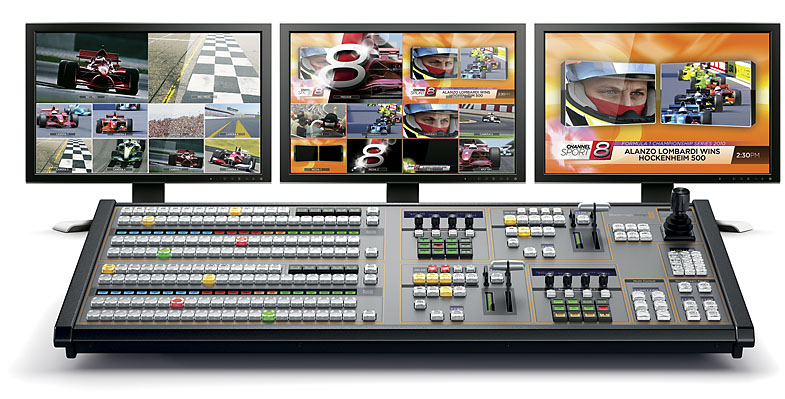
Blackmagic Design announced that Sky News in the UK has implemented Blackmagic's ATEM 2 M/E Production Studio 4K with an ATEM 2 M/E Broadcast Panel and Smart Videohub as part of an overhaul to the news organization's broadcast systems in “Studio D”.
A small team of multi skilled staff use the studio to create three minute news summary, which are then published across Sky News' digital outlets. The studio also has the layout and facilities available so that a bigger gallery set up, with producer, director, vision mixer and sound supervisor, all managed by a technical director, can be deployed on more complicated projects if the need arises.
Creating those news summaries had been very time consuming reveals veteran anchorman Martin Stanford. “This used to be a long edit suite job, marrying presenter video with news footage, adding information straps and so on. With the new studio workflow we can now create a bulletin in real time, mark the in and out, and then post to all digital devices. That has reduced the publication time lag from over an hour to a matter of minutes.”
“Every source, whether it’s station wide or local to the studio, goes through a Smart Videohub router to an assigned channel on the ATEM 2 M/E Production Studio 4K switcher. That includes three of our existing HD studio cameras, which have been repositioned onto the studio floor, as well as all of the monitoring in the gallery and on the studio floor, ensuring maximum flexibility.”
Four pre existing playout channels from the Sky News media server are connected to the switcher, as are three outside source channels, which can be populated by almost any source from the central Sky router, and our local feeds from a Mac computer and Apple TV unit, allowing us to connect devices via airplay.”
The lead project engineer, George Davies, Head of Operations at Sky News, explains they also assigned all three HD camera channels their own keyer. “Each camera has assigned to it an ATEM Television Studio switcher as a keyer. This means we can give the vision mixer access to camera sources with backgrounds already chroma keyed,” he explains. “Interviews and other program elements really are much easier to film against green when you don’t have to worry about cameras and keyed images at the same time!”
“For staff new to gallery operations the Blackmagic workflows we’ve implemented in “Studio D” have been both easy to learn and use, while the broadcast standard architecture and workflows have been easy enough to understand and adapt to for our more skilled operators,” concludes George. “Blackmagic’s ATEM 2 M/E Production Studio 4K offers good levels of functionality for the price, while the broadcast panel, provided us a reassuringly familiar layout for staff.”
Press Photography
Product photos of the ATEM 2 M/E Production Studio 4K, ATEM 2 M/E Broadcast Panel and Smart Videohub are available at www.blackmagicdesign.com/press/images.
About Blackmagic Design
Blackmagic Design creates the world’s highest quality video editing products, digital film cameras, color correctors, video converters, video monitoring, routers, live production switchers, disk recorders, waveform monitors and real time film scanners for the feature film, post production and television broadcast industries. Blackmagic Design’s DeckLink capture cards launched a revolution in quality and affordability in post production, while the company’s Emmy™ award winning DaVinci color correction products have dominated the television and film industry since 1984. Blackmagic Design continues ground breaking innovations including 6G-SDI and 12G-SDI products and stereoscopic 3D and Ultra HD workflows. Founded by world leading post production editors and engineers, Blackmagic Design has offices in the USA, UK, Japan, Singapore and Australia. For more information, please go to www.blackmagicdesign.com.
Date: 27. 02. 2015,
Category: News
FULL ARTICLE
Panasonic has introduced two new interchangeable lenses for its LUMIX G range of Micro Four Thirds System cameras – the H-HS030E, a 30mm macro lens, and the H-HS043E, a 42.5mm portrait lens.
The versatile LUMIX G MACRO 30mm/ F2.8 ASPH. / MEGA O.I.S. (H-HS030E) is ideal for life-size macro shots – such as close-ups of insects, food or flowers - as well as for stunning portrait. The new LUMIX G 42.5mm/F1.7 ASPH./POWER O.I.S. (H-HS043E) enables you to achieve a beautiful bokeh effect with soft, out-of-focus blur, allowing you to add stunning artistry to close-up portraits or shots in low light.
H-HS030 - a versatile F2.8 30mm macro lens
Elegantly designed with a sharp, metallic black finish, the new 30mm macro lens perfectly matches the style of the latest LUMIX G interchangeable lens cameras. With a 30mm (35mm camera equivalent: 60 mm) wide angle and a high speed F2.8 aperture, the lens provides sharp, high contrast image rendering. Utilising 1x life-size magnification, deep depth of field, and a focusing distance starting at just 0.105 m, the lens offers excellent performance even when shooting true-to-life macro shots.
A durable and reliable metal mount means the lens is perfectly suited for day-to-day use, while the multi-coated lens elements minimise ghosting and flaring to further enhance shooting performance. With a 240fpsDrive Auto Focus (AF) and MEGA O.I.S. (Optical Image Stabilizer), you can achieve fast, accurate focusing and stable framing with every shot.
Black, available from May
H-HS043 – a new F1.7 42.5mm portrait lens
The new 42.5mm lens is available in sharp metallic black and silver, and delivers beautiful defocus to help you add more artistry and creativity into your photography. Offering a 42.5mm middle-telephoto focal distance (35mm camera equivalent: 85mm equivalent to 85mm on a 35mm camera), a high speed F1.7 aperture, and a versatile focusing distance of 0.31 m, the lens can deliver portraits with a rich stereoscopic effect as well as close-ups with beautiful defocus.
The lens’ POWER O.I.S. system effectively compensatesunwanted blur caused by handshake - not only small, fast movements but also large, slow ones - helping you get the results you want, even in low light situations. The POWER O.I.S system, alongside the 240fps Drive AF, delivers stable framing and precise focusing every time.
Black & Silver, available from May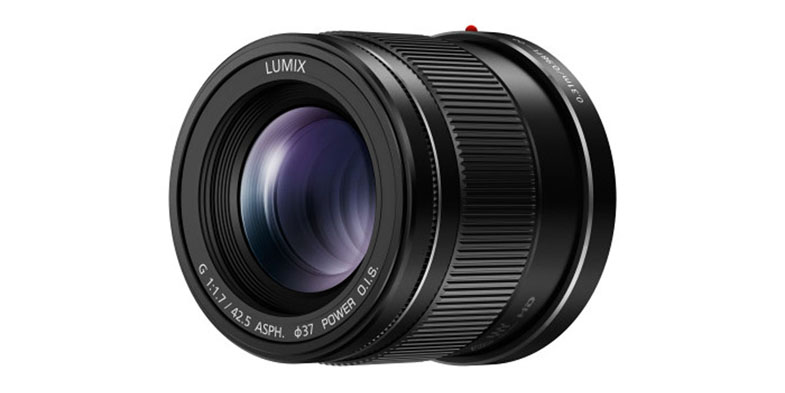
Date: 26. 02. 2015,
Category: News
FULL ARTICLE