
 CZ
CZ SK
SK HU
HU AT
AT DE
DE ES
ES SI
SI HR
HR
Nothing in the basket.

- Search
-
Login

-
0
Comparison
Add products to compare, then they will appear here and you can compare parameters.
-
0
0 €
News
NewTek unveiled 3Play Mini – the world's only sports production suite you can carry anywhere. This lightweight portable device allows sports video producers to add professional quality instant replay, slow motion, sophisticated transition effects and a broad range of other integrated production capabilities to their shows without being constrained by space, location or cost. Unlike expensive replay systems and stacks of complex components, 3Play Mini is powerful enough to drive your entire show, or plug into a switcher or video board and turn any production into amazing fan experiences that help attract big audiences, advertisers and sponsors. Anyone using up to four off-the-shelf HDMI cameras can produce multiple angle slow motion instant replays, edit highlights, roll stored video packages, create effects and transitions, publish to social media and much more. Out of the box, operators can control 3Play Mini with almost any touchscreen wireless mobile device or use an optional 3Play control surface. No other live sports solution includes a complete suite of sports production tools in such a small, affordable package. 3Play Mini is available immediately, an optional control surface is also available.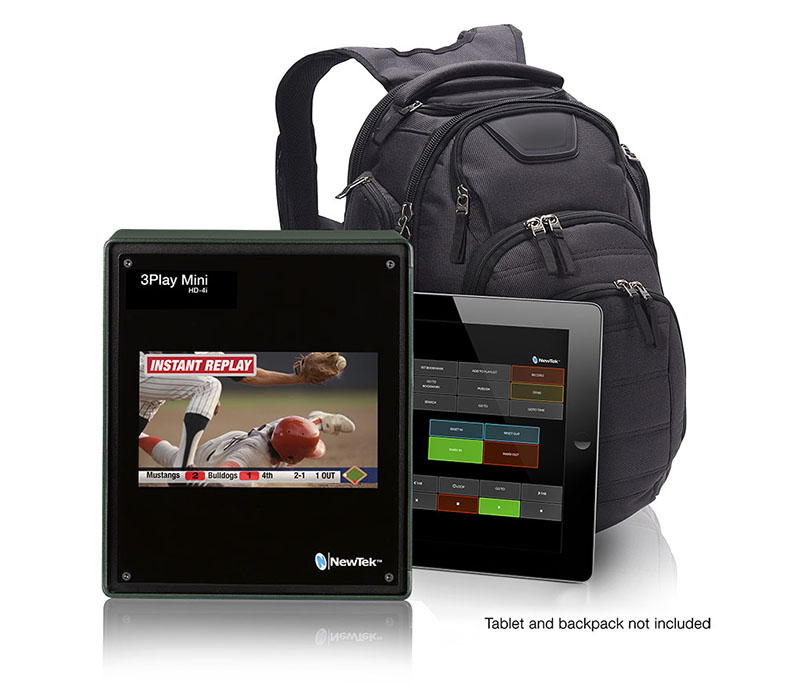
'
Date: 13. 04. 2015,
Category: News
FULL ARTICLE
Press Release
Major new software update adds improvements for Blackmagic URSA digital film cameras
Blackmagic Design today announced Blackmagic Camera 2.3, which is a major update for Blackmagic URSA cameras. This new software adds support for HD window mode allowing 150fps recording in 1920 x 1080 resolutions, adds support for ProRes 444 XQ, allows recording onto 2 CFast 2 cards simultaneously in RAW allowing higher frame rates in RAW and also adds support for the new V2 4K URSA image sensor which allows Ultra HD capture to 120 fps.
This new software update is available now to download from the Blackmagic Design support web site.
Since its introduction, Blackmagic URSA has been used on multiple television commercials and feature films worldwide. These high end customers have provided some great feedback on features most needed and this free software update incorporates many of the requests.
The new “window mode” allows customers to select up to 150 fps for allowing slow motion effects and other creative cinematography. The window mode keeps data rates lower, even when running at high frame rates because it does not use the whole 4K image sensor, but takes a 1920 x 1080 resolution window from the center of the sensor. This allows the camera to capture to higher frame rates than possible when using the whole sensor.
The new ProRes 444 XQ codec allows Blackmagic URSA cameras to record into the highest quality ProRes format and this allows incredible compatibility with both DaVinci Resolve and also Final Cut Pro X. ProRes 444 XQ is ideal when you need extremely high quality, but also need compatibility with a wide range of software that might not handle RAW files.
This software update also allows recording RAW to two CFast 2 cards simultaneously. This allows every second RAW frame to be sent to alternate CFast 2 cards so the recording data rate is doubled in comparison to using a single card. Because CFast 2 cards are extremely fast, being able to use two of them at the same time when recording allows extremely high data rates, which is vital when recording RAW. Because the frame rate is not fixed in RAW files, this means shooting RAW is ideal for high frame rate shooting and is more flexible when customers need to change the speed of the clips during post production.
This new Camera Update 2.3 also adds support for a new version of the URSA image sensor that allows higher frame rates. This new 4K v2 sensor is now rolling out in new URSA cameras and allows high frame rates full resolution 4K of up to 120 fps. This means customers can now go beyond 80 fps and up to 120 fps when running high resolution. Because Blackmagic URSA is user upgradable, this new sensor will also be offered as an upgrade so customers can increase the frame rate of their URSA cameras if required. Details on availability and cost of this 4K v2 sensor update will be available late in April.
“We are extremely happy to make this software update available free of charge for URSA customers!,” said Grant Petty, CEO, Blackmagic Design. “Blackmagic URSA customers have been giving us some great feedback on features they would like to see added to the camera and because URSA has so much power, we have been able to say yes! We have added these new features and there is more to come so we cannot wait to see what our customers do with this new update when they get the chance to use it in production!”
Camera Update 2.3 Key Features
Adds support for windowed recording up to 150 fps in 1920 x 1080 HD resolution.
Adds new ProRes 444 XQ codec for recording and playback.
Adds support for recording to 2 CFast 2 cards at the same time in RAW allowing higher frame rates.
Adds support for new Version 2 4K image sensor for recording to 120 fps in 4K.
Availability and Price
Blackmagic URSA is available now from Blackmagic Design resellers worldwide.
Press Photography
Product photos of the Blackmagic URSA, and all other Blackmagic Design products, are available at www.blackmagicdesign.com.
About Blackmagic Design
Blackmagic Design creates the world’s highest quality video editing products, digital film cameras, color correctors, video converters, video monitoring, routers, live production switchers, disk recorders, waveform monitors and real time film scanners for the feature film, post production and television broadcast industries. Blackmagic Design’s DeckLink capture cards launched a revolution in quality and affordability in post production, while the company’s Emmy™ award winning DaVinci color correction products have dominated the television and film industry since 1984. Blackmagic Design continues ground breaking innovations including 6G-SDI and 12G-SDI products and stereoscopic 3D and Ultra HD workflows. Founded by world leading post production editors and engineers, Blackmagic Design has offices in the USA, UK, Japan, Singapore and Australia. For more information, please go to www.blackmagicdesign.com.
Date: 10. 04. 2015,
Category: News
FULL ARTICLE
Panasonic is introducing an innovative "tap-assist" camera control system, the AW-HEA10, that dramatically simplifies and enhances remote control shooting with two of the company's next-generation pan/tilt/zoom cameras, the AW-HE130 and AW-HE40.
The complete solution includes either an HE130 or HE40 camera, mounted on top of an HEA10 tap-assist module, plus an optional tablet and network connection. When shooting with the primary HE40 or HE130 PTZ camera, a super wide-angle video image is simultaneously captured by the HEA10 and displayed on the tablet screen. Tapping the desired area of the image on the tablet allows the user to move the PTZ quickly and smoothly to capture the selected shot. Remote camera operation is thus significantly simplified and accelerated by allowing instant selection of a new shooting angle, eliminating the need to manually zoom out and reposition the camera. Zooming can be controlled via the familiar "pinching" motion, or via an on-screen control. Up to nine pre-set main-camera shots can also be selected via dedicated on-screen buttons.
Because the primary HE40/HE130 camera can be controlled using the HEA10's wide-angle view as a reference, the PTZ can be operated even when selecting a shot that can't be viewed in the primary camera's frame. This ability makes the system especially effective for remote seminars, sports, medical education, news, panel discussions and similar applications. Even non-technical personnel can easily select appropriate shots with this system, while experienced camera operators can use the HEA10 to expand the scope of their remote video production.
When using traditional camera controllers, the operator may sometimes miss action that happens outside the primary camera frame. With the tap-assist camera system, these changes in the action can be previewed in the wide-angle tablet view, and instantly responded to by simply tapping the tablet. Even when shooting rapidly changing circumstances, nothing need be missed. The very wide-angle horizontal view of the HEA10 is also available via an HDMI output, and can be used for input to a local production switcher for a wide-angle POV shot or other uses. The AW-HEA10 is offered in either black or white, to match the color of the main PTZ camera, and will be available in April.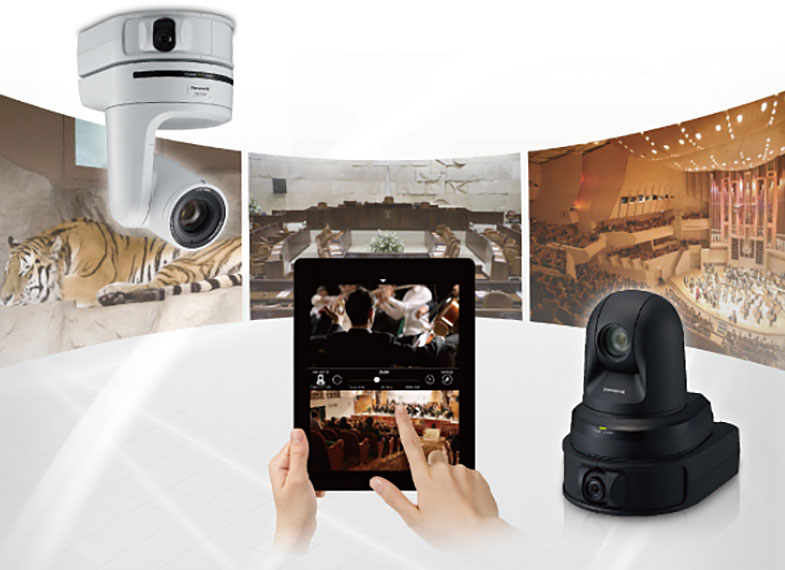
Date: 09. 04. 2015,
Category: News
FULL ARTICLE
To get an overall impression of Cubase, its capabilities and line-up, we recommend downloading one of the newly available trial versions: Cubase Pro 8 Trial and Cubase Elements 8 Trial. The latest Cubase iteration unites technical innovation and artistic inspiration in one awesomely powerful yet instantly accessible production environment. Sleeker, more efficient, more creative and offering new audio tools and instruments, Cubase Pro 8 blends the latest audio technology with inspiring music features to offer an exceptionally intuitive workflow.
Date: 09. 04. 2015,
Category: News
FULL ARTICLE
This year, at the 2015 NAB Show, Datavideo, a leading manufacturer of live video production workflows, will display 4 complete solutions for vertical markets such as Worship, Education, Sports, and Broadcast. Each of these vertical market tables will be showcasing new products that are integrated into complete Datavideo workflow solutions.
SE-700 Switcher
Debuting at NAB is Datavideo's highly anticipated product, SE-700, the most affordable 4-input HD video switcher on the market. Priced under $1,800 US, the SE-700 is loaded with features including dual chromakey, lumakey, downstream keying, PIP, clip storage, and a control panel. Applications for the SE-700 include morning announcements, worship services, podcast interviews, and band concerts. MSRP: $1,799
SE-1200MU Switcher
The SE-1200MU is a 6-input HD video switcher that is the only switcher on the market that can be controlled remotely while streaming the multiview. Applications for the SE-1200MU include city council meetings, worship services, distance learning, and corporate conventions.
HDR-10 Replay Recorder
The HDR-10 is an affordable single channel replay recorder that is designed for sporting events and sports training. It can store recorded clips on a removable SSD drive for instant replay during a broadcast or at a later time for reviewing highlights.
PTC-150 Remote Camera
The PTC-150 is a pan tilt zoom remote controlled camera that is designed with new unique features that include built-in tally lights and the ability to use different lenses. It is suitable for studio work, lectures, worship services, or any application where a cameraman is not needed. The camera is controlled by the RMC-180 surface panel via CAT 5/6 Ethernet cable. The RMC-180 has features such as iris control, joystick, focus, camera presets, and can control up to 4 PTC-150 cameras.
NVS-25 Stream Server
The NVS-25 is a standalone streaming encoder that can stream live video to a CDN and record to a removable USB drive simultaneously. It has SDI, HDMI, and Composite inputs. The versatility of the NVS-25 allows it fit into any application.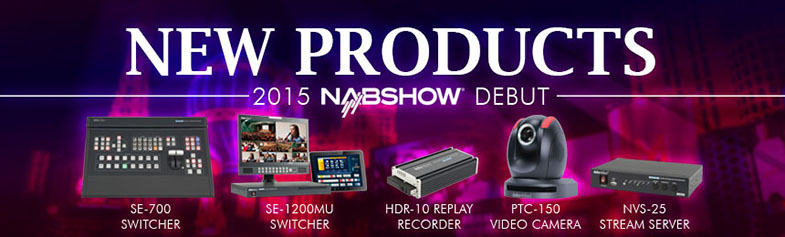
Date: 08. 04. 2015,
Category: News
FULL ARTICLE