
 CZ
CZ SK
SK HU
HU AT
AT DE
DE ES
ES SI
SI HR
HR
Nothing in the basket.

- Search
-
Login

-
0
Comparison
Add products to compare, then they will appear here and you can compare parameters.
-
0
0 €
News
Press Release
Blackmagic Design announced the availability of Blackmagic Camera 4.0 Public Beta. This public beta lets customers install and test Blackmagic’s major new camera operating system and user interface for URSA Mini. Blackmagic Camera 4.0 Public Beta is available for download free of charge from the Blackmagic Design website for all Blackmagic URSA Mini customers.
Since it was announced at NAB, Blackmagic Design engineers have worked closely with professional cinematographers and DoPs on the new camera operating system and have designed an interface that revolutionizes the way customers interact with and use digital film cameras. The new URSA Mini camera OS brings massive innovation to digital film, and makes Blackmagic Design cameras easier and more intuitive to use.
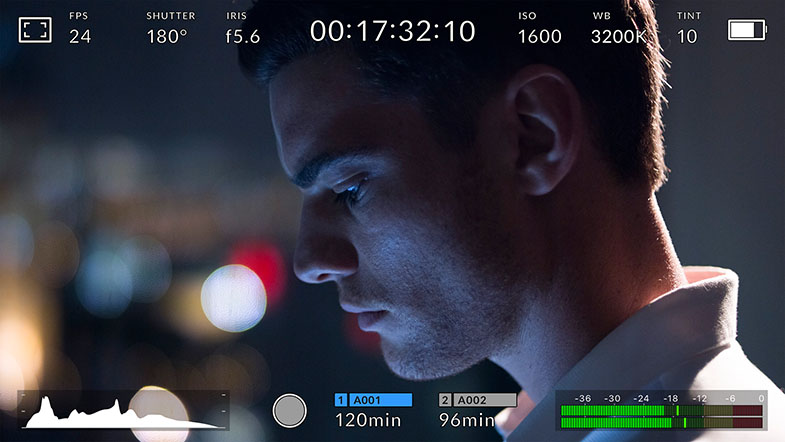
The public beta of the new camera operating system replaces multi level menus, massive numbers of buttons, and hard to find settings with an elegant, beautifully designed interface that puts the most important and often used functions at the operator’s fingertips. For example, the new heads up display dramatically reduces the number of menus and submenus needed to find specific settings and commands. That means customers can now quickly change settings such as ISO, white balance, shutter angle, iris, frame rate, frame guides and more without ever having to navigate through any menus. What’s even more exciting is that customers can quickly toggle back and forth between different settings, allowing them to try different combinations of settings on the fly. Customers can also save and load presets for different shooting situations and save them to a card for use on different cameras.
In addition, there are now custom white balance and white balance presets, along with tint control settings. Customers also get more accurate shutter angle selection, including a large easy to use on screen keyboard for quick entry of settings. When entering the shutter angle, the new URSA Mini camera OS will even offer smart flicker free shutter angle suggestions to assist the camera operator. These suggestions are automatically calculated based on the frame rate and the electrical system (50Hz or 60Hz).
False color exposure tools have also been added that make it easier to properly set exposure. When using false color, specific ranges of luminance in the image will show a color overlay. For example, green indicates neutral grey, while pink tones are good references for skin, which is typically one stop over neutral grey. Using false color helps camera operators keep exposure consistent from shot to shot, which also saves time in post production when color correcting and finishing.
The public beta of the new URSA Mini camera OS also improves focus assist. Customers can now adjust the color for focus assist overlays, or they can choose to use more traditional focus peaking tools that simply highlight the sharpest areas of an image.
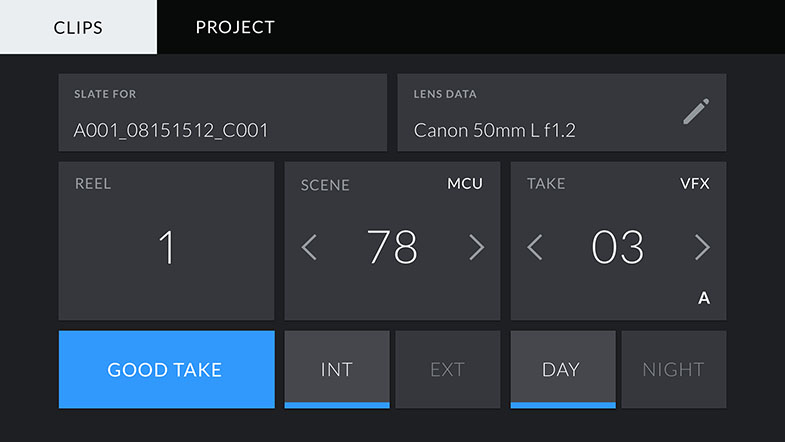
Entering metadata on cameras has always been tedious. The new URSA Mini camera OS solves this by giving customers a new “slate” page that can be accessed by simply swiping left or right on the screen. This brings up a slate for both the shot and the entire project. Entering metadata is simplified through the use of predictive entry suggestions. A preloaded dictionary of commonly used terms can be applied as metadata tags with a simple tap. For example, if you stop and start recording, the take will automatically increment. If you increase the scene number, the shot and take will automatically reset to 1.
In addition, lens metadata is automatically read from electronic lenses or can be entered manually, along with production specific information, technical information and much more. All of this metadata is saved with the files and can be used by software such as DaVinci Resolve for editing and color correction.
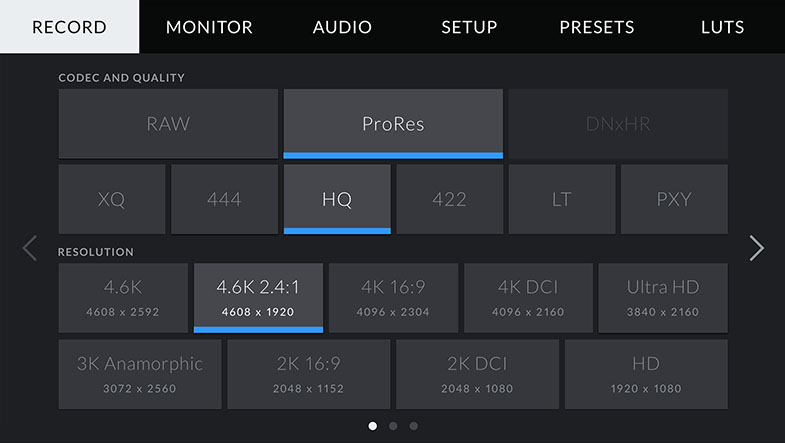
To further simplify camera setup and use, all other settings are located under 5 easy to access tabs called Record, Monitor, Audio, Setup, Presets, and LUTS. The Record tab lets customers quickly select codec, quality, and resolution, while also setting up dynamic range, frame rates, sensor windowing and more. The new URSA Mini camera OS provides much more flexible media formatting, card usage, and recording information as well, making it easier for customers to know exactly how much more shooting time they have left and when they should switch cards.
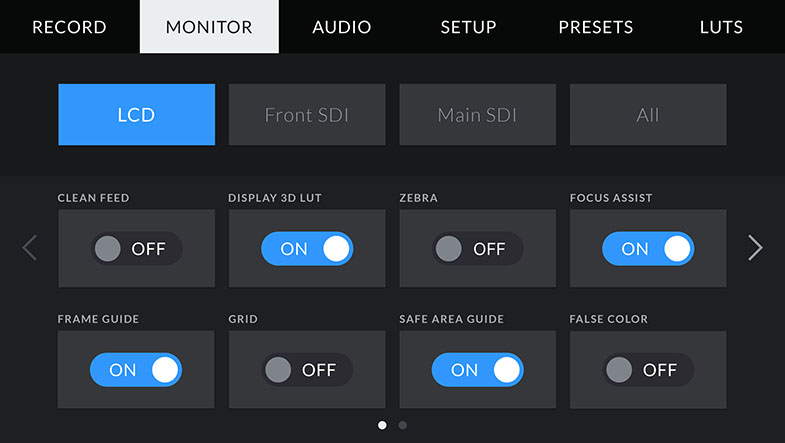
The new Monitor tab lets customers decide what is shown on the main LCD, and what is output on the front and main SDI. This can include any thing from clean feeds to LUTs, frame guides and more. Customers can even send different status text for the cinematographer or the director to different outputs as needed. The new URSA Mini camera OS also adds 1.33x and 2.x anamorphic de-squeeze for monitoring when shooting with anamorphic lenses.
Customers can get quick access to audio level settings by tapping on the live audio meters. For more detailed settings, all of the audio input controls under the Audio tab. This includes features such as levels for the internal mic, speaker and headphone volume, low cut filter and more.
The new setup tab provides access to basic camera settings, as well as the ability to customize and program the external physical F1 and F2 buttons on the camera. Function buttons can trigger presets, be used as up/down buttons, or be used toggle specific feature on and off. In addition, the new URSA Mini camera OS can have up to 6 presets loaded. These can be loaded, saved, exported and imported from the Presets tab.
The LUTS tab lets customers import, export, manage and delete 3D LUTs. The LUTs can be assigned and displayed on the LCD or front and main SDI outputs independently.
In addition to all of the URSA Mini improvements, Blackmagic Camera 4.0 Public Beta also improves the performance of the Blackmagic URSA Viewfinder. Customers will get better colorimetry, improved proximity sensor sensitivity and timeout settings. In addition, the Blackmagic URSA Viewfinder will now support the new URSA Mini camera OS metadata settings, new frame guides, safe areas, grids and menu items for configuring overlay settings.
“The combination of URSA Mini’s 4.6K resolution with 15 stops of dynamic range and the new camera OS is incredibly exciting,” said Grant Petty, CEO, Blackmagic Design. “Customers already love the images they’re getting from URSA Mini and we are still working incredibly hard to meet all the customers back orders. This public beta of the new URSA Mini camera OS gives our customers an opportunity to test all of the new features and provide feedback to Blackmagic Design engineers on these exciting new features. Our dream is to design the world’s most advanced cameras with an incredibly modern OS that’s faster to use and more feature rich than has ever been possible before. Its a privilege to be able provide this update to our URSA Mini customers who are some of the worlds top cinematographers and who blow our minds with their creative work!”
Availability and Price
The Blackmagic URSA Mini camera OS is available now via that Blackmagic Camera 4.0 Public Beta, which can be downloaded free of charge from the Blackmagic Design website.
Press Photography
Product photos of DaVinci Resolve 12.5, and all other Blackmagic Design products, are available at www.blackmagicdesign.com/press/images.
About Blackmagic Design
Blackmagic Design creates the world’s highest quality video editing products, digital film cameras, color correctors, video converters, video monitoring, routers, live production switchers, disk recorders, waveform monitors and real time film scanners for the feature film, post production and television broadcast industries. Blackmagic Design’s DeckLink capture cards launched a revolution in quality and affordability in post production, while the company’s Emmy™ award winning DaVinci color correction products have dominated the television and film industry since 1984. Blackmagic Design continues ground breaking innovations including 6G-SDI and 12G-SDI products and stereoscopic 3D and Ultra HD workflows. Founded by world leading post production editors and engineers, Blackmagic Design has offices in the USA, UK, Japan, Singapore and Australia. For more information, please go to www.blackmagicdesign.com.
Date: 16. 08. 2016,
Category: News
FULL ARTICLE
Omni is a special six-camera rig for HERO4 Black cameras: at its core lives a synchronization mechanism that allows all six cameras to act as one. Power on the primary camera, and you power on all-six cameras. Adjust the shooting mode on the primary camera, and all cameras automatically, and instantly align on the same mode. Omni is a sophisticated six-camera rig available for professionals and aspirational consumers interested in shooting spherical content. 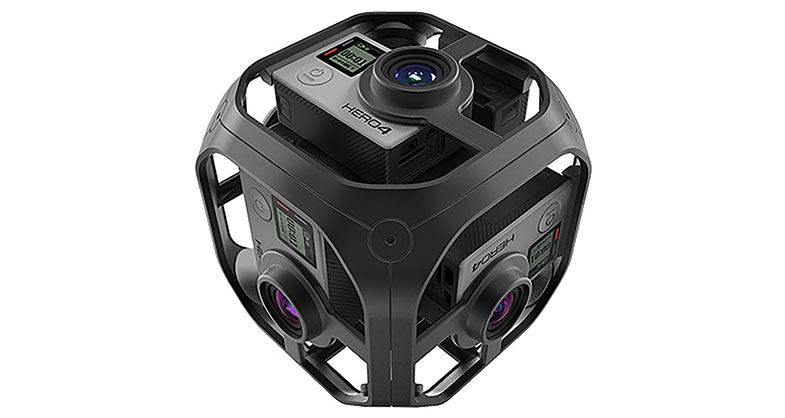
Date: 15. 08. 2016,
Category: News
FULL ARTICLE
Press Release
Blackmagic Design announced a new DaVinci Resolve 12.5.1 update for its professional editing and color correction software. DaVinci Resolve 12.5.1 features support for Apple ProRes decode on Windows, ResolveFX enhancements and even more editing and color improvements. DaVinci Resolve 12.5.1 update is available now for both DaVinci Resolve 12.5 and DaVinci Resolve 12.5 Studio customers, and can be downloaded free of charge from the Blackmagic Design website.
DaVinci Resolve 12.5.1 update adds direct support for ProRes decoding on Windows so that DaVinci Resolve no longer requires QuickTime 7. Trimming and multicam performance for Windows is improved as DaVinci Resolve 12.5.1 now uses its own native 64-bit code to read and write .mov files. Windows and Linux users will also see better H.264 playback performance.
Editors can now make selections based on flag, marker and clip colors, EDLs can now include durational markers and consistency of edit functions has been improved when the timeline is in full screen mode. On the Color page, DaVinci Resolve 12.5.1 features faster Spatial Noise reduction in “better” mode, the ability to align keyframe timelines of color grades, new support for box wipe mode when using offline reference clips, improved listing of mattes in the node graph, enhancements to the 3D and Qualifier panel layout in dual screen mode and more. The improvements in DaVinci Resolve 12.5.1 will help editors and colorists greatly speed up some of the routine tasks they perform every day.
DaVinci Resolve 12.5.1 update adds new Generate Color and Tilt-shift Blur ResolveFX. In addition, GPU acceleration has been added or improved on many ResolveFX, and additional parameters and controls have been added, giving customers even more creative options.
The 12.5.1 update gives DaVinci Resolve Studio customers new support for 3D left and right eye grades for the timeline node graph, the ability to convert a mono timeline or clip into stereoscopic 3D, support for caching clips in 3D sequences and nodes, and support for copying Dolby Vision grades using stills and middle clicks on the mouse. Customers can now also create stereo clips from mismatched source resolution files so they can compare low and hi res versions of each shot.
In addition DaVinci Resolve 12.5.1 also adds supports for Ultra HD H.264 renders on Windows, HEVC (H.265) decoding on Linux, alpha channel support for DNxHR 444, support for the Sony X-OCN format, improved AAC encoding, improved handling of AVCHD .mts clips and much more.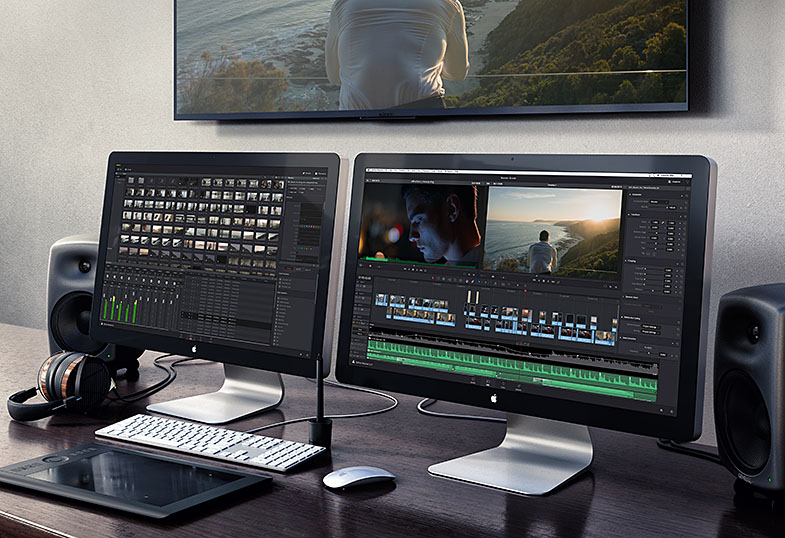
What’s new in DaVinci Resolve 12.5.1
Edit Improvements
Improved 2-up and 4-up, multicam and playback performance when using QuickTime ProRes on Windows
Added menu items to allow selection of clips based on Flag, Marker and Clip colors on the edit timeline
Added ability to import and export duration markers using EDL
Added the ability for clips to snap to their own markers when adjusting In and Out points
Improved consistency of edit functions when Timeline is in full screen mode
Added support for box wipe mode for offline reference wipe
Color Improvements
Improved performance for Spatial Noise reduction in Better mode
Improved listing of attached and timeline mattes in the node graph with support for alphabetical listing
Added ability to apply grades from a reference wipe using the viewer context menu
Added ability to align keyframe timelines of color grades using playhead position and wiped still frame
Next node and previous node operations now loop around the node graph
The ‘displayed’ node graph now automatically updates when the current still is changed
Swapping nodes now also swaps the node labels
Shift Up + Next Still will now append grade from the current still on the advanced control panel (Studio version)
Added support for left eye and right eye grades for the timeline node graph (Studio version)
Added ability to convert a mono timeline into stereoscopic 3D (Studio version)
Added ability to convert a mono clip into stereoscopic 3D (Studio version)
Added support for sequence and node render caching for stereoscopic clips and timelines (Studio version)
Added compensation for stereoscopic slip when exporting timecodes in ALE (Studio version)
Added support copying DolbyVision grades using stills and middle click (Studio version)
Improved 3D and Qualifier panel layout in dual screen mode
Improved behavior to stay on the same frame when joining two clips
Resolve FX Improvements
Added ResolveFX Generate Color (GPU accelerated)
Added ResolveFX Tilt-shift Blur
Added support for anamorphism in ResolveFX Lens Blur (Studio version)
GPU acceleration support for ResolveFX Lens Flare (Studio version)
Ability to adjust Shadows/Midtones/Highlights in ResolveFX Film Grain in all compositing modes (Studio version)
GPU acceleration support for ResolveFX Emboss, Waviness, Vortex, Ripples, Dent, Mirror
Improved ResolveFX Scanlines and added various composite modes
Ability to view the ResolveFX Scanline layer without the background
Improved border behavior for ResolveFX Gaussian Blur, Directional Blur, Mosaic Blur, Radial Blur and Zoom Blur
Added support for horizontal/vertical ratio in ResolveFX Glow
Added support for pan and tilt on ResolveFX Prism Blur
Improved performance for ResolveFX Light Rays
Improved performance for ResolveFX JPEG Damage
Media Improvements
Added new Import Media options to File menu and Media Pool context menu
Added support for stereoscopic 3D clips in Media Management (Studio version)
Added ability to create stereo clips with mismatched source resolution (Studio version)
Added support for display drive names in Media Storage on Windows
Addressed issues with open file location from Media Pool on Linux
Added Source Name tag support for filename without extension
Codec & Format Improvements
Adds direct support for ProRes decode on Windows so that QuickTime 7 is no longer required
Improved .mov decode and encode performance on Windows
Support for UHD H.264 renders on Windows
Improved .mov decode and encode performance on Linux
Added support for HEVC (H.265) decode on Linux
Added support for alpha channel on DNxHR 444
Added support for the Sony X-OCN format
Added support for various AAC encode parameters on macOS
Added support for QuickTime AAC audio encoding on Windows
Added support for V-Gamut in RCM for improved Panasonic camera image handling
Added ARRI LogC to Linear and Linear to ARRI LogC LUTs in VFX I/O
Addressed decoding of last frame in some Panasonic AVCHD clips
Improved handling of AVCHD .MTS clips
General Improvements
Alpha-numerical listing of codecs and format in the Deliver and Media Management pulldowns
When running DaVinci Resolve in window mode, the macOS dock is now visible
Improved latency for remote grading (Studio version)
Improved handling of dissolves and overlapping clips in DolbyVision metadata export (Studio version)
Improved behaviour when creating render jobs on locations without write permissions
General performance and stability improvements
Availability and Price
DaVinci Resolve 12.5.1 update and DaVinci Resolve 12.5.1 Studio update are now available for download from the Blackmagic Design website free of charge for all current DaVinci Resolve customers.
Press Photography
Product photos of DaVinci Resolve 12.5, and all other Blackmagic Design products, are available at www.blackmagicdesign.com/press/images.
About Blackmagic Design
Blackmagic Design creates the world’s highest quality video editing products, digital film cameras, color correctors, video converters, video monitoring, routers, live production switchers, disk recorders, waveform monitors and real time film scanners for the feature film, post production and television broadcast industries. Blackmagic Design’s DeckLink capture cards launched a revolution in quality and affordability in post production, while the company’s Emmy™ award winning DaVinci color correction products have dominated the television and film industry since 1984. Blackmagic Design continues ground breaking innovations including 6G-SDI and 12G-SDI products and stereoscopic 3D and Ultra HD workflows. Founded by world leading post production editors and engineers, Blackmagic Design has offices in the USA, UK, Japan, Singapore and Australia. For more information, please go to www.blackmagicdesign.com.
Date: 12. 08. 2016,
Category: News
FULL ARTICLE
Blackmagic Design announced that the home of leading Eredivisie football club AFC Ajax, Amsterdam ArenA has upgraded it's audiovisual production capabilities with the addition of Blackmagic MultiView 16 and two Smart Videohub 40 x 40 video routers. The Amsterdam ArenA is a multi-purpose stadium, hosting some 450 corporate events per year in its hospitality areas, as well as a dozen major annual music concerts including Rihanna, One Direction and the dance event Sensation. The ArenA's production facilities are primarily used, however, by Ajax Media, the club's content division. Ajax Media produces three in-house television channels during live games, including a live feed of the match action taken from the league's host broadcaster, mixed with bespoke sponsor logos and public transport information. Signals from all the Ajax Media cameras are routed through a Blackmagic Design MultiView 16 and to a Blackmagic Design Smart Videohub 40 x 40 before onward connection to a video switcher. The ArenA's Smart Videohub is mirrored by a second identical unit at Ajax Media's facility for post production of content.
Date: 10. 08. 2016,
Category: News
FULL ARTICLE
Microsoft has announced the release of an updated Windows 10 operating system, codenamed Redstone. The OS was launched on August 2, 2016, and Steinberg already tested compatibility with this new release. Test results show that, in some cases, performance cuts varying between 5 and 10 percent can occur compared to the previous Windows 10 operating system. Steinberg's Quality Assurance team currently researches probable causes for these performance cuts and will evaluate potential solutions for customers concerned. The test's conclusion is that, except for the HALion product family which is still in the testing phase, Steinberg's current software range now officially supports Windows 10 Redstone.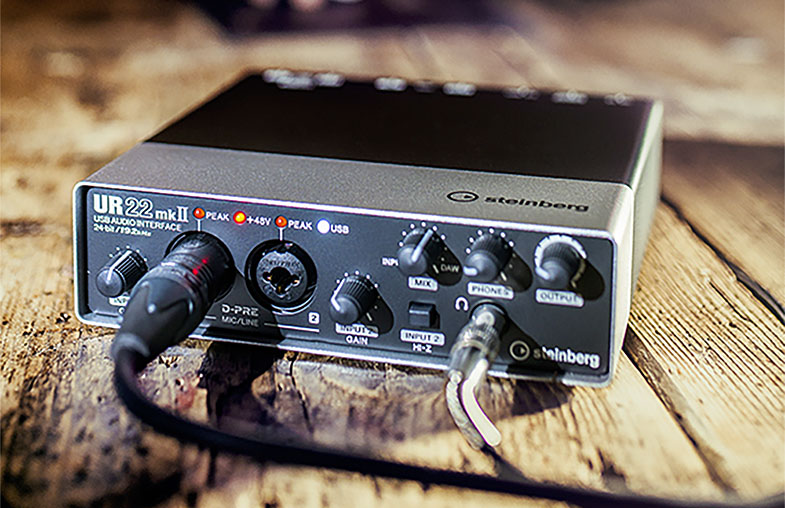
Date: 09. 08. 2016,
Category: News
FULL ARTICLE