
 CZ
CZ SK
SK HU
HU AT
AT DE
DE SI
SI HR
HR
Nothing in the basket.

- Search
-
Login

-
0
Comparison
Add products to compare, then they will appear here and you can compare parameters.
-
0
0 €
Stardom SOHORAID MR2-WBS2
SKU: mr2-wbs2
This product is no longer offered. Please select from the alternatives below.
Product description
Product description
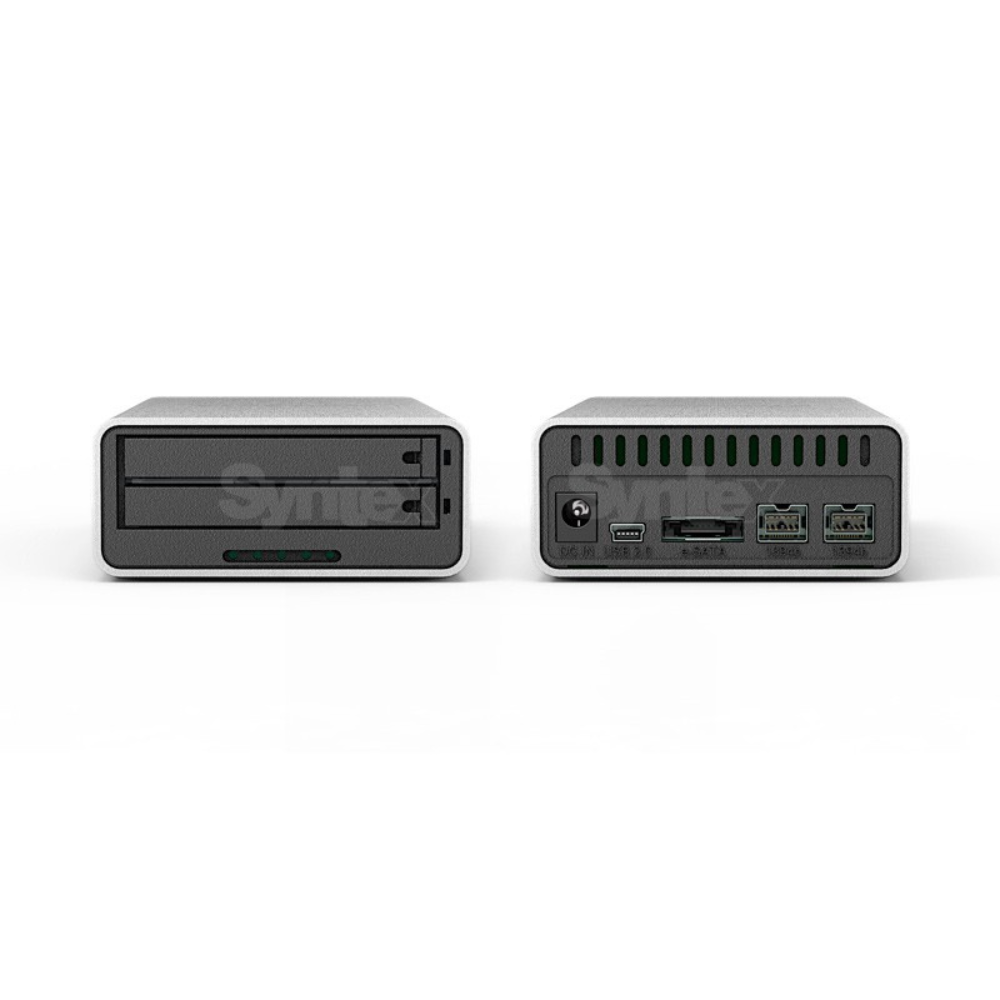
MR2-WBS2 je ultrakompaktné externé 2-diskové pole s RAID 1/0 a JBOD nastavením a obsahuje nasledovné rozhrania:
- 1x USB 2.0
- 2x Firewire800
- 1x e-SATA
The SOHORAID MR2-WBS2 is the most compact and efficient 2.5" hard drive RAID unit on the market. Its built-in backup function within an aluminum alloy structure automatically backs up all your digital photos and videos using RAID 1 technology, or you can choose RAID 0 mode for significantly improved storage performance. Easy to install and set up, simple to operate, large capacity, high performance, and maximum storage security make it an indispensable storage device for every creative professional.
Small Body, Large Capacity
The new MR2-WBS2 supports hard drive sizes up to 750GB (6GB/3GB), allowing you to back up more of your work data and store any files, ensuring your work is perfectly protected.
Perfectly Compatible with Time Machine™
Through the MR2-WBS2, regardless of the interface you use, it works perfectly with Time Machine™ in Mac OS X Leopard, automatically backing up all your digital content. This is truly an effortless and fast backup solution.
Three interfaces for Mac or PC
Features three high-speed interfaces: e-SATA 3G, FireWire 800, and USB 2.0. The MR2-WBS2 is compatible with both Mac and Windows operating systems, offering great convenience and flexibility. [The 1394b interface provides power to start the MR2-WBS2, even when using the e-SATA interface, it can still utilize port 1394 as a power source.]
The MR2-WBS2 offers three storage modes, configurable to meet specific needs.
The MR2-WBS2 has three built-in storage modes: RAID 1 (Safe Mode), RAID 0 (Speed Mode), and JBOD (Two Independent Volume), which can be configured according to different user requirements.
Convenient and Secure Hard Drive Removal Module
The MR2-WBS2's dedicated hard drive trays are designed with security locks and a secure architecture to lock the hard drives. Effective for sensitive data maintenance, it's simple and easy to use. If a hard drive fails, users don't need to worry about data recovery; simply purchase a replacement of the same model and capacity, significantly reducing waiting time for machine repairs.
Compatible with Thunderbolt Video Capture Boxes
You can capture images via the high-speed Thunderbolt™ interface and store data using common eSATA or FireWire 800 connections. This configuration not only distributes the load on the computer system across the same interface but also meets most of your work needs, designed to quickly fulfill your work requirements.
Easy-to-Use FireWire 800
Every Mac computer has a FireWire 800 (1394b) interface, the most convenient interface for expanding data storage space and the most suitable connection interface for connecting various Mac computers. With the MR2-WBS2's FireWire 800 interface, you can use it with your MacBook Pro while out and about to save the large amounts of digital images you need while outdoors. Once you're back at home or in your studio, you can directly connect the MR2-WBS2 to your iMac or Mac mini for image processing.
Ensuring Smooth Completion of Photography Projects
As a professional, every photography assignment is a new challenge. Protecting, quickly archiving, and managing the large amounts of digital data collected while shooting outdoors is a crucial concern for every professional. Protecting this digital data is handled by MR2-WBS2. Utilizing MR2-WBS2's RAID 1 mechanism, important data is constantly backed up to both hard drives simultaneously. The large storage capacity of these hard drives eliminates the hassle of carrying multiple memory cards that are difficult to manage. Files imported into MR2-WBS2 can be quickly categorized and managed using file management software such as Adobe Lightroom or Aperture, allowing you to easily find and categorize your important photos. Take all your hard drive data with you.
If your work files are too large to be transferred over a network, and you need to use the same data in different situations on different devices—for example, editing a photo or video library of 500GB to 750GB—then the hard drive tray design is perfect for your needs. In MR2-WBS2's independent mode, each hard drive can be used independently, like an independent database. You can quickly change the library you need, and you can also use other STARDOM models to meet your various needs in different computer environments.
No need to worry about running out of hard drive space.
As your iPhoto library grows, it may become too large to fit on your computer's hard drive. Aperture lets you set up an unlimited number of external disks and specify the storage location for each photo, without having to change your Aperture library. You can access and edit your photos as usual, without worrying about where the original files are stored. This feature also allows you to add files to the hard drive as needed. This allows your device to expand along with your gallery.
Host Interface / Connectivity Ports
- Firewire 800 x 2 ports +
- e-SATA x 1 port + USB 2.0 port
Compatible Hard Drives
- 2 x 2.5” SATA III (6.0 Gbits) Hard Drives
- Supports maximum hard drive capacity up to 750GB
- SSDs (Solid State Drives) are not supported
Storage Modes
- 2 x Dedicated Capacity / RAID 0 / RAID 1
Product Dimensions
- 85 mm (W) x 37 mm (H) x 143 mm (D)
- Product Weight: 0.95 kg
Package Contents
- MR2-WBS2 x 1
- AC Power Supply x 1
- e-SATA Cable x 1
- Firewire 800 (1394b) Cable x 1
- USB 2.0 Cable x 1
- Accessories Kit
- manual!
- Show all
Stardom SOHORAID MR2-WBS2
MR2-WBS2 je ultrakompaktné externé 2-diskové pole s RAID 1/0 a JBOD nastavením a119 €No longer available